



Hey there 👋
Every few weeks, another story seems to surface about a game turning out to be malware.
These games came from legitimate platforms that people already trust, the kind you’d never think twice about downloading from.
Steam reported 132 million monthly users back in 2021, and SteamDB now counts more than 130,000 games. Millions of people use it to download and play games every day. So when malware starts showing up inside games on a platform like this, it becomes worth paying attention to.
This isn’t a new problem either. We’ve seen malicious games and mods used to steal sensitive information for years. But some recent cases caught my attention, which made me want to dig into it.
So, today that’s what we will be looking at in this piece. I’ll go through some real-world cases where games have been used to distribute malware, explain why these attacks can make it through trusted platforms, and look at what you can do to protect yourself.
How the Attack Works
It starts with the game itself.
A game appears on Steam and looks completely normal. Some of these games are also built using commercial game templates. A game template is essentially a pre-built foundation that developers can use to create a game without building every system from scratch. It might already include things like player movement, menus, graphics, inventory systems, or other basic mechanics.
In February 2025, PirateFi, a game available on Steam, was found to contain malware designed to steal users' sensitive information. Researchers found that the game had been built using the Easy Survival RPG template, which costs between $399 and $1,099 to license. That gives an attacker a functioning game that can be modified and published.
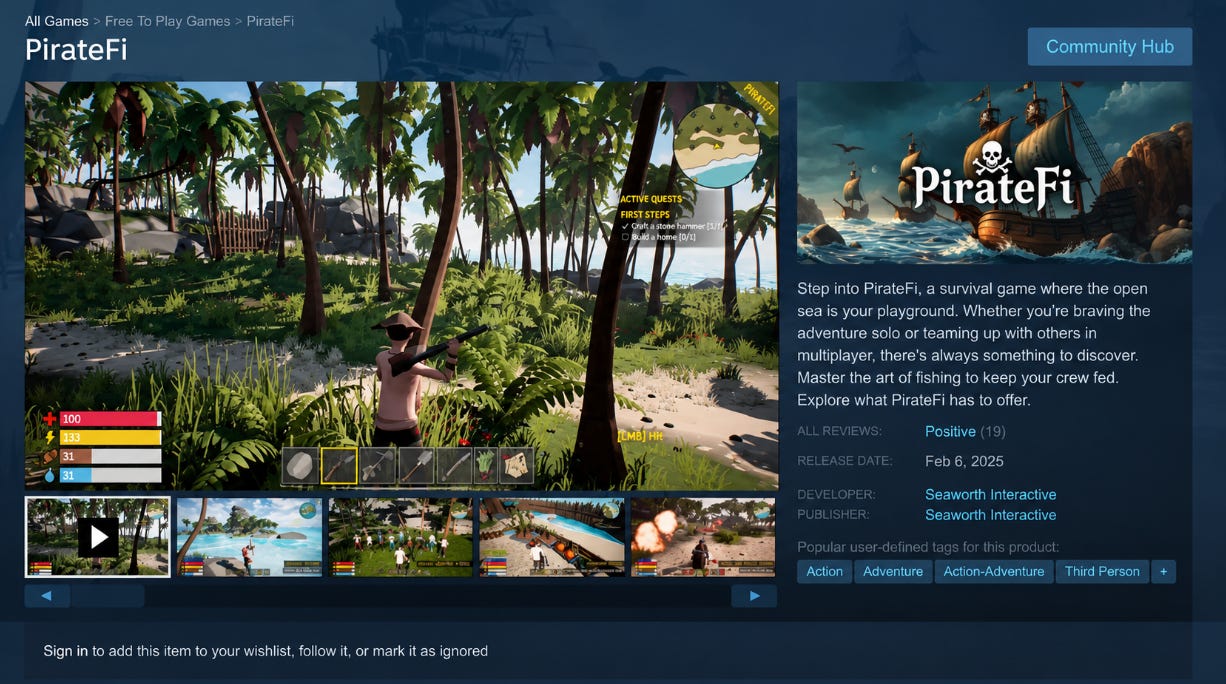
The game can therefore look like a legitimate product while carrying something dangerous underneath.
But creating the game is only half the job. Attackers still need people to download it.
That’s where trust comes in.
Attackers can promote these games through compromised accounts, bots, social media, or recommendations that appear to come from someone the user already trusts. If the game is sitting on Steam and someone you know recommends it, there may be little reason to suspect that the download itself is the problem.
Once the user launches it, the malicious code can run alongside the game and begin collecting information from the computer. Depending on the malware involved, that can include browser cookies, saved passwords, session tokens or other sensitive information.
One of the more serious targets is the session token.
A session token is what allows a website or service to recognize that you’ve already logged in. If an attacker steals a valid token, they may be able to use your existing authenticated session instead of logging in with your password.
That can allow an attacker to bypass protections such as passwords and, in some cases, two-factor authentication. Instead of seeing a new login attempt and asking you to verify it, the service may see the stolen session as an already authenticated connection.
That can give attackers access to accounts such as email, social media, cloud services, and cryptocurrency platforms.
On March 12, 2026, the FBI’s Seattle Division published a victim identification notice connected to malware distributed through Steam games. The agency named seven games as part of its investigation: BlockBlasters, Chemia, Dashverse/DashFPS, Lampy, Lunara, PirateFi and Tokenova.

According to the FBI, one threat actor mainly targeted users between May 2024 and January 2026. The games have since been removed from Steam.
The FBI is now asking people who may have been affected to report information through its dedicated Steam malware investigation page and has provided Steam_Malware@fbi.gov for potential victims.
Real-World Cases
BlockBlasters: A Malware Attack Caught Live
On September 21, 2025, Twitch streamer Raivo “RastalandTV” Plavnieks was raising money for his stage 4 cancer treatment when someone in his chat recommended that he play a game called BlockBlasters. The game was available on Steam and looked like a normal 2D platformer.
Plavnieks downloaded it and started playing on stream.
Within minutes, more than $31,000 in cryptocurrency was drained from his wallet. The money had been raised through Pump.fun to help pay for his treatment. He watched it happen during the livestream.
BlockBlasters looked like an ordinary 2D platformer on Steam.
BlockBlasters was released on Steam in late July 2025. On August 30, an update added malicious files to the game. G DATA’s analysis found that the update contained code designed to steal cryptocurrency and other sensitive information from infected systems.
That means the game could exist on Steam as a normal-looking title before the malicious update changed what it did.
And Plavnieks wasn’t the only victim.
ZachXBT, a blockchain investigator, estimated that around $150,000 had been stolen from at least 261 Steam accounts. vx-underground reported a higher figure of 478 affected accounts, which shows how difficult it was to establish the full scale of the attack.
The incident also triggered a beautiful response that you don’t usually see after a malware attack.
Security researchers began reverse-engineering the malware and tracing the stolen funds. The wider crypto community also stepped in to help Plavnieks. Crypto influencer Alex Becker sent $32,500 to a secure wallet to replace the money that had been stolen from him.
The incident eventually led to BlockBlasters being removed from Steam. But by then, the malware had already been distributed to players who had downloaded the game and its malicious update.
Wallpaper Engine and the Steam Workshop Problem
BlockBlasters was one example of malware reaching users through a game. But the problem doesn’t stop with games themselves.
In June 2026, Kaspersky documented a separate campaign abusing Steam Workshop to distribute malware through wallpapers made for Wallpaper Engine. Researchers found dozens of infected wallpaper packages, some with tens of thousands of downloads.
For those of you who don’t know, Wallpaper Engine is a popular Steam application for creating and sharing animated desktop backgrounds.
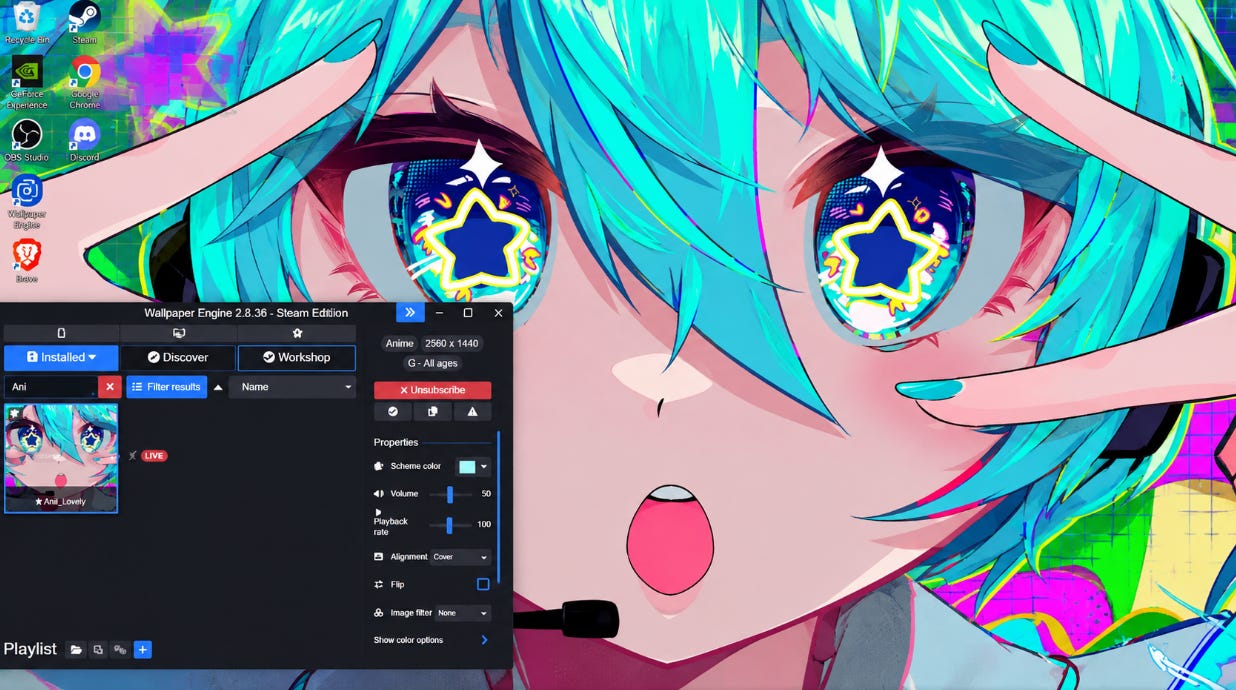
The important detail here is how Wallpaper Engine handles certain types of wallpapers. Alongside videos and interactive scenes, it supports application wallpapers, which are Windows applications that can run directly on the user’s computer as the desktop background.
That gives attackers another way to hide malicious software inside something that looks harmless.
Kaspersky found cases where malware was bundled directly into wallpaper packages. Attackers hid malicious files inside password-protected archives included with the wallpaper. Once installed, the malicious payload could run automatically.
One example discovered in December 2025 appeared to work normally. It even launched a desktop game, so there was no obvious sign that anything was wrong. In the background, however, it installed malware that could steal account information and hijack active Steam sessions.
Kaspersky also found several types of malware in the campaign, and the attacks appear to have involved multiple threat actors.
The bigger problem was where these wallpapers came from. They were community-created files distributed through Steam Workshop, a trusted part of the Steam ecosystem.
Why Platforms Struggle to Stop This
Why Steam Has a Hard Job
I don’t want to paint Steam as some shady operation that doesn’t care about its users. I’ve used the platform for years, and my own experiences with Steam’s support have been good. Steam is also dealing with an enormous amount of content from developers and users around the world.
Valve reviews a game’s store page and build before release, but its own documentation states:
“Once your game has been reviewed and approved, there is no need to go through review again. You are free to update your game as much as you need to.”
This means that a game can be clean when Valve reviews it and become malicious later, which is exactly the gap BlockBlasters used.
Steam Workshop adds another problem. Users can upload and distribute their own content for games such as Cities: Skylines, creating another route for malicious files to reach users. That content doesn’t go through the same review process as a commercial game submitted to the Steam store.

Steam also relies on user reports and moderation systems to deal with problematic content. Valve’s own documentation shows that some user-generated content goes through moderation queues, while other content can be reported by users for review.
At Steam’s scale, manually examining every game and community upload in depth isn’t realistic. Automated checks help, but malware can be disguised inside software that otherwise works normally. That makes detecting a malicious update much harder than checking whether a game launches and functions as expected.
There are legitimate limits to what a platform can catch before users encounter it. The BlockBlasters case shows what can happen when something slips through.
Why a Hard Job Isn’t an Excuse for a Slow Response
According to BleepingComputer, Valve didn’t act on multiple user reports, and the infected version stayed up for about three weeks while people kept downloading it.
The main problem is the difference between having moderation capabilities and reacting fast enough to make use of them.
Independent researchers like ZachXBT and vx-underground traced the stolen funds and took the malware apart within days. Steam has the technical resources to investigate these threats as well, but its moderation process moves at a much slower pace.
And that pace matters when users are reporting an active threat.
A large platform will always have a longer process before removing content. But a hard moderation problem doesn’t mean the response has to stay slow.
Steam and other platforms need to figure out how to close that gap. Independent researchers have already shown that threats like this can be tracked and investigated quickly.
The question is whether platforms can build a response system that moves with the same urgency.
The Problem With Trusting the Source
What happened on Steam is part of a much wider problem. The same basic idea can work anywhere people download software from a platform they trust.
The Chrome Web Store is a good example. Google runs security checks on extensions, but malicious extensions have still made it onto the store. In 2025, researchers found almost a dozen Chrome extensions with around 1.7 million downloads that could track users, steal browser activity, and redirect traffic.
In April 2026, researchers at Socket found more than 100 malicious extensions targeting account information and authentication tokens.
Google Play faces the same challenge at an even larger scale. Google says it blocked more than 1.75 million policy-violating apps from being published in 2025. Google also says that it banned more than 80,000 developer accounts.
The lesson is simple.
A legitimate platform does not automatically make everything on it safe. The platform may have security checks and other protection mechanisms, but malicious software can still slip through.
Kaspersky made the same point when discussing the Steam Workshop campaign. The researchers said trusted platforms can be abused to distribute malware because users trust content hosted inside legitimate ecosystems.
And this goes beyond software stores.
The same idea appears in phishing and other types of social media scams. Attackers don’t always need to break through a technical security system. Sometimes they can take advantage of the trust people have already built around a platform.
That is where this connects to social engineering. A social engineering attack often starts by getting someone to trust the thing in front of them. The more familiar and legitimate that thing looks, the easier it can be to lower someone’s guard.
I wrote about how these attacks work in more detail in my guide to social engineering. If you understand how attackers manipulate trust, it’ll be even easier to spot the same tactics when they appear somewhere else:

How to Protect Yourself
Check Before You Download
The easiest way to protect yourself from these attacks is to stop treating a download as safe simply because someone you trust recommended it.
That someone could be a friend, an influencer, or even a platform you have used for years. I’ve had friends whose accounts were compromised and then used to send me Discord Nitro offers and other links.
The same applies to game recommendations. If an influencer suddenly promotes a game, that doesn’t mean the game is safe. Check it yourself before downloading it. Look at its history, reviews, and what other users are saying. Independent sites such as SteamDB can also give you more information about a game’s history and activity.
In short, never outsource your own judgment. A recommendation can help you find something. It shouldn’t replace your own check before you install it.
Keep Your Devices and Accounts Protected
Keep your operating system and security software updated. Security tools can catch known threats even when a malicious file makes it through a platform’s own checks.
Your accounts need the same attention. Use strong, unique passwords and enable two-factor authentication wherever possible. Just remember that 2FA stops a stolen password, but not a stolen session, which is why revoking active sessions matters. If malware does get onto your device, an attacker may try to use every possible technique to get into other accounts.
If you think you’ve installed something malicious:
Stop using the affected device for sensitive activity and run a full security scan.
Change important passwords from a device you trust and revoke active sessions where possible.
Contact your bank immediately if financial accounts may have been exposed.
I’ve also covered the basics in my Privacy Fundamentals series, including account authentication, safer communication, safer browsing, and securing your network, all of which make your accounts and devices harder to compromise:


Your Own Check Is the Last Line
We’ve seen how malware can hide inside something as ordinary as a game. The platform and the software might look completely normal. That doesn’t guarantee it’s safe.
Trust is becoming more valuable in the online world, and attackers know it. The more we rely on external sources to tell us what’s safe, the more important it becomes to make our own checks.
Most of the risks we face online can be reduced by knowing what to look for and staying aware of what we’re doing.
A Steam listing, a friend’s recommendation and good reviews can all be borrowed. Your own check can’t.
Anyway, thanks for reading.
See you next time.