



Hey there👋
If you’re here, you’re trying to take control of your digital security and that is a good thing.
In the previous piece, we focused on authentication - locking down access, strengthening credentials, and reducing account takeover risk. If you missed that one, go back and read it first. This builds directly on it.
For anyone new - this is the Part 2 of a practical privacy series designed to help you secure your digital life step by step.
Part 1 was about who gets in.
Part 2 is about what goes out.
A lot of people harden their passwords, enable two-factor authentication - and then discuss sensitive matters over insecure channels every day which kills the whole point of privacy and securing yourself.
But worry not, cause I am here, I’ll be guiding you on how to patch this bug in your life. And before starting, just a quick heads up for the new folks, If you’re unsure about the sequence, follow this order:
How Digital Communication Actually Works
A lot of people think of digital communication as a direct exchange - one device sending a message straight to another.
But, that’s not how it really works.
Messages normally pass through multiple layers before reaching their destination. They move through servers operated by service providers. They may be stored temporarily or permanently on cloud infrastructure. Logs may record when messages were sent, from which device, and to whom.
Even when a message appears instant and private, it is usually traveling through systems designed for reliability and data analysis.
It’s important to note that modern communication platforms prioritize convenience, and analytics. Privacy is not their default objective.
What End-to-End Encryption Means
You must have seen this term tossed around here and there, but what does it mean?
When we talk about end-to-end encryption (E2EE), we mean something very specific. Only the sender and the receiver can decrypt the message.
In simple terms, only you and the person you are communicating with hold the keys needed to read the content. Neither the platform, nor anyone else should theoretically be able to view the content of the messages.
That means the message content - what you actually wrote - cannot be read by anyone else while it is in transit. If you want a deeper technical explanation of how E2EE works, including how encryption keys are generated and exchanged, you can read this article:

Now, you know what E2EE is, but another important thing to understand is what it protects and what it doesn’t protect.
What E2EE Protects:
The content of your messages
Attachments you send
Voice notes or media shared within the encrypted channel
What E2EE Doesn’t Protect:
Metadata (who you contacted)
Timing (when you communicated)
Frequency of communication
Contact lists…etc
So, yes - even with the use of encryption, service providers may still see who is talking to whom and when. Encryption only protects the contents of the message. It does not automatically protect the surrounding data.
Why Encrypted Doesn’t Mean Private by Default
There’s a common misconception that if an app claims to use encryption, it must automatically be private. That’s not how it works. I even talked on this in detail in one of my previous posts, about how security doesn’t guarantee privacy, if you haven’t read that till now, check it out:

As I mentioned earlier, End-to-end encryption protects the content of messages while they are being transmitted. It prevents outsiders from reading what was sent. But encryption alone does not determine how a company operates, what data it collects, or how it handles user information.
An app can advertise encryption while still collecting metadata. Backups may not be encrypted. Servers may retain logs. The user’s personal device itself might just be compromised. None of these risks disappear just because messages are encrypted in transit.
It’s also worth noting that on some social media platforms, end-to-end encryption is not enabled by default. Instagram is a good example of this. E2E encryption is not automatically turned on for chats, you have to enable it yourself.
And considering that Instagram is owned by Meta, a company not widely recognized for its privacy-first track record - it’s worth asking how much protection truly exists beyond the message itself.
Metadata: The Data Everyone Forgets About
Earlier, I mentioned the term “Metadata.” For those of you, who don’t know what it means. Meta data can be described as “data about data.” In the context of communication, it refers to the surrounding information attached to a message rather than the message itself.
It includes who you’re talking to, when you sent the message, how often you communicate, your IP address, your device information, and other contextual details.
A common misconception involves the assumption that the content of messages is the most sensitive part of communication. But patterns can reveal just as much - sometimes more.
Imagine this - you regularly message someone named Fat Billy at 2 a.m. Almost every night. You never contact him during the day. You stop messaging him during exam weeks. You were located in a specific city when sending the messages. You delete the conversation history afterward.
When these details are mapped together, behavior becomes visible and patterns start to emerge which can be used against you. In short, Metadata allows companies or anyone with access - to model behavior and identify relationships.
And this extends beyond messaging, let’s take a look at another example.
Every time you upload a photo from your smartphone, you may be attaching something called EXIF metadata. This is hidden technical information embedded inside the image file. It can include the exact GPS coordinates where the photo was taken, the date and time, the device model, and even the time zone.
This data can be extracted quite easily using tools like ExifTool.
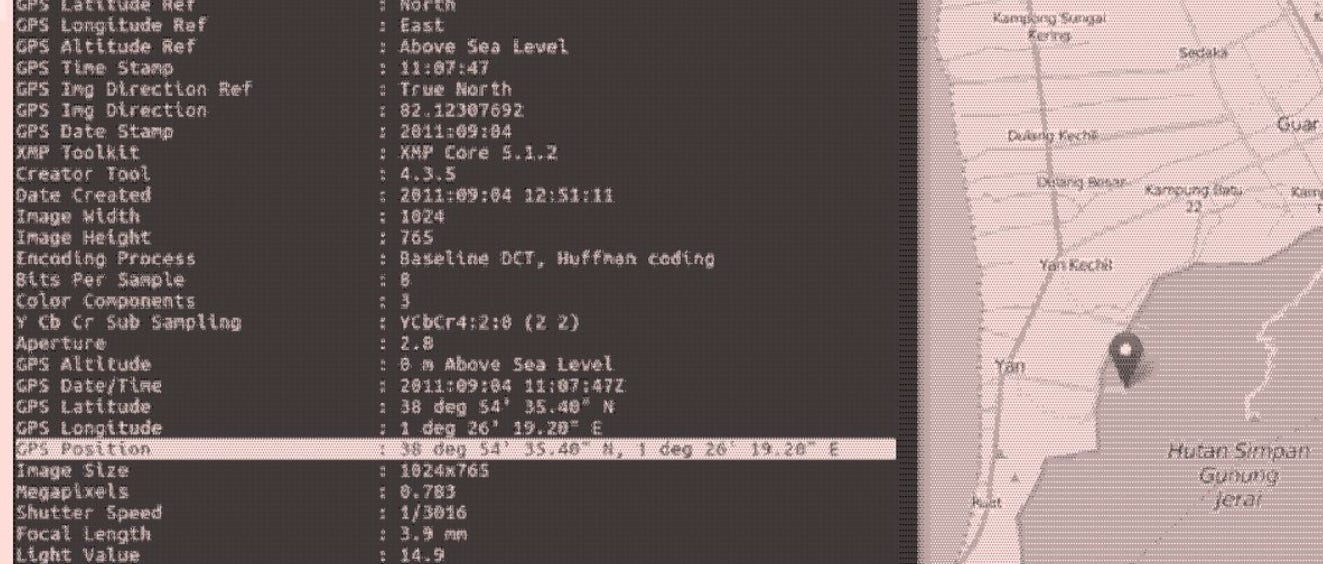
The John McAfee EXIF Metadata Exposure
In 2012, John McAfee who is a cybersecurity entrepreneur was in hiding. A journalist from Vice posted a photo of him online. The image still contained GPS EXIF metadata. Authorities extracted the coordinates and ultimately his location was exposed.

In short, the data attached to the picture ended up exposing him.
Communication Tools to Rethink
Let’s start with email.
Gmail and most major email providers encrypt messages in transit. That means emails are protected while traveling between servers. But that does not mean they are end-to-end encrypted. The provider can technically access message content. In corporate environments, administrators can often read employee emails as well..
SMS is even worse. Traditional text messages are not E2E encrypted. They are vulnerable to interception and are logged by carriers. They should never be used for sensitive communication.
The same caution applies to most mainstream social media messaging platforms. Instagram, Facebook Messenger, TikTok, and X (formerly Twitter) either do not provide end-to-end encryption by default - or do not provide it at all. Even where encryption exists, it is often optional and must be manually enabled.
Slack messages and Google Meet calls are not end-to-end encrypted. Zoom does offer E2EE, but it must be manually enabled through the Zoom web portal, and not all meetings use it by default.
What About WhatsApp and iMessage?
WhatsApp claims to use end-to-end encryption. Technically, message content is protected. However, it is owned by Meta, and many folks including me, remain skeptical about broader data practices. For non-sensitive communication, WhatsApp is generally acceptable. But for anything truly sensitive, stronger options exist.
iMessage is end-to-end encrypted and includes encrypted backups. However, it works only between Apple devices. You must share a phone number or email address to use it, and you may not always know whether the recipient is using iMessage or standard SMS.
Once again, for non-sensitive conversations, iMessage and WhatsApp are fine.
Also, just for your awareness - there is also an ongoing lawsuit challenging WhatsApp’s encryption claims. WhatsApp and Meta state that messages are end-to-end encrypted, meaning no one outside the chat can read them. The lawsuit alleges that Meta can access messages in near real time through internal processes.
So far, there is no definitive public evidence supporting those claims. Maybe it’s true, maybe it isn’t. If it were proven, it would represent one of the largest privacy scandals in modern tech.
Either way, transparency eventually surfaces….
Privacy-Focused Alternatives and Their Tradeoffs
If you want better privacy, you have to choose tools built with that priority in mind. Although better does not mean perfect.
Let’s look at a few widely used alternatives and where their limits still exist:
Proton Mail
Proton Mail is structured differently from traditional email providers. Its architecture is designed so that the company cannot directly access stored email content. This zero-access model strengthens user privacy but can limit certain convenience features.
Emails sent between Proton users are generally end-to-end encrypted. The service is based in Switzerland, a jurisdiction known for relatively strong privacy protections compared to many other countries. Jurisdiction matters because it determines how companies can be legally compelled to provide data.
That said, Proton Mail does not eliminate all exposure.
Email metadata such as - sender, recipient, timestamps - is embedded in the email system itself. Subject lines are not consistently end-to-end encrypted. Messages sent to Gmail or Outlook accounts lose automatic E2EE unless additional encryption steps are taken. IP addresses may still be logged unless masked through tools like Tor or a VPN. And if your device is infected with malware, no email provider can compensate for that.
Undoubtedly, proton significantly improves email privacy but keep in mind, it does NOT redefine how email works at the protocol level.
Signal
Signal is widely regarded as one of the strongest consumer messaging applications available. Unlike many platforms where encryption is optional, Signal’s end-to-end encryption is always active.
Its reputation for security extends beyond everyday users. According to public statements from CIA Director John Ratcliffe, Signal is widely used within the agency. Ratcliffe told the Senate Select Committee on Intelligence that Signal was installed on his CIA computer upon confirmation and is used by most CIA officers. That level of institutional adoption reflects trust in its security design.
Signal also allows users to communicate via usernames instead of exposing their phone numbers. Contacts can exist entirely within Signal without being uploaded to a central database in a readable form. Your phone number does not need to be visible unless you choose to share it.
Still, Signal has limits.
It requires a phone number to register, creating some degree of identity linkage. Internet service providers can see that you are connecting to Signal servers, even if they cannot read the content. Timing patterns such as - who you message and when - may still exist at a network level. And again, if a device is compromised, even the strongest encryption cannot protect the conversation.
I would recommend checking out the following post by Tate Jarrow if you want to dive more into learning stuff regarding signal:

Jitsi Meet
For video conferencing, Jitsi Meet presents a different model from mainstream platforms like Zoom or Google Meet. It is open-source and can be self-hosted, giving organizations full control over infrastructure if they choose to deploy it on their own servers.
For casual use, meetings can be started without creating an account, reducing identity exposure. This makes it useful for both informal and professional communication.
However, default Jitsi meetings are encrypted in transit, not always fully end-to-end encrypted in the strictest sense. Server operators can still see IP addresses and certain session metadata. Meeting duration and participant counts remain visible at the server level. As always, browser and device security play a critical role.
Accepting the Limits of the System
There is a hard truth about digital communication that no encryption tool can erase.
For a message to move across the internet, the network must know three things: where it came from, where it’s going, and when it was sent. Without that information, routing simply wouldn’t work. This is metadata and it’s unavoidable.
Keep in mind - you can’t eliminate metadata because that’s fantasy. The real objective is minimizing who can access it and how easily it can be analyzed or correlated over time.
Here are some additional steps you can take to minimize your metadata:
Hide Your IP Address
Your IP address reveals decent information about you - an approximate location, your internet service provider, and sometimes even your identity through account records.
Using a privacy-focused VPN such as Mullvad can mask your real IP from the services you connect to. But understand what’s happening - you’re placing trust on someone else, not eliminating it. Instead of your ISP seeing everything, your VPN provider will be.
There’s more depth to networks, tunnels, and traffic routing than we’re covering here. That deserves its own dedicated discussion and it will have one, stay tuned for that.
Use Apps That Minimize Metadata
Not all end-to-end encrypted services treat metadata the same way.
Some store connection logs. Some build analytics systems around usage patterns. Even the privacy-respecting tools discussed earlier aren’t flawless, nothing is.
But, here’s what you can do - Before using any service, examine how it encrypts data, what it stores, how long it stores it, and how it makes money. All of this matters more than you think.
Blind trust defeats the purpose of privacy.
Control Your Device
If your device is compromised in any way, either via malware or spyware or if someone has root access to your computer, then nothing really matters.
So, start focusing on what you install on your device, where you are downloading applications from, what you are clicking on the internet, what already exists on your device, using an antivirus like malwarebytes is also a good thing.
I would suggest checking out the following pieces to get some help on this particular matter:


Scope and Threat Model
If you are someone technical, you might wonder why this guide doesn’t dive into advanced tactics like identity compartmentalization, timing obfuscation, decentralized systems, or complex anonymity frameworks - all these techniques allow you to minimize your metadata even further.
I get it, such methods exist, they work. But they are designed for high-risk threat models.
This guide is for people trying to raise their baseline privacy, not disappear from nation-state intelligence.
A more useful starting question is this:
“Who are you trying to protect your data from?”
Because protection depends entirely on the threat model.
Layer 1: Your Internet Service Provide (ISP)
Layer 2: Opportunistic hackers
Layer 3: Big Tech companies
Layer 4: Governments
Layer 5: Targeted surveillances
Each layer requires completely different tools, discipline, and tradeoffs to protect yourself from it.
The privacy-series I am doing focuses on layer 1 – layer 3. Government-level or targeted surveillance is a different category entirely, and defending against that requires a different level of operational rigor.
Communication Habits That Matter More Than Tools
If you made it this far, good. Most people never question how their communication systems work. You did and that is another step in the right direction.
Know this - Private communication isn’t about hiding. It’s simply about choosing the right channel for the right conversation.
Encryption, apps matter, infrastructure, all of this stuff matters, but behavior sits above all of it.
That’s why you need to start being more aware of your actions.
Be conscious of what you discuss, where you discuss it, and with whom. Not every conversation belongs on every platform nor every thought needs to live in a searchable chat history.
Separate personal and professional channels. Don’t mix identities casually. Check whether your cloud backups are encrypted. And understand this clearly - deletion does not automatically mean disappearance. Data lingers in backups, logs, and recipient devices.
Privacy is shaped by habits more than software, you can start today by working on building small, consistent habits:
Thinking before choosing a platform
Limiting oversharing
Keeping your devices clean and updated
Over time, that discipline compounds.
In the next part, I will shift focus to something that is a bit more overlooked aka The Browser. It is one of the most powerful surveillance surfaces in your digital life. I’ll break down why it matters and what practical steps you can take to fix what’s leaking.
Thanks for reading.
See you next time.
The Algorithm is Winning!
I got a confession - most of my time goes into researching on topics - so, I can help you see what the system doesn’t want you to see. At this point, it’s me versus The Algorithm and the Algorithm is winning…
That’s why I need your help.
If SK NEXUS has earned a place in your inbox, consider subscribing if you haven’t already.
And if you’re active elsewhere, follow along on Bluesky or X (Twitter) or LinkedIn - those are the two places I show up most consistently outside Substack. A follow, a like, a repost - it matters to me, more than you think.
Independent research only works if the signal travels. If this work has been useful to you, help it travel.
What You Might Like
If you want to learn more, you can give the posts of different creators involving The Digital Watchtower, Erich Winkler, ToxSec, Mila Agius, Joel Salinas on different topics a read:


Great piece! I really like how you turn “privacy” from an abstract virtue into concrete communication choices people can actually adopt. The framing around threat models and everyday trade-offs is especially useful, because it avoids both paranoia and complacency. It also reads like a practical field guide: clear, specific, and grounded in real behavior rather than slogans.
Quick question: what’s your take on Zangi as a messenger from a security perspective – would you consider it a credible option for sensitive conversations, and under what assumptions?
another banger by SK Nexus. really, one of the best substacks on user privacy out there. Definitely worth a read. particularly good section on habits!