



Hey there 👋
Looks like you made it to Part 4, I respect the consistency.
Quick recap - in the last piece, we focused on browsers aka the primary gateway to surveillance. I broke down how third-party tracking works, why default configurations aren’t enough, and how to harden your setup properly. If you skipped that one, go back and read it first. This builds directly on it.
For anyone new here - this is Part 4 of a practical privacy series designed to help you secure your digital life step by step.
Now, up until this point if you have done everything right. That still doesn’t mean you are truly protected because your IP address is exposed and tied directly to you, that’s still a wide attack surface.
Your IP address is your rough digital location. It’s assigned by your Internet Service Provider. And even with HTTPS, your ISP can see a lot because metadata still exists, DNS requests still travel and connection records still get logged.
So the question becomes simple:
If the network itself sees you, how do you reduce that visibility?
That’s exactly what we’re breaking down in this part.
And just a heads up for the new folks - if you’re unsure about the order of this series, follow it like this:
The Core Issue: Network-Level Exposure
When you go online. You are basically moving through infrastructure and whoever controls that infrastructure, is the big guy.
Start with your Internet Service Provider.
Every request you make - passes through their network. Even when traffic is encrypted via HTTPS, your ISP can still see the domains you connect to, your destination IP address, session duration. This is called metadata about which we previously discussed as well.
Similarly, let’s say you are sitting in a coffee shop or maybe an airport and using the public Wi-Fi.
By doing that - you’re plugging your device into a network you don’t control, administered by people you don’t know, and shared with strangers. HTTPS protects the content of most modern websites. That’s good.
But it doesn’t make the environment trustworthy.
The person operating the network can still see where you’re connecting. They can attempt traffic manipulation. They can redirect users to phishing pages and if any connection on your device isn’t using an encrypted protocol, then they can take advantage of it.
The main problem is that you are operating inside infrastructure that isn’t yours.
The same applies for different social media companies, content platforms, cloud providers - your data flows through their servers. They sit at the main pathways and whoever controls those pathways controls information flow.
That control isn’t automatically malicious. But structurally, it grants power to log, to block and to do much more.
Understanding VPNs
A VPN aka Virtual Private Network is one of the most marketed privacy tools on the internet.
At its core, it creates an encrypted tunnel between your device and a remote server operated by the VPN provider. Instead of your traffic going directly from your device to the website you’re visiting, it first travels through that encrypted tunnel to the VPN server and only then out to the wider internet.
In practical terms, this adds a protective layer. But it’s important to understand what that actually means, and what it doesn’t.
How a VPN Works
There are three core functions happening when you connect to a VPN:
Encryption - Your internet traffic is encrypted before it leaves your device. Anyone monitoring the local network, including your ISP or a public Wi-Fi operator - sees scrambled data rather than readable content.
Secure Data Transmission - On compromised or public Wi-Fi networks, this encryption becomes critical. Even if someone intercepts your traffic, they can’t easily break it.
IP Address Masking - When connected, your visible IP address changes to the IP of the VPN server. To external websites, it appears as if your traffic is originating from that server’s location instead of your real one.
That masking is what makes it appear as though you’re browsing from another country.
What a VPN Actually Hides
IP Address and Geolocation
For those of you who don’t know, an IP address (Internet Protocol address) is a unique numerical label assigned to your device whenever it connects to a network. It identifies your device and provides a routing location for internet traffic.
Without a VPN, that IP address is visible to websites, trackers, and your ISP.
With a VPN, the IP assigned by your ISP is hidden from the websites you visit. Instead, they see the VPN server’s IP. That means:
Your real location is masked
Trackers can’t directly tie browsing sessions to your residential IP.
Your ISP sees encrypted traffic going to the VPN, not the final websites you access.
If you’re curious what your current IP reveals, you can visit this link to do that.
And yes - this is also why VPNs are commonly used for bypassing regional restrictions. Let’s say if you’re in the USA and a Netflix title isn’t available locally, connecting to a server in another country can make it appear as though you’re browsing from there.
Search Activity and Torrents
When using a VPN properly - your ISP cannot see the specific websites you visit. Your local network observers cannot read your traffic and your browsing activity becomes harder to link directly to your home IP.
If you avoid logging into identifiable accounts unnecessarily, correlation becomes more difficult. Trackers still exist - but without your direct IP address, cross-site tracking weakens. Your browsing habits are less easily tied back to your physical connection.
Overall, a VPN does a solid job of protecting a significant amount of personally identifiable network data.
But that’s not the whole story.
What a VPN Does Not Hide
This is where people get misled. It’s important to note that a VPN does NOT hide your digital fingerprint, your logged-in personal accounts, any kind of malware infections or protect you from getting social engineered.
If you sign into Google or any personal account, those platforms know exactly who you are, it doesn’t matter if you are using VPN or not, at that moment. Or if your browser fingerprint is unique, websites can still track you or if you download malware, a VPN won’t stop it.
A VPN is not a bulletproof vest, it’s a layer and like every layer we’ve discussed in this series, it only works properly when combined with disciplined behavior.
Tools matter, but habits matter more.
VPN vs WARP vs Proxies
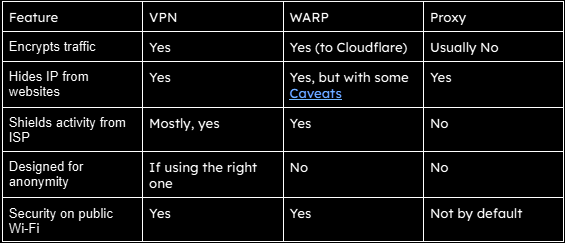
VPNs, WARP, and proxies are often used interchangeably online. They shouldn’t be. They solve different problems, operate at different layers, and carry different trade-offs.
If you don’t understand the distinction, you’ll either overestimate your privacy or use the wrong tool entirely.
WARP
Cloudflare WARP encrypts your DNS requests and routes your traffic through Cloudflare’s network. The goal is to protect you from local network snooping and improve connection reliability using Cloudflare’s infrastructure.
It does a good job securing traffic on public Wi-Fi and preventing your ISP from easily seeing specific domains you connect to. But it is not built primarily as an anonymity service and it does not prevent Cloudflare from having visibility into traffic flowing through its own network.
In short, WARP strengthens connection security and is not a serious anonymity layer.
Proxies
A proxy is the simplest of the three.
Instead of your device connecting directly to a website, the connection goes through a middle server first. The website sees the proxy’s IP address, not yours.
That’s the core function.
Unlike a VPN, a proxy typically does not encrypt your traffic end-to-end. That means your ISP can still see what you’re accessing unless additional encryption (like HTTPS) is in place. Proxies are commonly used for automation, bypassing regional restrictions, or routing specific applications through alternate servers.
In short, Proxies are functional tools, not privacy guarantees.
These technologies may look similar from the outside. Under the hood, they are solving different problems. Here’s a table to make the difference more prominent:
The VPN Trade-Off
You thought there’s no trade-off? Here’s an eye opener:
When you activate a VPN, your ISP mostly sees an encrypted tunnel going to one server. They no longer easily see the final destinations of your traffic.
But now the VPN provider becomes the one in control.
Technically, that VPN provider can see your real IP address when you connect. They can see which VPN server you’re assigned. They can see connection timestamps. Whether they log that information depends on internal policies.
And this is exactly why logging policies, jurisdiction and ownership matters.
A subpoena aka a legal order requiring a company to provide records - can compel a VPN provider to hand over whatever data they have retained. There’s a real-world example of this:
In 2017, U.S. authorities were investigating a cyberstalking case. They traced suspicious activity to an IP address belonging to PureVPN. The company had advertised a “no-logs” policy, but it turned out that wasn’t the case. When served with a subpoena, PureVPN provided the data it had. That information helped identify and arrest the suspect.
The deeper issue wasn’t that they complied with a lawful request - most companies will. The issue was transparency versus marketing language.
One last thing, don’t even think about using free-VPN’s. Servers, bandwidth, and infrastructure cost money. If a VPN is free, revenue comes from somewhere. In many cases, that somewhere is user data getting sold.
Keep in mind - if something is free, you are often the product.
What Should You Actually Use?
So, whether you’re on public Wi-Fi at a café, w or just scrolling on your phone, the same basic principle applies - your internet connection reveals a lot about you, your IP address alone can expose your approximate location, the network you’re using, and create a persistent identifier tied to your activity.
Now, the question is for a casual internet user who simply wants better privacy and safer browsing habits, what can he/she do? Well, here are three realistic options:
Mullvad VPN - The Most Transparent Option
If your goal is serious privacy at the network level, Mullvad is one of the strongest options currently available.
Unlike most VPN providers, Mullvad does not require an email address or personal details when creating an account. Instead, it generates a random account number that becomes your only identifier.
Jurisdiction also plays a role here. Mullvad operates out of Sweden, where privacy protections and regulatory structures are relatively strong. While many companies claim a no-log policy, Mullvad has repeatedly positioned itself around minimal data collection by design - reducing the amount of information that could exist in the first place.
Another feature that privacy-conscious users appreciate is payment flexibility. Mullvad accepts several forms of payment, including cryptocurrencies, which means users can avoid attaching card details if they prefer.
Although the service is not free, the pricing is intentionally simple - one flat monthly rate regardless of how long you subscribe.

If you want to explore the deeper technical breakdown, this review provides additional details: https://cyberinsider.com/vpn/reviews/mullvad-vpn/ And if you’d like to get started directly, Mullvad provides setup guides for every platform here: https://mullvad.net/en/download/vpn/linux
Proton VPN - A Reasonable Free Alternative
For people who are not ready to pay for a VPN service, Proton VPN is one of the few free options that still maintains a strong privacy reputation.
Proton is widely known for building privacy-focused software products, including encrypted email and secure cloud services. Their VPN follows the same philosophy.
Even the free version of Proton VPN maintains a fairly strong privacy posture. However, there are limitations.
But many advanced features are reserved for paid subscribers. This is typical across most VPN services. Another downside common to free VPN tiers is traffic overload on servers. Because thousands of users rely on the same limited infrastructure, free servers can become overloaded, which impacts connection speed.
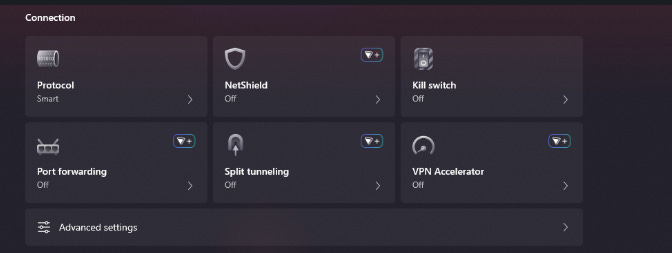
Despite these limitations, Proton remains one of the few providers offering a free service that does not appear to rely on aggressive data monetization.
And yes, proton also has a paid version, here are the details for it:
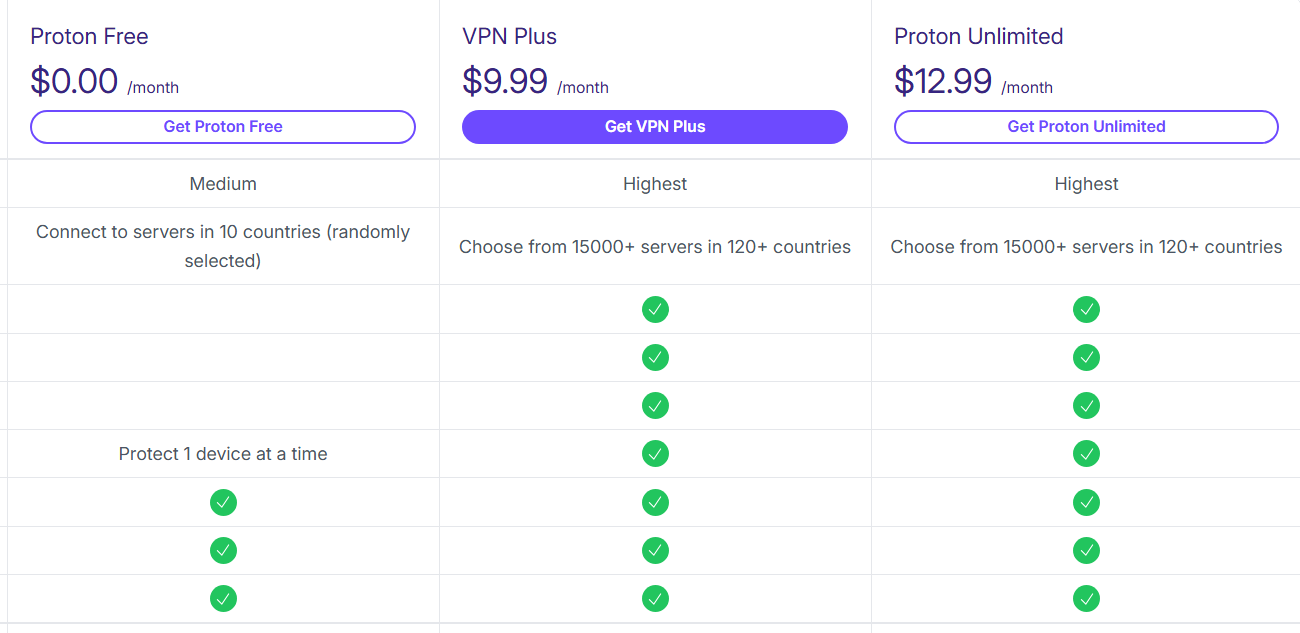
For anyone exploring VPNs without committing to a paid subscription immediately, Proton VPN is one of the safer starting points - you can download it by visiting this link.
Cloudflare WARP - A Lightweight Privacy Layer
If you are someone who believes they don’t need the additional features that a full VPN provides. And If your primary goal is simply preventing an ISP or local network from easily monitoring traffic - Cloudflare WARP can be a practical alternative.
WARP works by routing your internet traffic through Cloudflare’s network while encrypting DNS requests and connection data. Instead of exposing your original IP address to websites, your traffic appears to originate from Cloudflare’s infrastructure.
However, it’s important to understand what this does and what it does not do.
WARP replaces your public IP address with a Cloudflare IP that still reflects your approximate geographic location. It is not designed as an anonymity service and does not attempt to conceal your location in the same way traditional VPN services do.
For users who want something lightweight that improves connection security without managing a full VPN service, it can be a convenient solution.
You can download the client directly from Cloudflare here: https://developers.cloudflare.com/warp-client/get-started/windows/
The Habit Side of Privacy
If you have made it this far, it means you have addressed several major layers of digital privacy including identity and authentication, secure communication tools, browser choices and tracking behavior. And now we’ve looked at the network layer - where your IP address and connection metadata exist.
Each one of these layers reduces exposure in a different way.
Understand that using a VPN does not suddenly make someone anonymous online and that privacy is not a single tool you enable once and forget. It’s a set of habits built gradually over time. The tools help, but behavior ultimately determines how effective those tools are.
That’s why stacking everything you have learnt is where meaningful protection emerges.
By the way, there is still one layer we haven’t explored yet - the operating system itself.
If privacy is your priority, know that Microsoft Windows is not something worth using and the natural alternative is Linux.
If enough of you are interested, the next article can break that down in detail - including why Linux is often the better choice for privacy, which distributions make sense for beginners, and how to transition without breaking your workflow.
For now, this wraps up the series.
This was the final part, but it builds on everything that came before it. The previous four parts break down the foundations in detail, so if you haven’t gone through them yet, it’s worth starting there.
Thanks for reading.
See you in the next one.
One Last Thing
Nearly all people interact with systems without questioning them. This space is about doing the opposite aka understanding how things work, where they fail, and what that means in practice.
If that’s the kind of content you want more of, subscribe. And if this piece added something new to how you see things, pass it on. Good information only matters if it travels.
And if you’re active elsewhere, follow along on Bluesky or X (Twitter) or LinkedIn - those are the two places I show up most consistently outside Substack. A follow, a like, a repost - it matters to me, more than you think.


"When you activate a VPN, your ISP mostly sees an encrypted tunnel going to one server. They no longer easily see the final destinations of your traffic.
But now the VPN provider becomes the one in control."
Great call out here, not enough people understand how these tradeoffs work. VPNs are great but not magic. Great post!