



Hey there 👋
If you read our last piece on upscaling, you already know that your GPU has been tricking you for a while now.
Drawing your games at a lower resolution and then letting AI fill in the missing pixels. This was your GPU’s first trick but it doesn’t stop there.
In addition to upscaling, your GPU has another trick up its sleeve which it uses to smooth out your gameplay. That is called Frame Generation.
Where upscaling makes your games look sharper without actually drawing all the pixels, frame generation goes one step further.
It makes your games feel smoother without your GPU actually drawing all the frames.
In extreme cases, only one out of every six displayed frames may be traditionally rendered. The rest are software inventions.
That sounds weird to read but the frame generation technology is pretty cool.
And it’s more relevant now than ever, because of AI demand adding to graphics card prices.
Like any other technology, frame generation isn’t a silver bullet and it comes with trade-offs that marketing material often downplays.
That’s where this article comes in. I’ll go over what Frame Generation is and how it affects us gamers, especially those on a budget.
This article you’re reading is second in a 3-part series on gaming technologies that go unnoticed. Other articles in this series are linked below:

What Even Is a Frame?
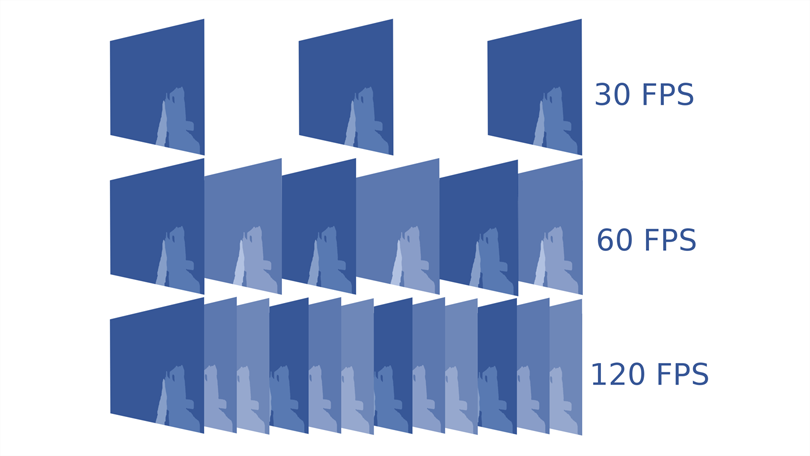
Before frame generation makes any sense, let me explain how video games generally work.
When you play a video game, your graphics card is basically drawing lots of images in a matter of seconds. Each one of those images is called a frame.
Your monitor then displays those frames one after another, and your brain stitches them together into smooth motion.
The number of frames your GPU draws per second is your frame rate. If you are getting 60 FPS (frames per second), your GPU is drawing 60 full images every second.
The general rule is: the higher the FPS, the smoother the gameplay.
At 30 FPS, your GPU is drawing a new frame roughly every 33 milliseconds. At 60 FPS, it is every 17 milliseconds.
Now here is the catch.
More demanding games running at higher resolutions push even powerful GPUs to their limits. Hitting 60 FPS in a heavy game at 4K is genuinely hard work.
Hitting 120 FPS is much harder. And modern high refresh rate monitors, some running at 240Hz or higher, want a lot of frames to stay busy.
What Is Frame Generation?
Frame generation (aka Frame Gen) is a software technology that basically invents new frames and inserts them between the real ones in real-time while you play your games.
Your GPU still does the actual work. It draws a real frame, then draws another real frame.
Frame generation software then looks at those two real frames, analyzes what moved and where it moved to, and creates a new frame that sits between them in time.
Your monitor then displays the sequence: real frame, generated frame, real frame, generated frame.
In its basic form, frame-gen looks like twice the frame rate, even though your GPU only did half the drawing work. And that is basically frame generation.
The basic version of this is called 2x frame generation. One generated frame for every real frame. That is what AMD has offered for a while.
But the technology has moved fast and things have gotten more aggressive.
Frame generation is sometimes confused with upscaling because companies like NVIDIA bundle both into the same package like DLSS.
However, from a technology POV upscaling and frame generation are actually separate things doing separate jobs.
Upscaling makes each frame look sharper. Frame generation makes more frames appear.
You can use one without the other, though in practice most games bundle both together under a single option like DLSS or FSR.
How Frame Gen Actually Works
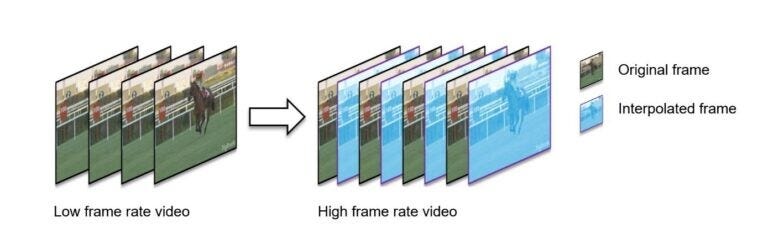
What frame generation does is not as simple as just copying a frame or blurring two together.
The software analyzes motion between two real frames. It builds what is called an optical flow map, which is basically a picture of how every part of the scene moved between those two moments in time.
Then it uses that map to predict where everything should be at the midpoint and renders that.
Think of it like watching two photos of a running person and being asked to draw the frame in between. If you know where their leg was in photo one and where it is in photo two, you can make a pretty good guess at where it was halfway through.
Modern frame generation, especially the AI-powered versions, is significantly more complicated than this example but you get the point, right?
In recent years, frame generation has gotten so good that it now looks quite real to the eyes of mere mortals :p.
NVIDIA’s Frame Gen
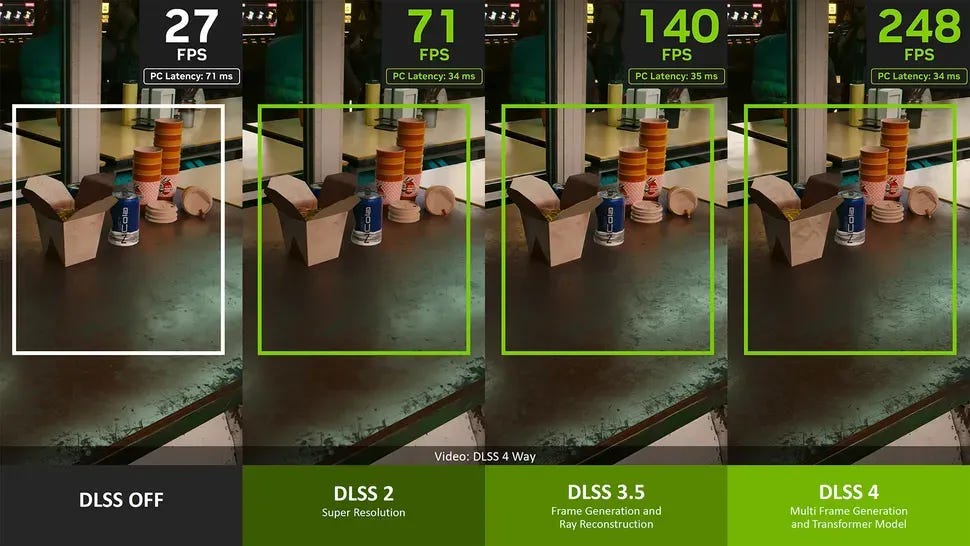
Just like upscaling technology in video games, NVIDIA was the company that pushed frame generation into the mainstream.
They introduced it with DLSS 3 back in 2022 with the RTX 40-series cards.
The basic idea was the same as above: draw one real frame, invent one in between, display both. This effectively doubled the visible framerate.
What made NVIDIA’s tech stand out was the hardware behind it. RTX cards have dedicated AI chips called Tensor Cores. These are chips designed specifically to run AI workloads quickly.
NVIDIA uses them to power its frame generation, which means the process is faster and adds less overhead than doing the same work purely in software.
Then at CES 2025, NVIDIA introduced DLSS 4 with Multi Frame Generation for their RTX 50-series cards.
Multi Frame Generation or MFG can generate up to 8x fps over traditional rendering when used with DLSS upscaling.
MFG is basically the big brother of frame generation :p
By early 2026, over 250 games had already added support for DLSS Multi Frame Generation, making it NVIDIA’s most rapidly adopted gaming technology.
Then at CES 2026, NVIDIA went further with DLSS 4.5.
The company increased the maximum frame generation multiplier from 4x to 6x for RTX 50-series users.
DLSS 4.5 also introduced Dynamic Frame Generation, which lets the software automatically adjust how many frames it is generating based on what your monitor can actually display.
By March 2026, the full DLSS 4.5 feature set became available including Dynamic Multi Frame Generation and the new 6x mode.
The important caveat here is that 6x Multi Frame Generation is exclusive to RTX 50-series cards. You’re kinda left out if you don’t have a 50-series NVIDIA card.
RTX 40-series cards are limited to traditional 2x Frame Generation, while RTX 20 and 30-series cards do not officially support DLSS Frame Generation.
GeForce graphics cards are what made NVIDIA’s name but today, revenue from graphics cards seems tiny compared to their AI-revenue.
To learn how NVIDIA got to be a $5 trillion empire and the heart of this AI revolution, you can read my deep-dive article on NVIDIA linked here.
AMD’s Take on Frame Gen
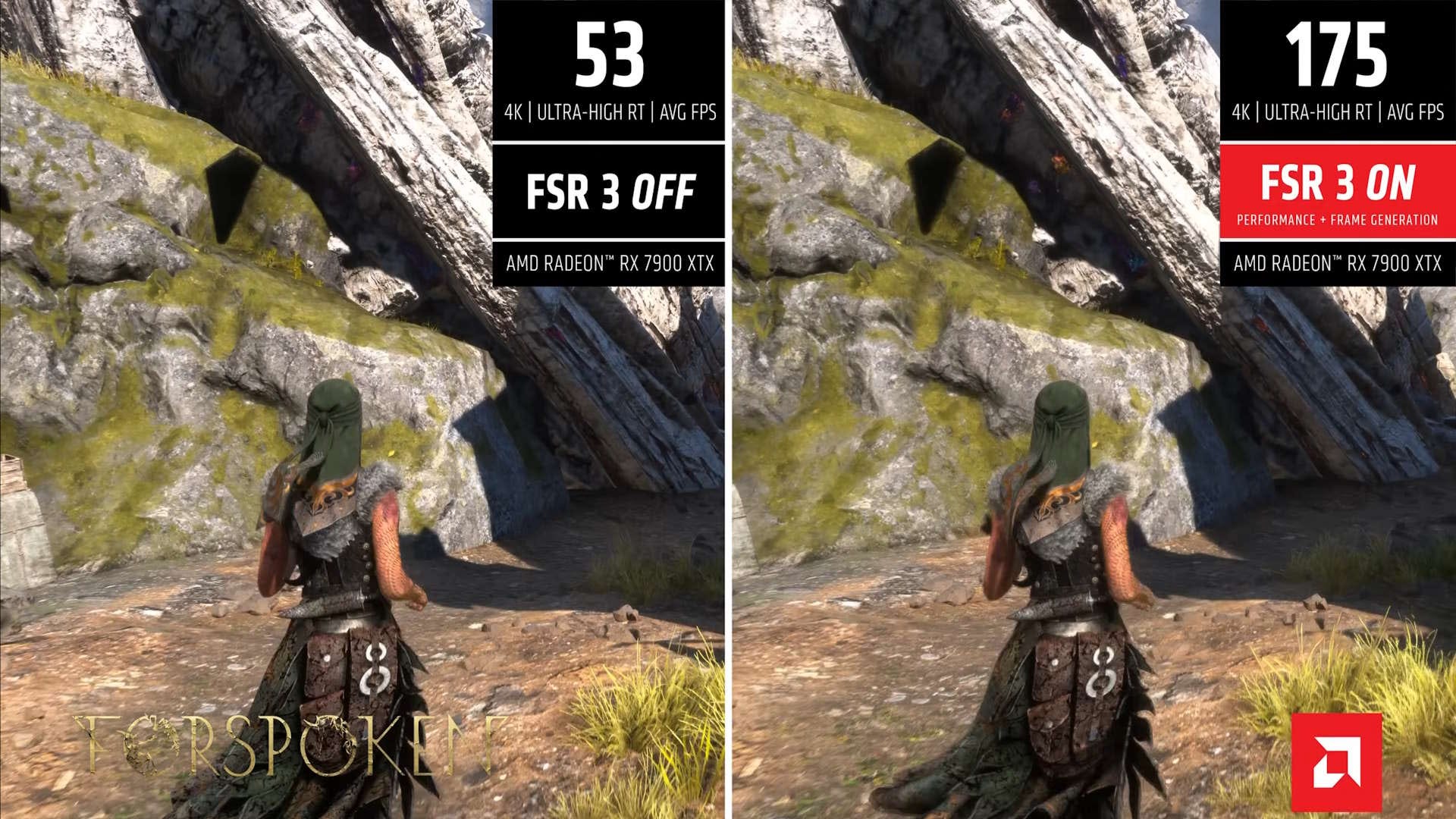
AMD introduced frame generation with FSR 3 in 2023. Their pitch, as always, was broad compatibility.
FSR 3 frame generation works on any GPU, not just AMD cards. You don’t need an AMD card to use it. That openness is genuinely useful for people (like me) with older or non-AMD hardware.
The trade-off was quality. The original FSR frame generation ran on regular shader cores rather than dedicated AI hardware. It produced some glitches on fast-moving objects and the results were not quite as clean as NVIDIA’s implementation.
AMD’s newer answer is FSR Redstone.
The AI-based FSR Frame Generation is designed specifically for AMD RDNA 4 architecture GPUs, the RX 9000 series, delivering higher quality results with fewer artifacts than the older version.
Here is where AMD is behind the competition right now. AMD’s frame generation is still limited to 2x. This means one generated frame for each real frame.
Intel and NVIDIA have both moved to multi-frame generation while AMD has not yet.
However, that appears to be changing soon because AMD recently hinted at upcoming multi-frame generation support.
AMD is probably having the best moment of its gaming history but for the most part they’ve been catching up with NVIDIA.
To know more about why AMD had to play catch-up with big boys like Intel and NVIDIA, check out my deep-dive article on AMD’s comeback here.
AMD has previewed FSR Diamond, the evolution of its frame-generation technology especially for consoles like next Xbox.
So if you are on an AMD card and frustrated that you are stuck at 2x while NVIDIA users brag about 6x, help may be on the way.
Intel and the Frame Gen Race
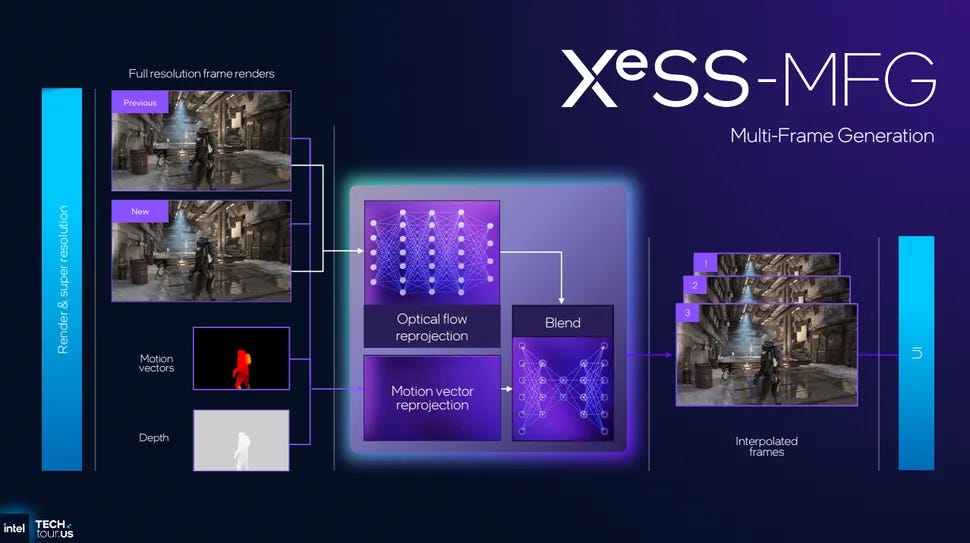
Intel is the newest player in this space and they have been quietly doing cool stuff.
Intel introduced XeSS frame generation as part of their Arc GPU lineup. For a while it was basic, similar to early FSR. But in early 2026 they made a big move.
Intel released XeSS 3 with Multi Frame Generation in January 2026, offering 2x, 3x, and 4x modes. Any game already supporting XeSS 2 frame generation would be compatible with XeSS MFG with no developer update required.
Then things got even more interesting.
In April 2026 Intel expanded XeSS 3 Multi Frame Generation support to virtually all Arc GPUs, including their older generation graphics cards and integrated graphics too.
That last part is remarkable. Multi-frame generation on integrated graphics chips inside laptop processors. Nobody else is doing that.
Intel even enabled multi-frame generation support across three generations of Intel Arc integrated graphics solutions.
Few GPU vendors have extended frame-generation support this broadly.
The catch with Intel is game support. XeSS as a whole has fewer supported games than DLSS or FSR. That is the ongoing challenge for Team Blue.
Intel’s technology works but it takes time for developers to actually implement it which is the harder problem.
Intel’s first graphics card entry failed and now they’re probably the newest entrant to graphics.
Intel lost the crown of being the best CPU maker to AMD. We covered Intel’s fall from the top in our Intel deep-dive article linked here.
The Input Lag Problem
Here is the thing nobody in the marketing materials will say very clearly.
Frame generation makes your game look smoother. It does not make your game feel more responsive.
Those are two different things and the difference matters a lot depending on how you play.
When your GPU draws a real frame, that frame contains information about where your mouse was and what buttons you pressed at that exact moment.
It is a true snapshot of what the game world looked like when you were interacting with it.
A generated frame does not have that. It was invented based on two real frames that already existed. It does not know what your mouse did. It fills in the gap based on what was already moving in the scene.
In competitive settings, the extra frames from frame generation do not help reduce latency.
The input lag remains tied to the speed at which the base game loop runs, and frame generation adds overhead that can actually increase the total time between your input and the response appearing on screen.
Think of it like getting a text message summary of a conversation that already happened. The summary looks detailed and covers everything. But it was written after the fact. Your input was not part of it.
NVIDIA has Reflex and AMD has Anti-Lag to help reduce this penalty. These tools lower the overhead and try to get you back toward a normal latency baseline.
These technologies reduce latency but they only bring you back to a baseline level. They do not make frame generation faster than native frames. They reduce the penalty without eliminating it.
The practical rule that most experienced PC gamers have landed on is: if you are playing single player story games like GTA 5, Red Dead Redemption 2, frame generation is great.
But when you are playing multiplayer games (competing with humans online) like Valorant, Call of Duty, etc., frame generation is not a good idea.
When Frame Gen Helps and Hurts
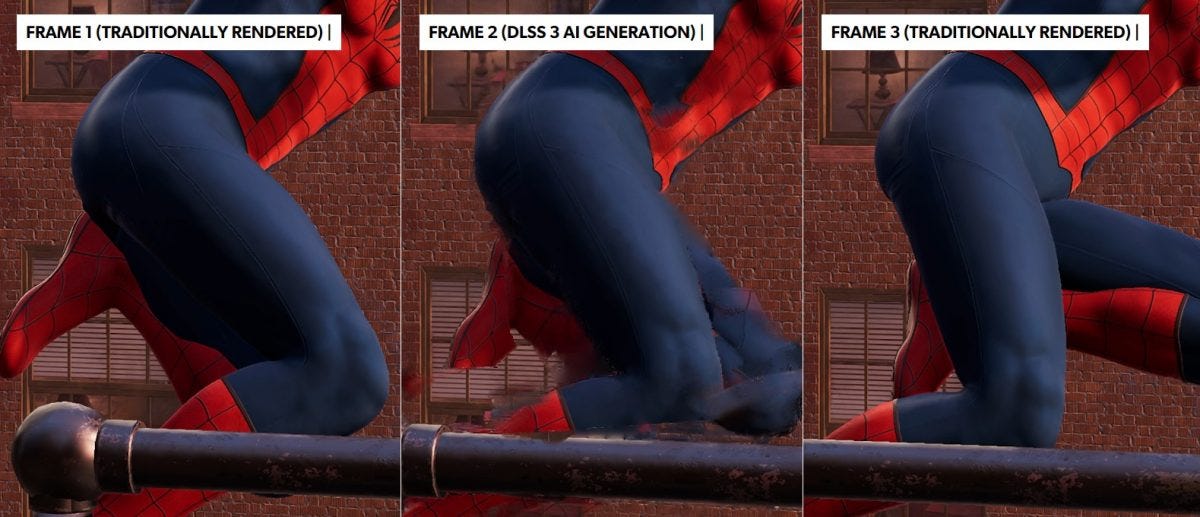
Look, frame generation isn’t magic.
It works best when your base frame rate is already decent. If you are running a game at 50 to 60 FPS natively and frame generation bumps that to 90 or 100, that is a genuine improvement.
Your game will feel smoother and the experience is noticeably nicer without obvious downsides.
Playing games like Cyberpunk 2077 on max settings can quickly take your performance down to 40 or 50 FPS.
Frame generation in these scenarios can push your displayed frame rate past 100 without requiring you to drop visual settings.
Where it falls apart is when your base frame rate is already too low. Multi-frame generation generally works best with a base frame rate of at least 60 FPS to avoid latency issues.
If your GPU is only getting 25 or 30 FPS natively and you turn on frame generation to get 60, you’ll have a bad experience. Visual glitches also get more noticeable at very low base frame rates.
Some developers have also been using frame generation as a crutch, launching games with heavy optimization issues and relying on frame generation to mask the stutter.
Frame generation cannot fix CPU bottlenecks. It can hide GPU frame rate problems but not everything.
You may have seen games in the last year or two that ran at oddly low native frame rates but shipped with frame generation on by default. That is not always a sign of a well-made game.
The ideal profile for frame generation is a game that runs at a solid 50 to 70 FPS natively, where you want visual smoothness more than you need razor-sharp response times.
That is the sweet spot and usually most people don’t need razor-sharp response times all the time so that makes technologies like frame generation actually useful.
The Future Of Frame Gen
Frame generation has gone from an exclusive feature to something all three major GPU makers now offer. That happened in just about three years.
The multipliers keep going up. NVIDIA is at 6x on their latest hardware. Intel is at 4x. AMD is catching up with multi-frame support likely coming soon.
Valve’s recently released Steam Machine uses upscaling and frame generation to achieve their performance targets. Valve has partnered with AMD to bring FSR 4 to their Steam Machines as well.
So, I feel there are two angles to frame generation:
The first one is that frame generation has been a really cool technology that has allowed gamers on a budget to play games that once ran badly on their systems.
I’m a testament to that. It’s great to have FSR supported on my graphics card even though it’s more than a decade old at this point.
And the way gaming hardware has shot up in prices because of AI-related demand, not everyone can afford 40-series graphics cards.
That’s where Intel’s open approach helps people who may not even have an Intel card, that’s a really positive thing.
But there is another concern: many developers have become complacent because of these technologies.
Instead of doing their best to optimize their games so they use resources efficiently, some game developers have started to lean on frame generation to take care of that.
Frame generation is like a supplement rather than a replacement for native performance. But the line between what your GPU rendered and what software invented keeps getting harder to find.
For now though, frame generation is increasingly common on gaming systems that support it.
If you have a reasonably modern GPU and you are playing a supported game, there is a good chance software is inventing at least some of what you are seeing.
And in single player games (that most of us play) the majority won’t even notice it.
Now that you’ve made it so far let me share a nugget of information.
The next article in this series is going to be on technologies like VSync, G-Sync, NVIDIA Reflex which make our games and hardware in-sync.
I’ll go over how gaming companies fix some of the issues that frame-gen and upscaling add to gameplay.
See you there :)
As always your feedback is what counts for SK NEXUS.
I’d really appreciate if you could just take a moment out and share this article to someone who’d benefit from learning about frame-gen technologies. You can use the button below:
Similar Articles From SK NEXUS


Further Learning
NVIDIA DLSS 4.5 Dynamic Multi Frame Generation Now Available
NVIDIA introduces DLSS 4.5 and Multi Frame Generation 6X at CES 2026
AMD SDK suggests 4x and 6x frame generation multipliers are in the works
Intel enables XeSS 3 Multi-Frame Generation in latest drivers
Input latency is the all-too-frequently missing piece of framegen analysis
AMD May Finally Add Multi-Frame Generation Support for Its Latest GPUs
Valve is working with AMD to bring FSR 4 to the Steam Machine