



Hey there 👋
There is a setting buried somewhere in almost every PC game released in the last few years called DLSS, or FSR, or XeSS.
Most people leave it on whatever the game sets by default and never think about it again. And that is honestly fine. It works. Your game looks good. Life moves on.
But here is the thing. If you have played any PC game, used a PS5 Pro, or owned a gaming handheld in the last couple of years, your screen has basically been lying to you.
It has almost certainly been showing you something that was never actually created by it. Your graphics card drew some pixels. Software invented the rest.
That is upscaling. And it quietly became one of the most important technologies in gaming.
The reason to talk about it now is because the current AI boom has already made most gaming unaffordable for many.
It’s honestly one of the worst times to be a gamer because RAM prices have shot to the moon, SSD have done the same and modern games become bloated day-by-day.
And upscaling helps in all of this by making your games run better on systems that are aging while being basically free for the most of us.
So it is a good time to start from the beginning and learn what is upscaling, how did we get here, and what is actually happening on your screen right now.
This article is special because it’s part of 3 article series we’ll call ‘Beyond The Frame’.
In this series we’ll focus on gaming technologies that work under-the-hood without us knowing. Technologies like NVIDIA’s DLSS, AMD’s FSR and low latency tech like G-SYNC and V-Sync will be our focus.
The main point is to discuss how they power gaming from consoles to PCs.
The next article will focus on Frame Generation, it’s benefits and limits. We’ll discuss Multi-Frame Gen and try to understand if it’s a good idea to use that or not.
What Even Is Upscaling?
Before any of this makes sense, you need to understand one basic thing about how games work.
When your PC or console renders a video game, it has to basically draw every single frame you see. At 60 frames per second or 60 Hertz, it is drawing 60 complete images every second.
Each one of those images has to have every object in the scene calculated, lit, and placed correctly. That is a lot of work.
The higher the resolution you play at, the more pixels need to be drawn per frame. Running a game at 4K means drawing roughly four times as many pixels as 1080p. For a GPU trying to hit smooth frame rates, that adds up fast.
If you’re not sure what the words “resolution” or “hertz” mean here, you might want to check our Monitor Buying article where we talked about those in more detail, that article is linked right here.
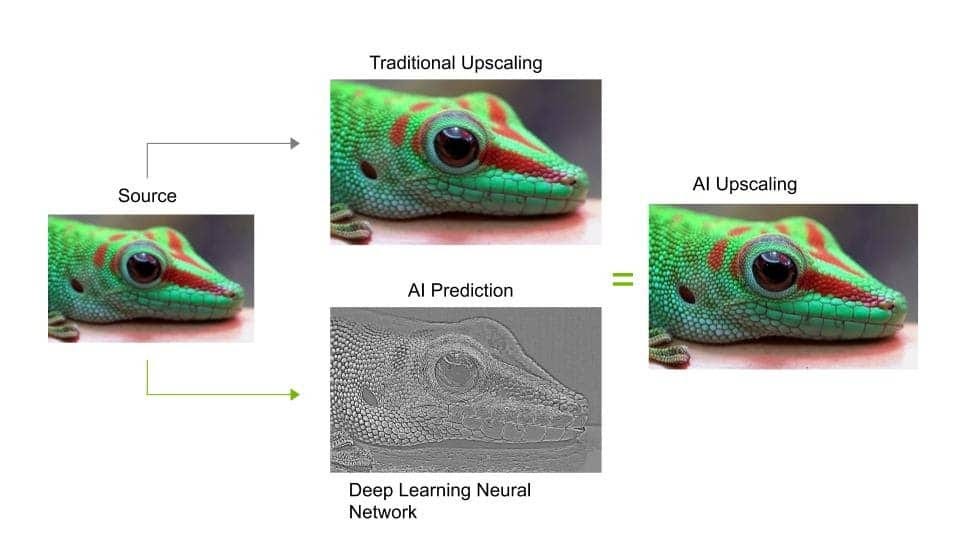
Upscaling is the answer the industry landed on. Instead of drawing the game at full 4K, your GPU draws it at a lower resolution, say 1080p or 1440p.
Upscaling software then takes that lower-resolution image and blows it up to 4K before it appears on your screen.
The result is that your GPU does far less work per frame. Games run faster, or can look much better, without needing a significantly more powerful graphics card.
This is the gist of upscaling in video games. You run your game at a lower resolution than your native resolution, this makes the game run smoother at first. Then AI takes over and upgrades those frames to a higher resolution.
That is basically what we need to know as gamers when it comes to upscaling. Of course there’s a lot more to it but I won’t bore you by converting this article into a research paper :p
How AI Upscaling Works?

You might be wondering what the catch is. How can the graphic card just take a normal resolution image and make it better?
Well, we all know that if you zoom into a digital photo, it gets blurry and pixelated the more you zoom into it. Upscaling in a way is doing that too.
That begs the question: Why does upscaling not give the blur effect?
The old way of upscaling, which games used for years, did look blurry. It was called bilinear or bicubic upscaling, and it basically averaged pixel values to fill in the missing ones.
The result was softer than native resolution and often quite noticeable. Modern upscaling however, is different because it uses AI.
Modern upscaling software is trained on thousands and thousands of high-resolution game images. Over time it learns how edges, textures, hair, grass, and other game elements look at full resolution.
When it sees a lower-resolution image, it does not just average pixels. It looks at the scene and intelligently guesses what the missing detail should look like, based on what it has learned.
Modern upscalers like DLSS and FSR all provide AI-based upscaling and they are genuinely hard to tell apart from native resolution, even to experienced eyes looking closely.
That is not just marketing. Blind tests have repeatedly confirmed it.
If you don’t have two computers running side-by-side with one using upscaling and the other without it, you probably won’t figure out if AI upscaling is being used in a video game or not.
How NVIDIA’s DLSS Became The Gold Standard
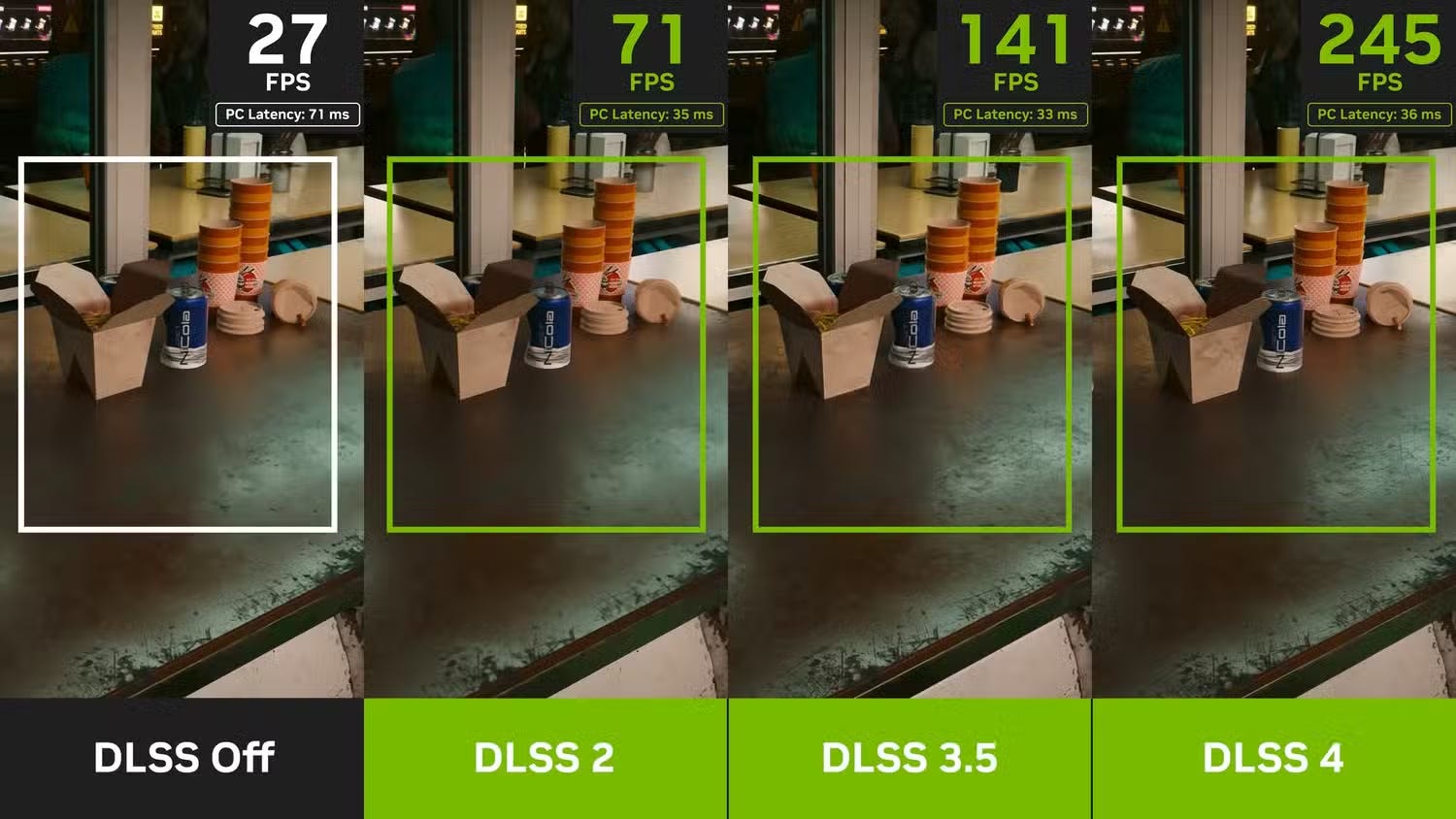
DLSS stands for Deep Learning Super Sampling. This is NVIDIA’s upscaling technology that was launched in 2018 alongside their RTX 20-series cards.
When it comes to upscaling technology inside PC gaming, DLSS is the industry standard. But that wasn’t the case at its launch.
NVIDIA sets the standard when it comes to PC gaming. Their GPUs are great and their software is too cool to resist.
But if you’re curious to know why NVIDIA dominates the PC market and now the AI industry, you can go through our detailed coverage on NVIDIA by clicking here.
The first version of DLSS was not impressive. Most reviewers said native resolution still looked clearly better and the performance gains were not worth the visual trade-off.
And this was the main thing, reviewers were able to tell the difference just by looking at the image.
DLSS 2 got to us in 2020. It was the real moment. NVIDIA rebuilt the underlying AI model completely, and reviewers who had dismissed the first version changed their minds quickly.
At quality settings, DLSS 2 output was genuinely difficult to distinguish from native resolution in most games.
What makes DLSS different from every other upscaler is that it requires dedicated hardware inside NVIDIA’s RTX graphics cards called tensor cores.
These are chips specifically designed to run AI workloads fast. That is why DLSS only works on NVIDIA RTX cards. There is no version for AMD or Intel GPUs.
The trade-off is that NVIDIA can train a much more sophisticated model because it knows exactly what hardware will be running it. The quality shows.
DLSS 3 and 4 built on DLSS 2 supporting an even bigger catalog of games and gradually fixing much of what was wrong with DLSS 2.
At CES 2026, NVIDIA announced DLSS 4.5, which introduced their second-generation AI model. The new model was trained on a significantly larger dataset and uses five times the compute of the previous version.
The result is better stability, cleaner edges, and improved motion clarity across all RTX cards.
DLSS 4.5 on RTX 50-series cards also brought a 6x Multi Frame Generation mode, which I will explain more in the frame generation section.
AMD’s Answer To DLSS
FSR stands for FidelityFX Super Resolution. AMD launched it in 2021 as an answer to NVIDIA’s DLSS.
The big pitch from day one was that FSR works on any GPU. FSR has been open-source which means that no matter if you have an NVIDIA, AMD, Intel card, you can just use FSR as long as the game supports it.
FSR does not require special AI hardware because it is built on algorithms that run on the regular shader cores every GPU has.
That openness was genuinely valuable. Anyone who had a graphics card could turn FSR on and get more performance out of it.
The trade-off was image quality. Early versions of FSR were noticeably softer and shakier than DLSS, especially in motion.
When a game had lots of small moving objects, or fine detail like hair or chain fences, FSR tended to struggle while DLSS held up well.
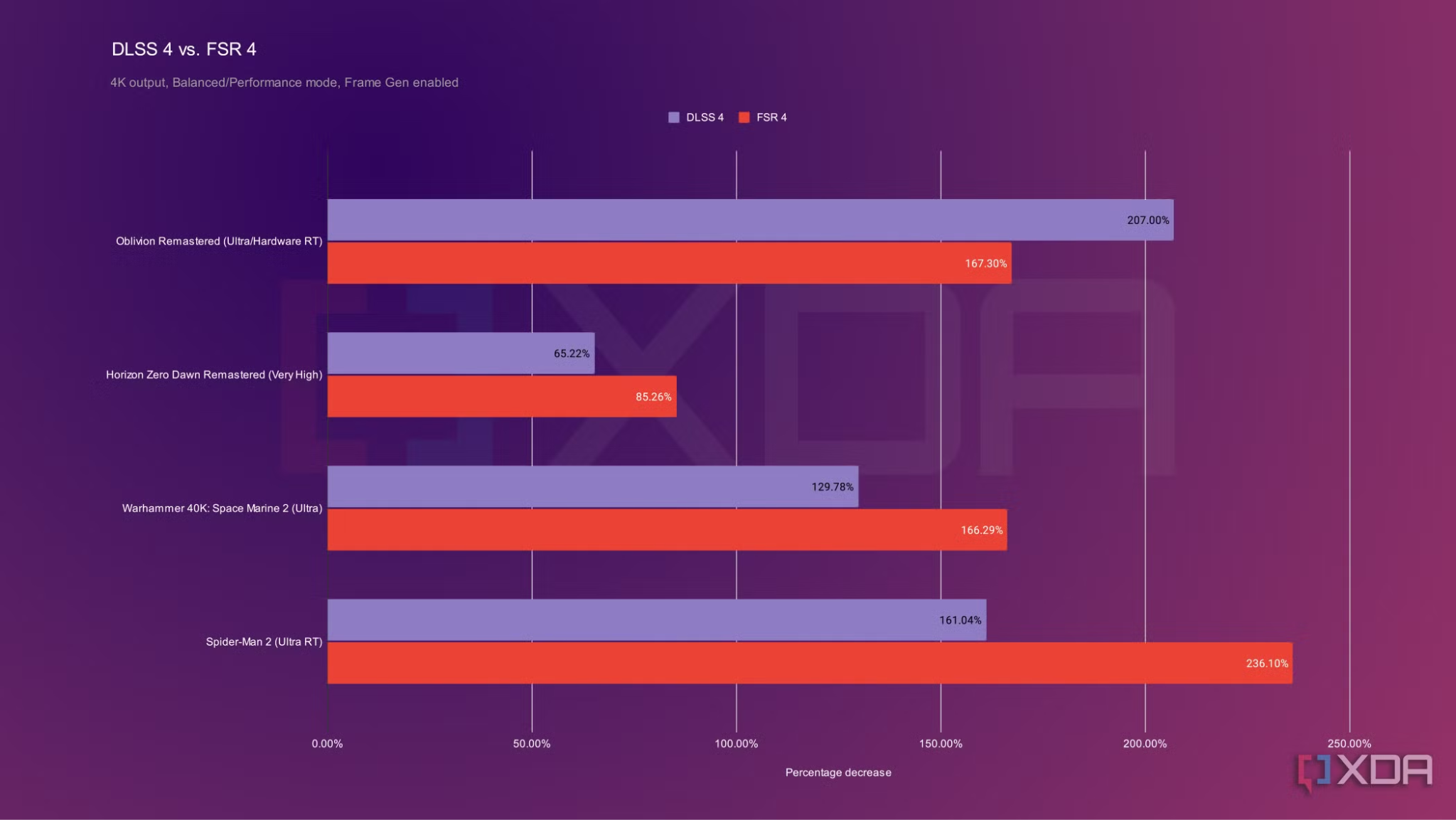
FSR 4, released in 2025, changed that significantly. AMD finally adopted an AI-powered approach similar to DLSS, and the jump in quality was substantial.
Blind tests confirmed that FSR 4 finally brought AMD’s upscaling into competitive territory with NVIDIA.
The catch is that FSR 4’s best quality requires AMD’s new RDNA 4 cards, like the RX 9070 series.
The older broad compatibility that made FSR famous does not fully apply to FSR 4’s highest-quality mode. Older AMD cards, and NVIDIA and Intel cards, still get the older FSR versions.
In March 2026, AMD also released FSR 4.1, which is based on the same neural network as Sony's updated PSSR. I'll talk about that in a moment.
FSR being competitive is one of the big reasons behind AMD’s comeback. If you want to know how, you can checkout the article linked here where we went deep into AMD’s failures and successes in graphics and computing.
Intel Joining The Upscaling Bandwagon
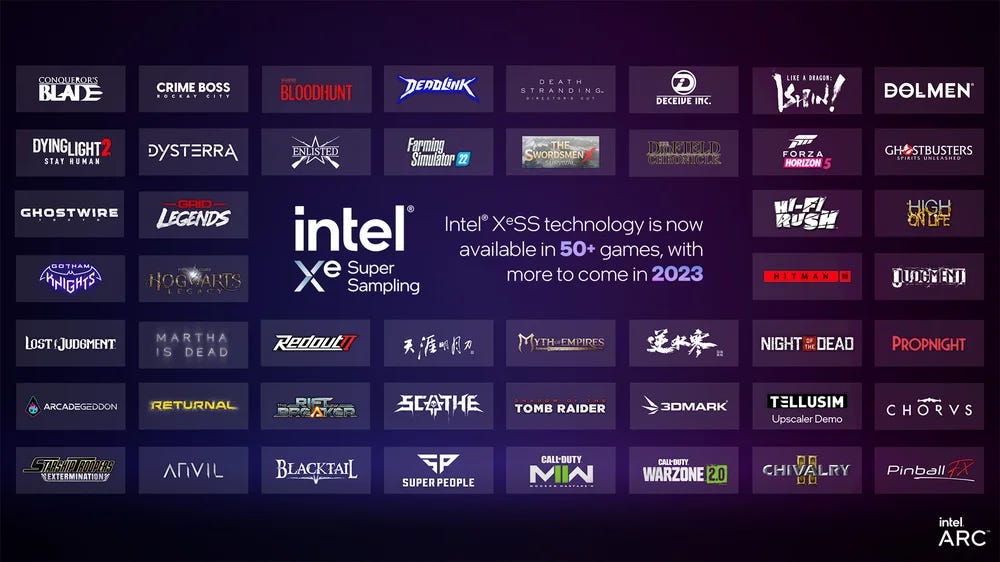
XeSS stands for Xe Super Sampling. It is Intel’s upscaling technology, released alongside their Arc graphics cards.
It does not get much attention because it is the new kid on the block when it comes to upscaling tech on PC graphics cards.
Like FSR, XeSS works on any GPU. But when running on Intel Arc cards, it uses dedicated AI acceleration hardware on those chips to produce better results than the standard version.
Think of it as a middle ground between DLSS and FSR in terms of how it scales with hardware. It is not totally exclusive like DLSS and not open-source like FSR. You can run it on other GPUs but it works best on Intel GPUs.
Image quality on XeSS sits between older FSR and DLSS in most comparisons. Not quite at DLSS levels, but better than FSR 3.
In 2025, Intel released XeSS 2.1, which quietly expanded frame generation support to NVIDIA and AMD cards as well, not just Intel hardware.
That makes Intel the most broadly compatible option in the room right now for both upscaling and frame generation across different GPU brands.
It does not get the headlines DLSS gets. But if you are on a non-NVIDIA, non-AMD card, or simply want the widest compatibility, XeSS is worth knowing about.
Intel, as a company has seen tremendous success in the chip-making space but it was pretty late to making GPUs and graphics technologies.
We covered Intel’s early years of success and its dark years in a deep-dive article which you can read here.
PlayStation Uses Upscaling Too
Consoles used to rely on fairly basic upscaling. The PS4 and base PS5 used AMD’s FSR in many games, which as we covered was not always flattering.
Sony decided to build their own.
PSSR stands for PlayStation Spectral Super Resolution. It launched with the PS5 Pro in late 2024.
Sony built PSSR as part of a joint project with AMD called Project Amethyst. The collaboration let Sony tune an AI upscaling model specifically for the PS5 Pro’s hardware and how it renders games.
The original PSSR was well-received. PS5 Pro games using it looked noticeably sharper and cleaner than the same games on the base PS5 using FSR.
Then in March 2026, an updated version of PSSR launched alongside Resident Evil Requiem. This version, often called PSSR 2.0, is based on the same neural network as AMD’s FSR 4.1.
PS5 architect Mark Cerny confirmed in an interview that the two share the same core technology, just trained differently to suit the different hardware in the console versus a PC GPU.
Reviewers who tested the updated PSSR said it is now very close to DLSS quality. For PS5 Pro owners, that is a meaningful upgrade.
In a way, PSSR and FSR 4.1 are like cousins. They have the same underlying neural network but are trained differently for different hardware.
Frame Generation
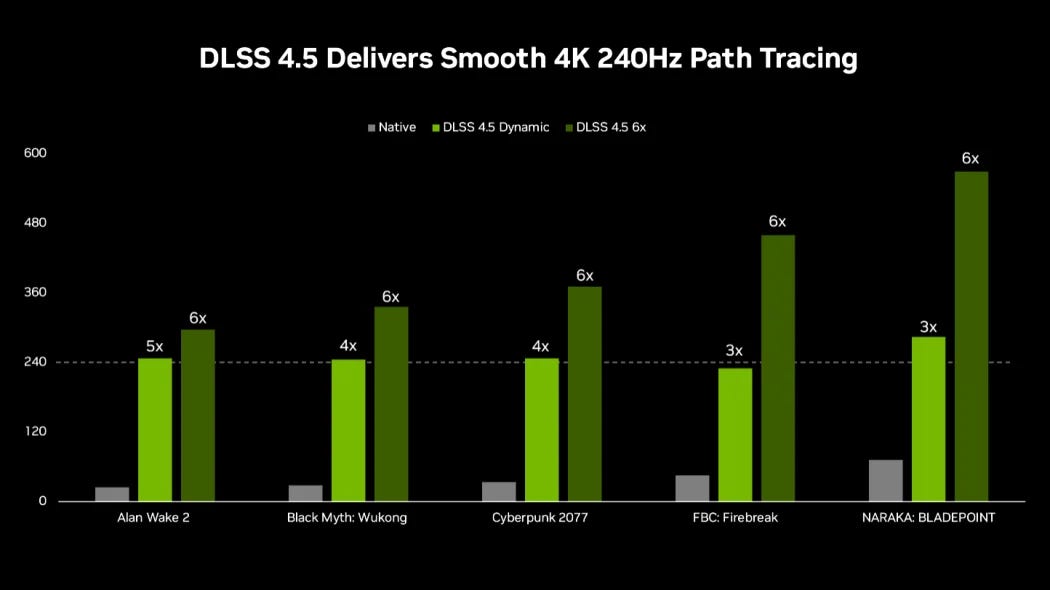
Upscaling makes your image look sharper. Frame generation does something different. It makes your frame rate appear higher.
Here is how it works. Your GPU renders one real frame. Frame generation software then invents additional frames between each real one and inserts them into the sequence your monitor displays.
With DLSS 4.5’s 6x Multi Frame Generation on RTX 50-series cards, your GPU renders one frame and the software generates up to five more around it before display.
The frame rate shown on screen can be dramatically higher than what your GPU is actually producing.
This is where the “23 out of 24 frames are AI” number you might have seen comes from. At 6x frame generation, only one in six frames is real.
The obvious question is whether those generated frames look and feel real. For the image quality side, they largely do in slow-paced or cinematic games. The bigger issue is input lag.
Generated frames are invented after the fact. They do not know what you did with your controller or mouse in the moment they represent. Real frames do.
So frame generation adds a small delay between your input and what you see on screen.
For a story-based game or an open-world exploration game, that delay is barely noticeable. For competitive multiplayer, especially at competitive skill levels, it matters.
Most professional or competitive players turn frame generation off.
I will cover frame generation in much more depth in a separate article, because it genuinely deserves its own piece.
For now, the short version is that Frame Generation works but it has real trade-offs, and you should understand it separately from upscaling even when companies sometimes mix them up.
DLSS 5 and the AI slop Controversy
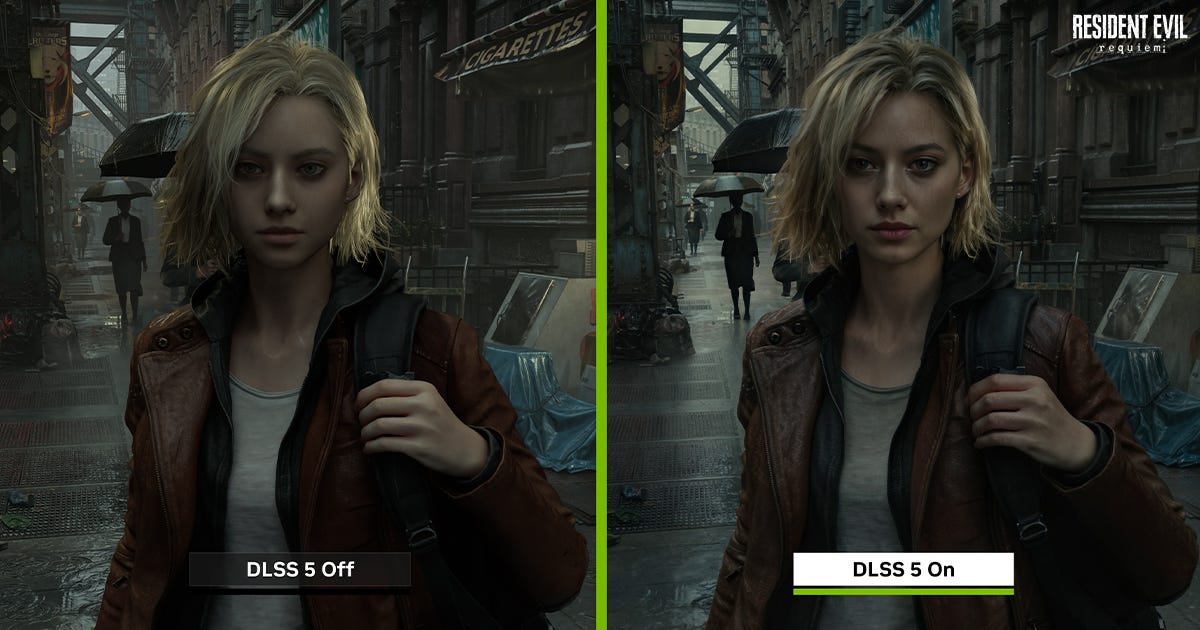
A couple of months ago NVIDIA took the stage at their GTC keynote and announced DLSS 5.
This is not upscaling. This is something different even though they call it DLSS.
DLSS 5 uses generative AI (think of tech behind ChatGPT) to actively alter how games look in real time, not just sharpen a lower-resolution image.
It analyses the scene and applies what NVIDIA described as neural rendering, re-drawing things like skin texture, lighting, and facial detail to look more real.
The first game they showed was Resident Evil Requiem, one of the most visually praised games in recent memory.
The demo showed the main character Grace Ashcroft with smoother skin, removed eye bags, and softened facial features. The internet called it “yassified” immediately.
It looked like an Instagram beauty filter applied to a character that was already beautifully designed. The YouTube reveal was heavily disliked.
Then things got more complicated. It was reported that developers at Capcom and Ubisoft found out about the demo at the same time as the public.
One Ubisoft developer was quoted saying “We found out at the same time as the public.”
Jensen Huang, NVIDIA’s CEO, said in an interview the day after the reveal that critics were “completely wrong” because the technology gives developers full control over the result.
Then, a few days later, on the Lex Fridman podcast, his tone shifted. “I think their perspective makes sense and I can see where they’re coming from,” he said. “I don’t love AI slop myself.”
The important context is that DLSS 5 is not yet available. It launches in fall 2026, only on RTX 50-series cards.
When it comes to DLSS 5, everything shown up till now was a controlled demo. We can only know for sure when it gets released later this year.
How Upscaling Is Helping Gamers Like Me
Upscaling went from a niche setting you turned on if you wanted a few extra frames to something that is now assumed by default.
Chances are that if you have a compatible GPU and a supported game you’re already using upscaling technologies to play your games.
Game developers increasingly design and test their games with upscaling turned on because that’s where consumers are at. It is no longer an optional setting for modern gaming.
New gaming hardware that would come out (like Valve’s Steam Machine) would actively use the upscaling tech from AMD to provide a promised 4k 60Hz experience.
DLSS 4.5 and FSR 4 both produce results that are hard to distinguish from native resolution in most scenarios at least for the average Bashir.
And especially now when AI has jacked prices for most components that make up our gaming consoles and gaming PCs, it’s high time that we get better upscaling technologies.
I use an AMD R9 290, it’s an old graphics card from 2013 and guess what? I can use FSR on it. Isn’t it great that I can still suck some juice out of this old beast even when it has given a decade of service?
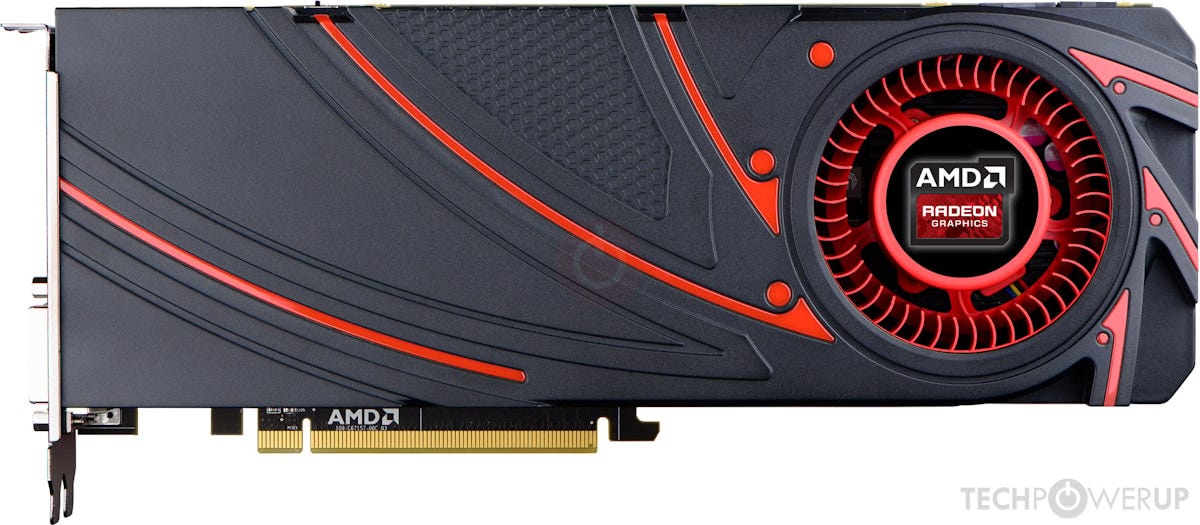
A couple of months ago I wanted to play Uncharted 4 on this same graphics card. And it was really struggling to launch the game.
I was hardly getting frames in the 30s I guess. But turning on FSR made the experience so great that I was able to play the game.
I didn’t finish the game but the point is that I had the option to play it on my old hardware just because companies like NVIDIA and AMD invested their time and effort in upscaling technologies.
With PC prices rising globally especially around this AI hype cycle that we’re going through, upscaling technologies are what gamers like me rely on.
And while generally upscaling technologies are great, NVIDIA just showed us in their DLSS 5 demo that things can really get out of hand too.
Whether NVIDIA ships DLSS 5 the way it is this fall is to be seen honestly. The people have shown their frustration, let’s see how NVIDIA takes that.
For now, the simplest version of all of this is that your GPU has likely been lying to you all this while. But the pixels it is inventing are getting very good.
And that’s breathing some more life to our aging gaming hardware.
This article is special because it’s the first in a series of three articles on background graphic technologies in video games.
The next article would go deep into Frame Generation technologies from NVIDIA, AMD and Intel.
Please leave any feedback for this article or the series, in the comments down below: