



Hey there 👋
If you play PC games, something a little strange is happening on your screen right now.
Your graphics card is drawing frames as fast as it can. Your monitor is refreshing at its own fixed speed. Two different machines, two different clocks, and nobody told them to agree.
Most of the time you don’t notice. But every so often they fall out of step, and you get screen tearing: that ugly horizontal split where the top of the screen shows one frame and the bottom shows the next.
You’ve probably seen it a hundred times, mid-turn in a shooter or during a fast camera pan. You just never had a name for it.
Let’s get into it.
So, this article is the last in a series of 3 articles where we talked about the hidden tech behind our games that most of us don’t see.
The first article in this series covered upscaling. It explained how your GPU is kind-of lying to you when it comes to rendering your games. It is linked below:

The second article covered frame generation. In this one I talked about how AI has been inside frames of your video games for quite some time now. It’s linked below too

The article you’re going through now is the last article in that series where we’ll go through frame-sync and latency improving technologies like Reflex, Anti-lag and so on.
The Monitor GPU Sync Issue
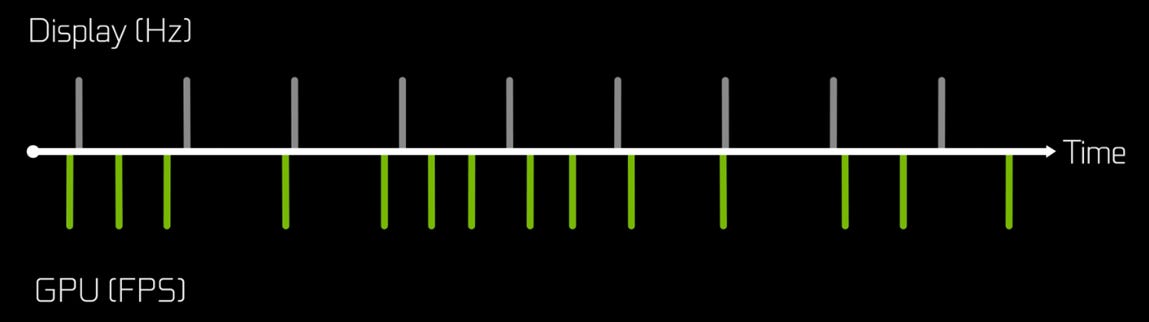
Your GPU sends frames to your monitor. Your monitor refreshes on its own clock. Those two clocks do not naturally sync. That speed is measured by Hz for your monitor and fps for your GPU.
When the Hz of your monitor doesn’t sync with the FPS your GPU is generating screen tearing in your video games.
That is when a horizontal split appears on screen where two different frames show up at the same time. Very noticeable in fast camera pans or quick turns in shooting games.
Most people have seen this happen but never knew what it was called.
The reason it happens is simple. Your monitor refreshes from top to bottom at a fixed rate, usually 60 times per second on a standard display.
If your GPU sends a new frame mid-refresh the monitor draws part of the old frame and part of the new one. The result is that visible horizontal line across the screen.
It gets worse the more your frame rate fluctuates. And in real games your frame rate fluctuates constantly.
One moment you are staring at a wall getting 120 frames per second. Next moment you turn around and see an explosion with ten enemies on screen and your frame rate drops to 45.
Your monitor does not care. It keeps refreshing at 60Hz no matter what your GPU is doing.
That mismatch is the core problem every sync technology has tried to solve.
What Screen Tearing Actually Is
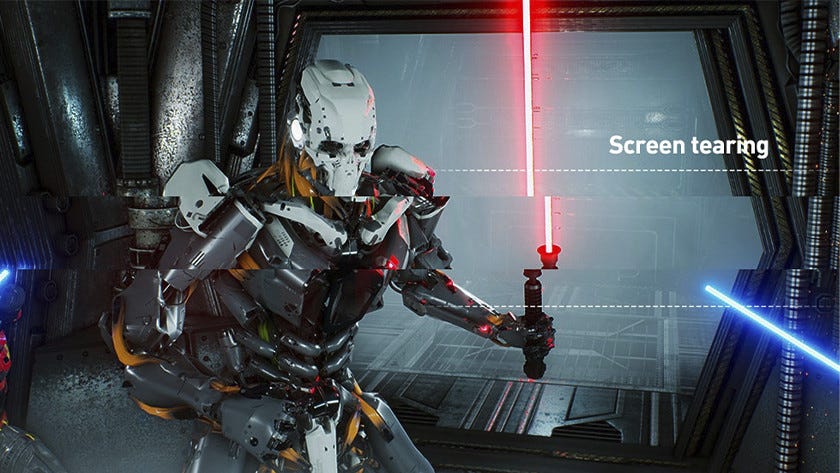
Let’s get specific about what is happening when you see that split.
Your monitor refreshes from top to bottom at a fixed rate. If your GPU sends a new frame mid-refresh the monitor draws part of the old frame at the top and part of the new frame at the bottom.
The result is a visible horizontal line across the screen.
In a racing game when you pan the camera quickly the tear line is obvious. Half the image shows your car in one position, the other half shows it slightly ahead.
Your brain notices this immediately even if you do not know what to call it.
The faster your frame rate moves relative to your monitor refresh rate the more tearing you see. A game running at 100fps on a 60Hz monitor will tear constantly.
A game locked at exactly 60fps on a 60Hz monitor will not tear at all because the refresh rate matches perfectly. But real games do not hold perfect frame rates.
You hit a particle effect, frame rate dips to 50. You look at the sky, frame rate jumps to 80. The monitor refresh stays at 60 the whole time.
That is why tearing has been a fact of life in PC gaming for decades.
The Old Fix That Made New Problems
The first widely used fix for screen tearing was VSync. Short for Vertical Synchronization.
VSync forces your GPU to wait until your monitor finishes refreshing before sending the next frame. This eliminates tearing completely.
To explain it simply, VSync forces your GPU to slow down to the speed of your monitor so both can remain in sync and there is no screen tearing.
But as with most technologies, there is a big tradeoff with VSync. If your GPU misses a refresh cycle you drop to the next sync point.
On a 60Hz monitor that means if you dip below 60fps you suddenly drop to 30fps because the GPU has to wait for the next available refresh window.
That causes stutter. Very noticeable stutter but still a stutter.
The wait time also adds input lag. The delay between when you click your mouse and when you see the result on screen gets longer.
Competitive players have hated VSync for years because of exactly this. Turning it off and accepting tearing was often considered the lesser evil.
For a long time that was the choice. Tearing with VSync off, or stutter and input lag with VSync on.
Neither option was great but VSync gave us the option to solve the sync issue even though it added some latency.
That latency is normally fine with story-mode games but it was never a solution for games that move fast.
G-Sync and FreeSync Enter The Chat
G-Sync and FreeSync arrived in 2013 and 2015 respectively. They solved the problem by flipping it around.
Instead of making the GPU wait for the monitor, these technologies make the monitor wait for the GPU.
The monitor dynamically adjusts its refresh rate to match whatever the GPU is outputting at that moment.
If your GPU sends a frame at 47fps the monitor refreshes at 47Hz. If your GPU jumps to 92fps the monitor refreshes at 92Hz.
No fixed clock conflict. No tearing. No stutter.
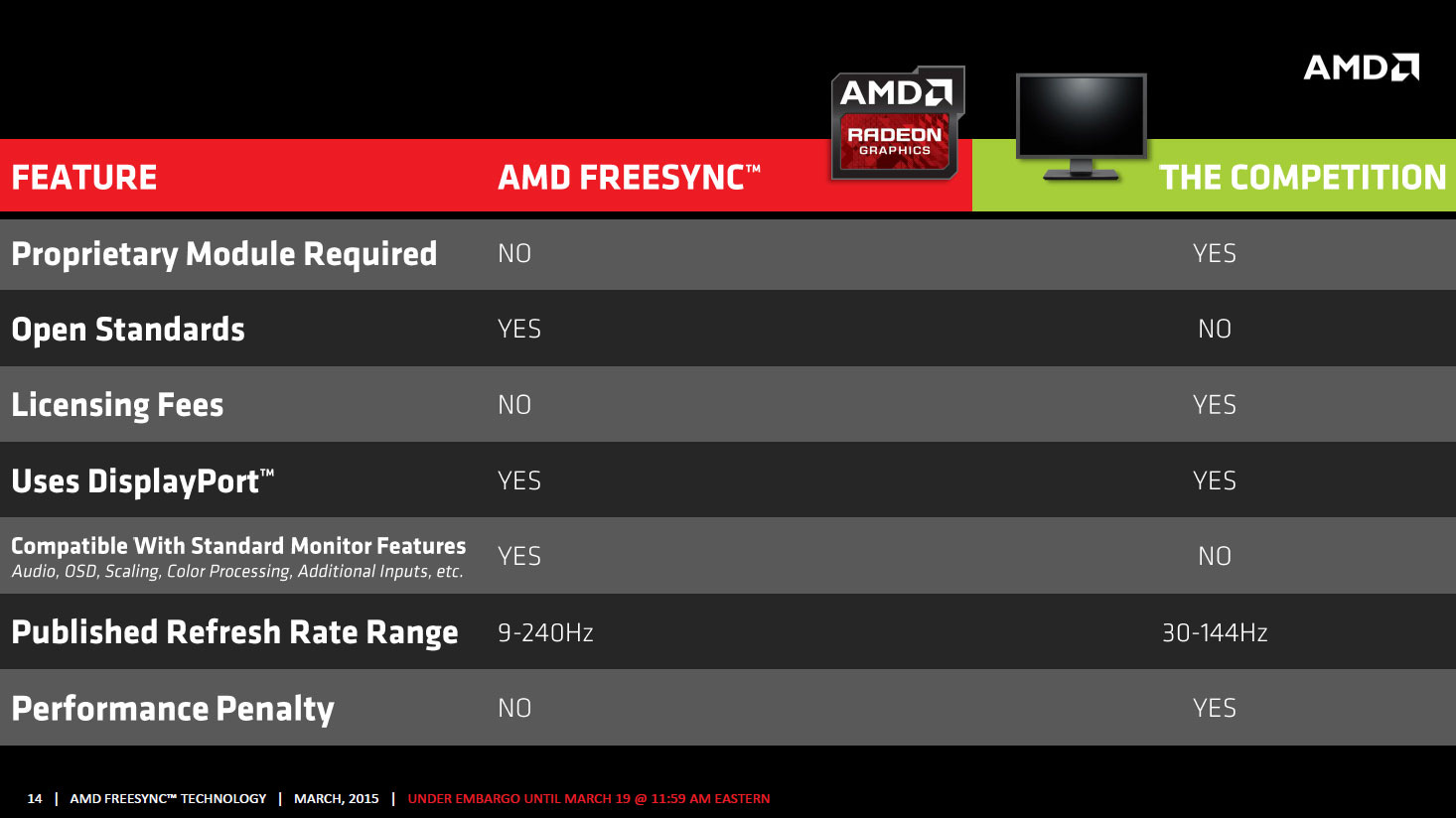
G-Sync is NVIDIA’s proprietary version. It requires a hardware module inside the monitor which is why G-Sync monitors used to cost significantly more than regular displays.
Basically, if you wanted to use G-Sync you had to buy a G-Sync capable monitor and when this technology started out, they weren’t that cheap.
FreeSync is AMD’s open standard version built on VESA Adaptive-Sync. It does not require special hardware in the monitor so FreeSync displays are cheaper.
Since 2019 NVIDIA GPUs also work with FreeSync monitors under the G-Sync Compatible label. NVIDIA tests certain FreeSync monitors and certifies them as working properly with their cards.
The practical difference today is minimal for most users. Both technologies eliminate tearing and stutter by letting the monitor follow the GPU instead of the other way around.
If you play on a PC built in the last five years and your monitor supports either technology you are probably already using it without thinking about it.
G-Sync monitors still tend to be more expensive but the performance gap has closed significantly. However, this situation is changing fast because NVIDIA just released sort-of version 2 of G-Sync.
This is called G-Sync Pulsar and not only is this technology much better but also cheaper to implement for monitor makers. G-Sync Pulsar mainly deals with ghosting issues inside gaming.
The technology is so cool that it’s hard to go through it in this article but I’ll be covering it in a separate article in full detail here on SK NEXUS.
While you wait for Reflex 2 to release why not give our in-depth coverage of NVIDIA a read?
I went over how this small startup that wanted to save itself from bankruptcy became the leader in PC gaming while also becoming a 5 Trillion Dollar Empire ruling the world of AI, the article’s linked here.
What Is NVIDIA Reflex?
Screen sync fixes tearing but it does not fix input lag caused by frames sitting in a render queue waiting to be sent to the display.
That is where NVIDIA Reflex comes in.
Reflex works by synchronizing CPU and GPU work so frames are produced right when they are needed rather than queued up ahead of time.
Normally your CPU submits work to the GPU in advance. The GPU builds up a backlog of frames to render. By the time a frame reaches your screen it is showing input from several frames ago.
Reflex reduces that queue. Frames are produced closer to the moment they are displayed which dramatically cuts the gap between your mouse click and what you see on screen.
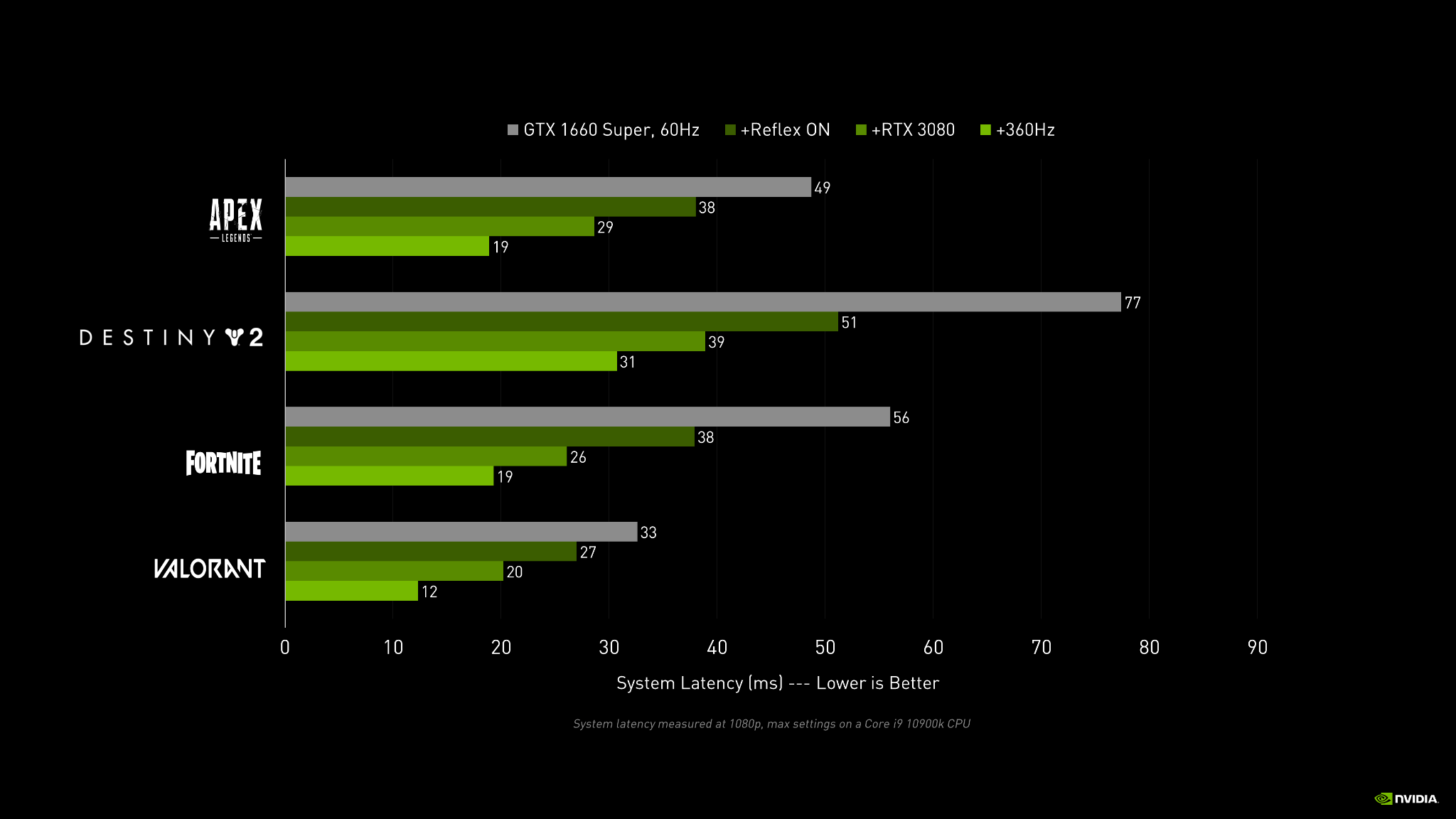
NVIDIA says Reflex reduces system latency by up to 50 percent across supported games.
At the moment, 150+ games support NVIDIA Reflex. Most competitive shooters like Valorant, Apex Legends, Call of Duty, and Fortnite, all support it.
The effect is most noticeable in fast-paced games where reaction time matters. Casual single-player games do not benefit as much.
For competitive players Reflex is considered essential. The difference between 60ms latency and 30ms latency is the difference between hitting a shot and missing it.
Although for our average Bashir playing story-mode games, it isn’t that necessary for him. He can choose to use Reflex or not.
You do not need special hardware to use Reflex. Any NVIDIA GPU from the GTX 900 series onward supports it as long as the game has implemented it.
Innovation in tech like Reflex has made NVIDIA that 5 trillion dollar giant it is today. But technologies like these aren’t what make NVIDIA its most money these days.
To find out why, check out my NVIDIA deep-dive article linked here.
Reflex 2 and Frame Warp
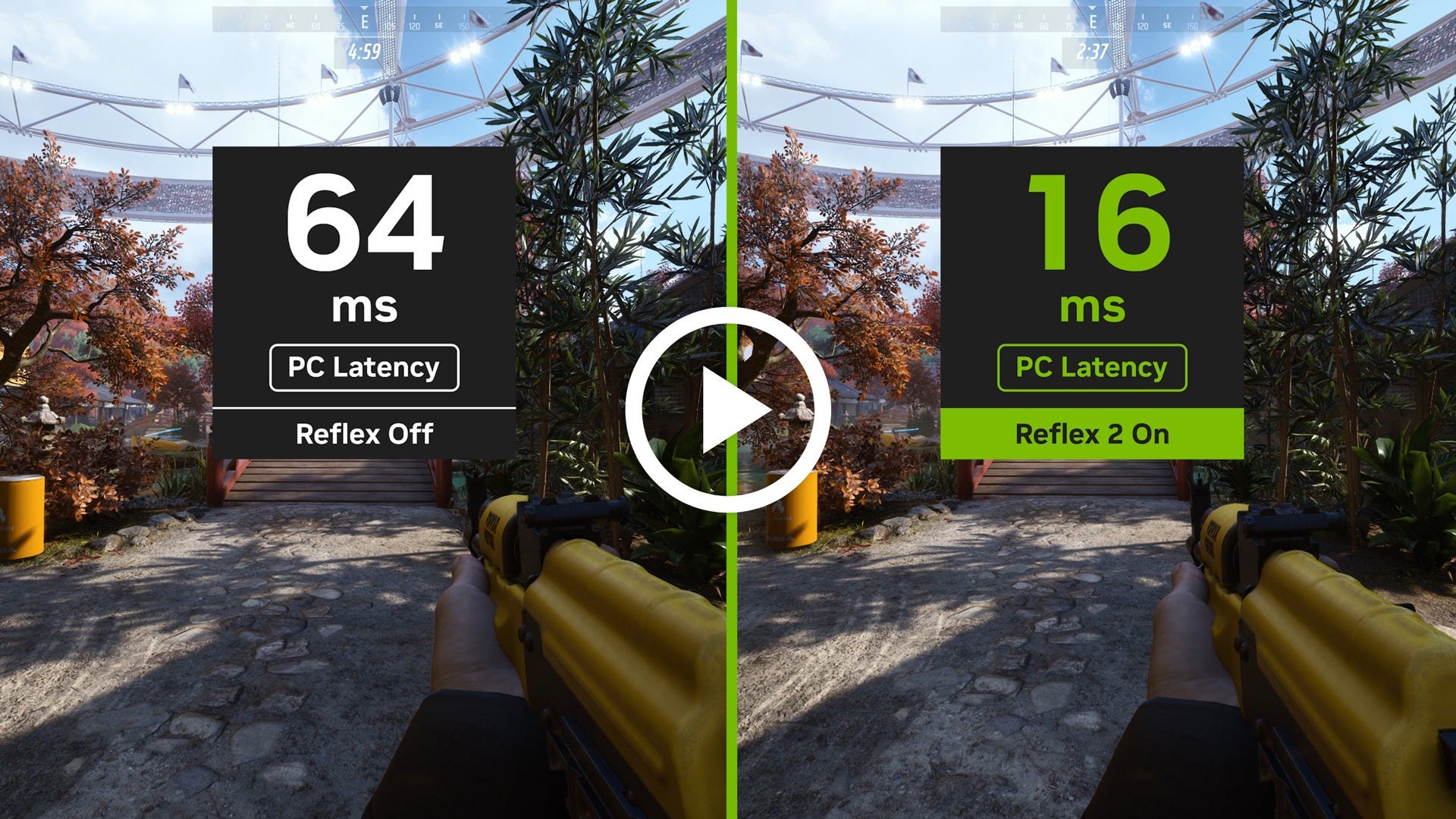
NVIDIA announced Reflex 2 at CES 2025 alongside the RTX 50 series cards. Note it was announced and hasn’t released yet.
Reflex 2 adds a new feature called Frame Warp. It warps the already-rendered frame to reflect the very latest mouse input right before it is sent to your display.
In NVIDIA’s own testing it reduced latency to ~14ms in The Finals at 4K on an RTX 5070 running at max settings. Down from 56ms without Reflex.
That is a massive improvement if it works as advertised.
Here is the catch though. NVIDIA has still not officially released Reflex 2 in a shipping game as of April 2026.
A modder named PureDark built a working demo from extracted binaries in late 2025 and confirmed it works on RTX 20 series cards too. But NVIDIA has not made it available to the public yet.
The company has not given a clear timeline on when Reflex 2 will actually ship in games.
So for now Reflex 2 exists in demos and modder builds but not in anything you can actually download and play officially.
AMD Anti-lag and the Other Side
AMD’s equivalent to Reflex is called Anti-Lag.
It reduces the render queue between CPU and GPU to cut input lag similarly to what Reflex does.
Anti-Lag 2 introduced per-game integration starting with Radeon Software Adrenalin. It works best paired with FreeSync just as Reflex works best paired with G-Sync.
AMD users do not get Reflex because it is NVIDIA-exclusive. But in supported games Anti-Lag 2 closes most of the gap.
FreeSync Premium monitors are widely available at prices significantly lower than full G-Sync hardware modules. That makes the AMD path more accessible if you are building on a budget.
The technology itself is comparable but the main difference is game support. Reflex has over 150 games as of 2026. Anti-Lag 2 supports around 30 or so games roughly speaking.
If you play competitive shooters on PC chances are the game supports Reflex but not Anti-Lag. That has been the pattern for years.
AMD is working to close that gap but developer adoption has favored NVIDIA’s solution so far.
Just so you know AMD has renamed Anti-Lag 2 to FSR Latency Reduction 2.0 but I went with the simple one because it sounds cleaner.
AMD’s story as a company is more interesting than their Anti-lag technology. The company has risen from the ashes multiple times.
If you’re interested in reading more about AMD’s story, check out my dedicated article linked here.
Neural Texture Compression Is Coming
Nvidia and AMD are both working on AI-powered texture compression for video games.
Instead of storing raw texture data the system stores textures in a compressed AI format. The GPU reconstructs that data into normal textures using AI.
This matters for game install sizes, texture streaming, and how much VRAM your graphics card needs to hold all the visual detail in a scene.
The promise is better quality at lower storage requirements. Instead of saving every pixel you save instructions on how to rebuild the texture.
Nothing has shipped to consumers as of now though. Both companies have demonstrated early versions but neither is available in a product you can actually use.
It fits the same pattern as upscaling and frame gen. Less real data, more AI filling in the gaps.
There will of course be some trade-offs with this compression though. It could be visual glitches or inconsistencies but the hope is that with time these issues will be ironed out.
For now this is mostly a research project. But it is worth knowing about because it shows where the industry is headed.
RTX 5090 And Your Kidney
If you’ve read through the three articles in this series you should have this stamped into your head:
Our GPUs render fewer real pixels and fewer real frames. And smarter delivery technologies (like G-Sync, FreeSync) make our games run better, especially when we’re constrained by our hardware.
As everything is claiming to be “AI-powered” these days, PC gaming has been using AI for quite some time now. It has been used in technologies like DLSS, FSR, XeSS.
These technologies may not make much sense for someone who owns an RTX 4090.
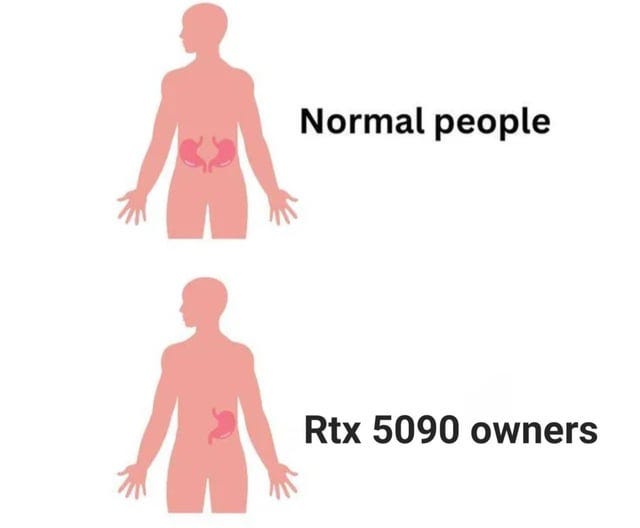
But as the Steam Hardware Survey shows, 99% of us gamers aren’t playing on that $2k RTX 5090 GPU. Maybe because we love our kidneys :p.
And if we turn our heads to developing countries like ours these technologies become even more relevant considering gaming hardware isn’t cheap here.
For people with aging hardware or tight budgets these technologies are the difference between playing new games or not being able to play them at all.
Look, I use an AMD R9 290 GPU from 2014 so I precisely know how gaming feels with these technologies turned off. FSR alone lets me play games that would otherwise be unplayable on this old card.
Things like FSR, DLSS didn’t exist ten years ago. Now these are assumed by default.
Game developers design and test their games with these technologies turned on because that is where most players are at.
And that’s the main thing, these technologies don’t just make your frames go up but they’re the difference between being able to play a game or not for many people.
Access to games you could not otherwise run. Access to smooth performance on hardware that should have been obsolete years ago.
The tech industry loves to sell you new hardware. These technologies let you squeeze more life out of what you already own.
That matters more now than ever with hardware prices where they are.
For now the short version is this. Your GPU and monitor are working together in ways they never used to.
The result is smoother, faster, and more responsive than what the raw hardware should be capable of producing.
Whether that is a good thing or a concerning one depends on how you feel about AI doing more of the work your hardware used to do.
And it’s not like anyone is forcing you. You’re free to disable DLSS, G-Sync but for those who can’t play their games without these technologies, there is an actual impact in their lives.
And many people don’t like the idea of these technologies. Some people genuinely hate “fake frames”.
But whether one likes these technologies or not that is the way how gaming works at the moment. And it is not going back it seems.
If you enjoyed going through the article this far, a subscribe to our publication would make my day, just hit the button below, it’s free:


