



Hey there 👋
Let me tell you something that happened to me recently.
I was sitting (as usual) at my 2019 Dell workstation, writing, doing some research, having a bunch of tabs open. The usual stuff. Everything was running fine.
And then a notification popped up that this new shiny processor just got launched by Intel (It was the Core Ultra 270K btw).
I sat there for a second but then I realized that my work is going fine with my laptop and computer that I already have. Even if I had the money, would it be reasonable to buy the latest processor just because it’s cool tech?
In 2026, keeping your old hardware is not just acceptable. In many cases, it is the smarter move. And I think a lot of people need to hear right now.
We are seeing companies like NVIDIA bringing back their old cards like 3060 back into production because they know too that AI crises has raised prices by alot.
On the consumer side, we’re also seeing people buy used hardware or hardware that is a few years old. The most sold CPUs are AMD processors which are 2-4 years old.
And all the while Linux is making headlines into consumer devices who are sick and tired of Microsoft Windows. Because just a few days ago, Steam’s March 2026 stats show Linux doubling it’s market share from a few months ago, in December 2025.
As things stand, Linux has outpaced MacOS numbers. From the March 2026 report, Linux now stands at 5.3% while MacOS stands at 2.3%.
And actually, there’s nothing to be embarrassed about if you’re not upgrading to the bleeding-edge tech right now. It’s the smarter move especially we have wars all over our world and AI too.
In this article I’ll share my experience buying used tech hardware and discuss why in many cases it makes sense to buy used tech hardware esp in country like ours where we earn in PKR and spend in USD.
The Upgrade Itch
You know the feeling. At least I know it ever since forever.
A new chip drops. A benchmark video shows up in your feed. Someone in your circle gets a new laptop. And suddenly your perfectly working machine starts to feel slow. Outdated. Behind.
It is not real. But it feels real. And it is supposed to feel that way.
Tech marketing is specifically designed to create that itch. Every new chip is “the fastest ever.” Every new laptop is “twice as fast as the previous generation.” And technically, a lot of that is true.
But here is what the benchmarks never tell you. Twice as fast at what?
If you are not doing the thing being benchmarked, the speed difference is invisible in your daily life. Opening Chrome does not feel faster. Writing does not feel faster. Watching a video does not feel faster.
The gap between what your machine can do and what you actually need it to do is wider than it has ever been for most people.
That gap is the whole argument.
AI Made Everything Expensive
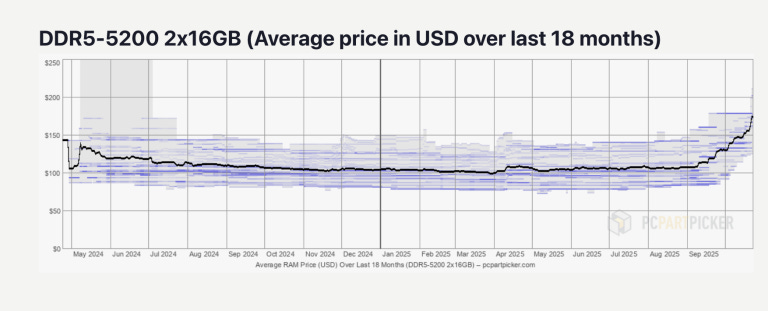
Here is the plot twist nobody saw coming a couple of years ago.
AI did not just change software. It changed hardware prices in a way that hits every regular person trying to buy or upgrade a computer right now.
DDR5 RAM prices jumped 60 to 75% in just a few months through late 2025. 16GB modules that were selling for around $7 to $8 earlier in the year climbed to roughly $13 by the end of it. And that is the mild version of the story.
Some specific kits saw increases of 500%. A 32GB DDR5 kit that cost around $87 in early 2025 was listed at $399 on Amazon by mid-December.
Why? Because the companies building AI infrastructure - your Microsofts, your Metas, your Googles - need enormous amounts of memory for their data centers. And the three companies that make almost all of the world’s RAM - Samsung, SK Hynix, and Micron - started redirecting production toward high-bandwidth AI memory because it is far more profitable.
Memory manufacturers have reallocated more than three times their wafer capacity toward HBM chips for AI workloads. That leaves fewer DDR4 and DDR5 chips for regular consumers. Basic supply and demand.
NVMe SSDs followed the same trajectory. NAND flash prices went on an almost identical ride.
Industry analysts are warning we have not hit peak pricing yet, with meaningful relief possibly not arriving until late 2026 at the earliest.
So this is genuinely not a great moment to be buying new hardware.
And conveniently, as we are about to discuss, it is also not a necessary one.
If you want to learn more about how AI made our tech expensive, here’s a detailed article I did here on SK NEXUS.
A Reasonable Upgrade Cycle
Here is something the tech industry does not want you to think about too hard.
PC hardware has historically moved in roughly three-year meaningful performance cycles. Every few years there would be a genuine leap that made a real difference to everyday users.
But lately those genuine leaps have been narrowing for most workloads. The jump from one chip generation to the next delivers impressive benchmark numbers.
The actual experience for someone doing documents, browsing, video calls, and light creative work is increasingly difficult to distinguish from the previous generation.
Think about what actually triggers a genuine need to upgrade.
A piece of software you rely on stops running on your machine. Your hardware physically fails. You start doing a genuinely new kind of work that your current machine simply cannot handle.
For most people, none of those triggers have fired in a long time.
The software still runs. The hardware still works. The workload has not changed dramatically.
The upgrade pressure you feel is real. The reason behind it mostly is not.
The MacBook M1 example
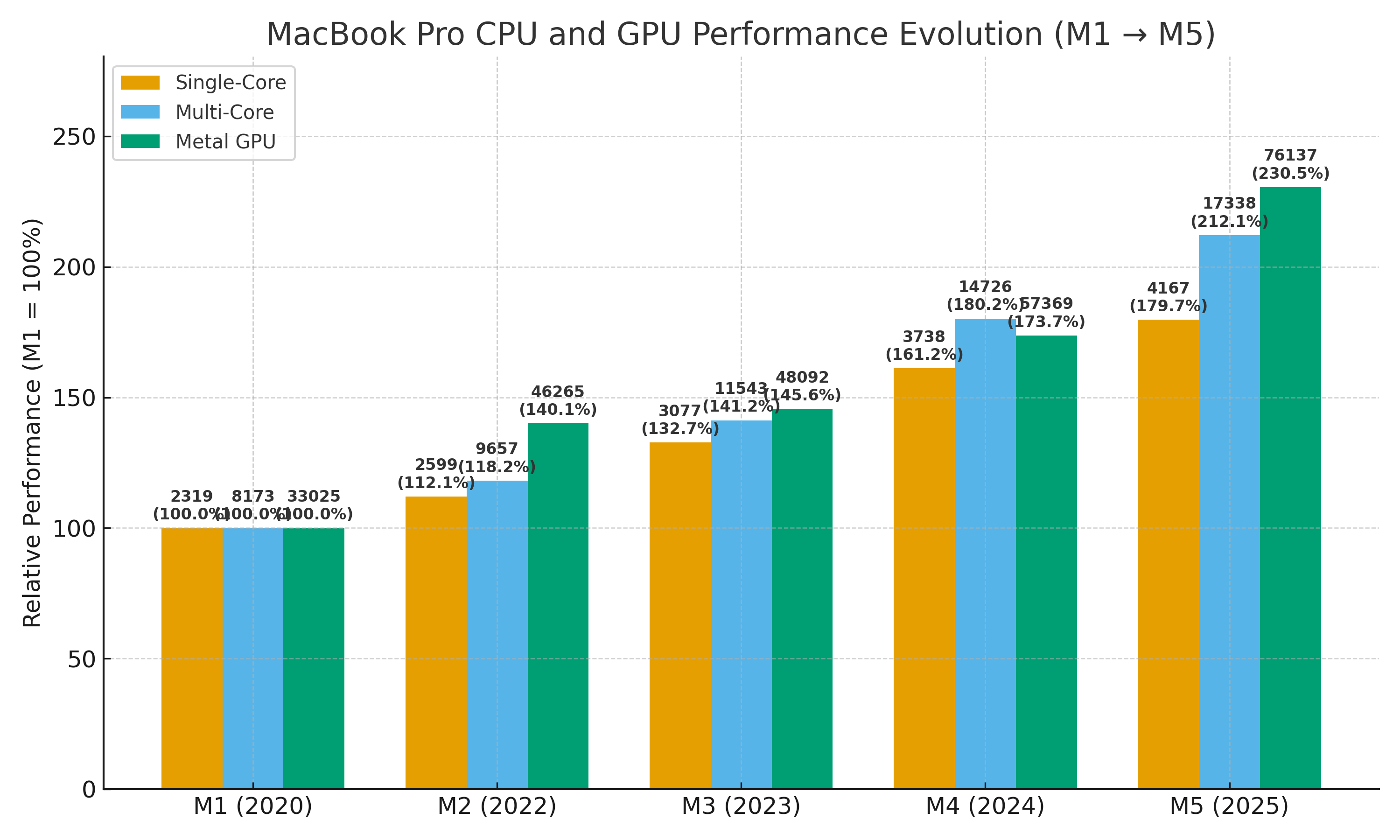
Apple released the M1 chip in late 2020. It was a genuine generational leap - fast, efficient, ran everything well.
Here we are in 2026. The M4 and M5 are both out now. Benchmarks are impressive. The M5 is roughly 2.5 times as powerful as the M1 on certain workloads.
And yet a huge number of people are still on M1 machines. And they are completely fine.
Writers are writing on them. Designers are designing on them. Developers are coding on them. The machines have not become slow. The software has not stopped working.
The experience has not degraded.I personally know people who are fine with their M1 MacBook Pros.
This is what a good hardware purchase looks like across time. You buy something solid, you use it, it keeps working, and you do not upgrade until there is a real reason to.
The M1 owners still running their machines in 2026 did not make a mistake. They made a smart purchase and are getting full value out of it years later.
I am living a version of this myself. My 2019 Dell workstation handles everything I throw at it without complaint. Writing, research, video calls, light editing, multiple browser tabs. All of it. No issues.
The machine is not the bottleneck in my life. My workflow is.
Faster hardware would not make me faster. I had to be honest with myself about that.
The Windows 11 Problem
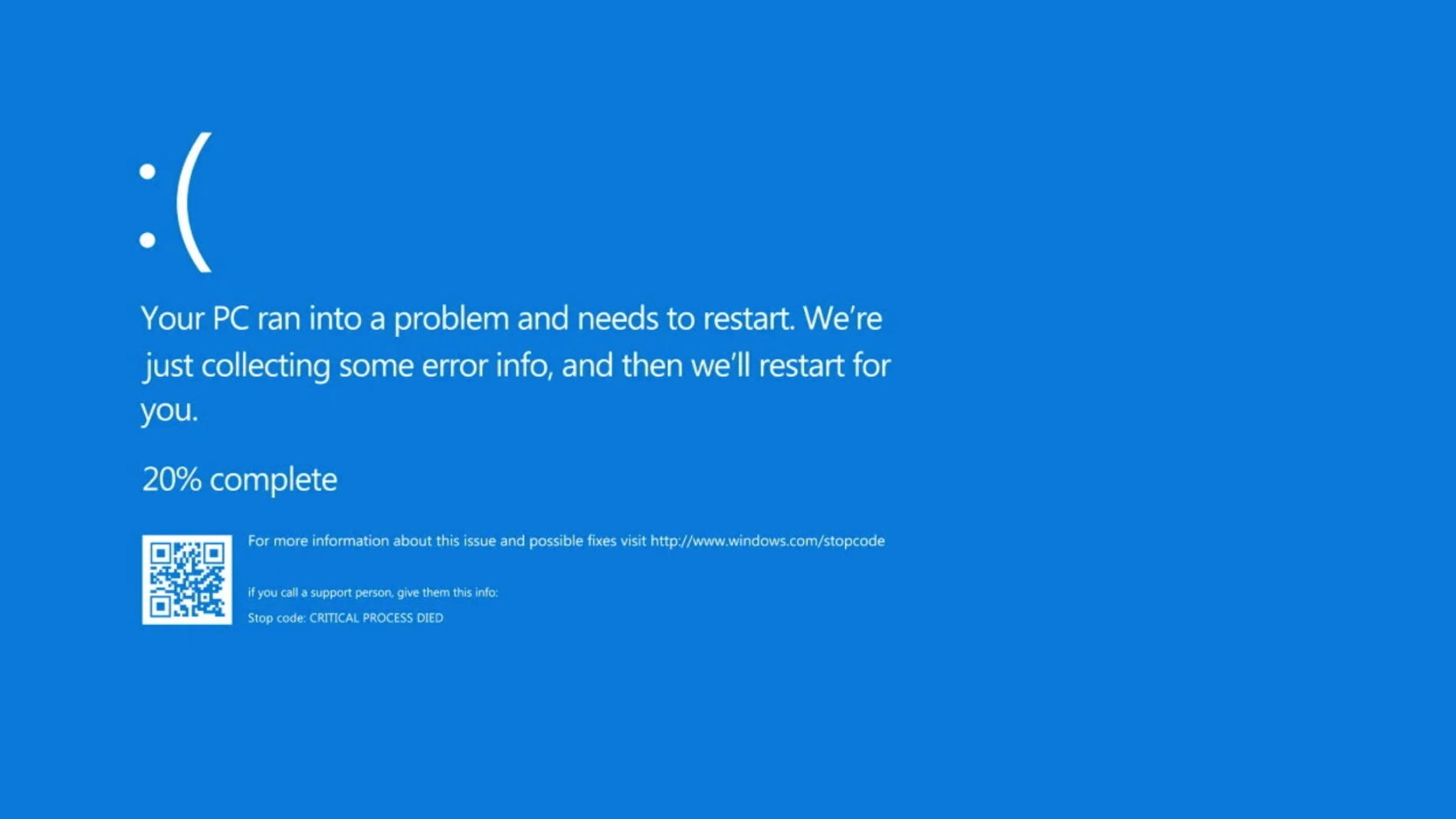
I don’t want to start my rant on Windows 11. Just yesterday I found 15 minutes trying to find an option to troubleshoot my bluetooth headphone.
I wanted to play a game and the audio sucked on Bluetooth because of a setting that I had to change. Turns out, I had to go through 3 different settings pages just to get to that.
That’s Windows 11 for you. But this isn’t the only big problem. A major problem was Windows 11’s launch.
Back when it launched, Windows 11 came with a set of hardware requirements that locked out a massive number of perfectly working machines.
The two big ones are TPM 2.0 - a security chip requirement and a specific list of supported processors up to 2016-era.
Computers from before, machines that run everything fine, were officially declared incompatible.
Owners of older but capable systems face a barrier. Their hardware may run Windows 11 perfectly except for lacking a TPM or being outside the CPU compatibility list.
That is not a a hardware problem even though it’s presented as a security problem.
Microsoft’s restrictions are estimated to threaten the usability of hundreds of millions of existing devices.
Windows 10 support officially ended last year and a massive number of functioning computers were quietly pushed toward replacement.
Environmental groups called this what it is. Planned obsolescence. The machine works. The software says it does not. Those are two very different things.
My fellow Mohib Ur Rehman wrote an in-depth exploration of this concept of Planned Obsolescence in his article that you could checkout here.
But here is the thing. This whole situation has a solution. And that solution has been getting better for years.
Linux Becoming Accessible

Before you get into this section, if you don’t know what Linux is or need a simple refresher, you may go through my article linked here where I explain what Linux is and why you should care.
Full disclaimer. Linux used to be genuinely difficult. And that’s coming from someone who’s been daily driving Linux since 8 years now.
It was a hobbyist operating system that required patience, comfort with the terminal, and a high tolerance for things occasionally not working. For most people it was not worth the trouble.
That has changed. Significantly.
In 2021, Linus from Linus Tech Tips - one of the biggest tech YouTube channels in the world did a series where he tried to use Linux as his daily driver. It was called “Linux Hates Me” which gives you a sense of how it went.
Linus ran into real friction. Things did not work the way he expected. He got frustrated. His co-host Luke had a much smoother time on Linux Mint. The series ended up being an honest portrait of where Linux stood then. Capable, but not quite plug-and-play for everyone.
That was 2021. It is 2026 now. And you know what? Linus is doing another one-month Linux challenge. That shows the renewed interest in Linux.
Modern distributions like Ubuntu, Fedora, and Linux Mint have closed most of the gaps that made everyday use difficult. Installation is straightforward. Most hardware is recognized automatically. Browsers work. Office suites work. Video calls work.
Gaming on Linux through Valve’s Proton compatibility layer has gotten to the point where a large percentage of Steam games just run, without any extra work from the user.
For someone whose machine has been locked out of Windows 11, Linux Mint is probably the most sensible next step. It looks familiar. It runs on older hardware beautifully. It handles the daily tasks that most people use a computer for. You do not need to know terminal commands. You just install it and use it.
It is not perfect. Some software does not have a Linux version. Some workflows need Windows-specific tools.
But for a large percentage of people whose machines Microsoft has declared obsolete, Linux is not a compromise. It is an upgrade.
PKR Earnings, USD Spendings
Let me get a little local for a second because you won’t hear this discussion in an article for US audience.
Everything we have discussed so far - the AI-driven RAM price surge, the cost of upgrading, the reasons to hold on to old hardware, all of that hits differently when you live in Pakistan. Or anywhere in South Asia, honestly.
Here is the basic problem. Almost every piece of tech you buy in Pakistan is imported. Laptops, GPUs, SSDs, phones - nearly all of it comes from China, Taiwan, the US, or the UAE. And all of it is paid for in dollars.
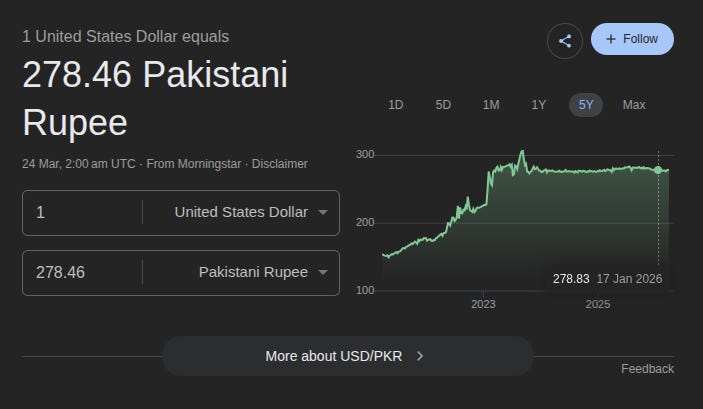
The dollar rate in 2025 was hovering around PKR 280, fluctuating with political instability and global economic pressure. Even a small move in the exchange rate directly changes what you pay at the counter. The machine did not get more expensive overnight.
The rupee got weaker. Same thing, different cause. And then there are the taxes on top of that.
Mobile phones imported into Pakistan are subject to taxes too, an 18% sales tax, withholding tax, a handset levy, and regulatory duties, all stacked on top of each other.
The FBR doubled the sales tax on imported computers and laptops in the 2024-25 tax year. The customs valuation system that determines how much duty you pay has been revised multiple times, sometimes helping, sometimes making things worse.
The result is that a laptop that costs $800 in the US does not cost the equivalent of PKR 240,000 here.
By the time import duties, sales tax, distributor margins, and retailer markup are applied, you are sometimes paying 30 to 50% more than what someone in the US or Europe pays for the exact same machine.
And unlike India , which has started building local assembly plants for brands like Dell and Acer to bring costs down - Pakistan has no major domestic tech manufacturing to speak of.
Although things are changing here. There are some companies doing some level of assembly here for TVs and smartphones but that’s still nowhere near as big as India.
Generally, every single laptop on the shelf at your local shop went through the full import chain. Every price you see carries that overhead.
This is why the “just buy new hardware” advice that floats around Western tech YouTube makes no sense here.
Linus can upgrade his workstation every two years and it is a reasonable decision for someone in Canada with Canadian prices and Canadian salaries. For a student in Lahore, a decent mid-range laptop can easily cost two to three months of salary.
You do not treat that purchase casually. You do not upgrade on a whim. You use what you have for as long as it works, and you squeeze every bit of life out of it.
That is not being cheap. That is being rational.
And it is exactly why old hardware makes more sense here than almost anywhere else.
Your 2019 machine is not just running fine. It is running fine and it would cost you an arm and a leg to replace it right now with something meaningfully better.
Hold on to it.
When Upgrading Actually Makes Sense
Okay. I have spent most of this article making the case for old hardware. Let me be fair and give you the honest answer to when upgrading is genuinely the right call.
There are real triggers.
A piece of software you depend on for work stops supporting your hardware entirely, with no workaround. Your hardware physically fails and repair costs more than replacement.
Or you take on a genuinely new workload - running local AI models, editing 4K video on a machine without the processing headroom, serious 3D rendering work.
Those are real reasons. Everything else is probably the upgrade itch talking.
And if you are not in one of those situations but your machine feels slow, there are cheap moves worth trying first.
Adding RAM if you are on 8GB is still the single most impactful cheap upgrade for most people. An SSD if you are still on a spinning hard drive transforms how a machine feels - used SSDs are still affordable right now.
A clean OS install often fixes half the sluggishness people blame on aging hardware.
And if your machine has been locked out of Windows 11, try Linux Mint before you decide you need to buy anything.
You might be surprised.
How I’m Using Used Tech
Let me just tell you where we are.
RAM and SSD prices are up there and probably will not correct significantly anytime soon.
New hardware is more expensive than it was a few years ago and the performance gains for everyday workloads are incremental rather than disruptive.
I covered this concept of progressive and disruptive in a detailed article which you can read here.
Your existing computer, if it was decent when you bought it, is probably still decent now. The software still runs on it. The work still gets done on it.
Look, I personally know people who bought a latest-gen machine back in 2019 or so and are still rocking that machine because their workflow hasn’t demanded more.
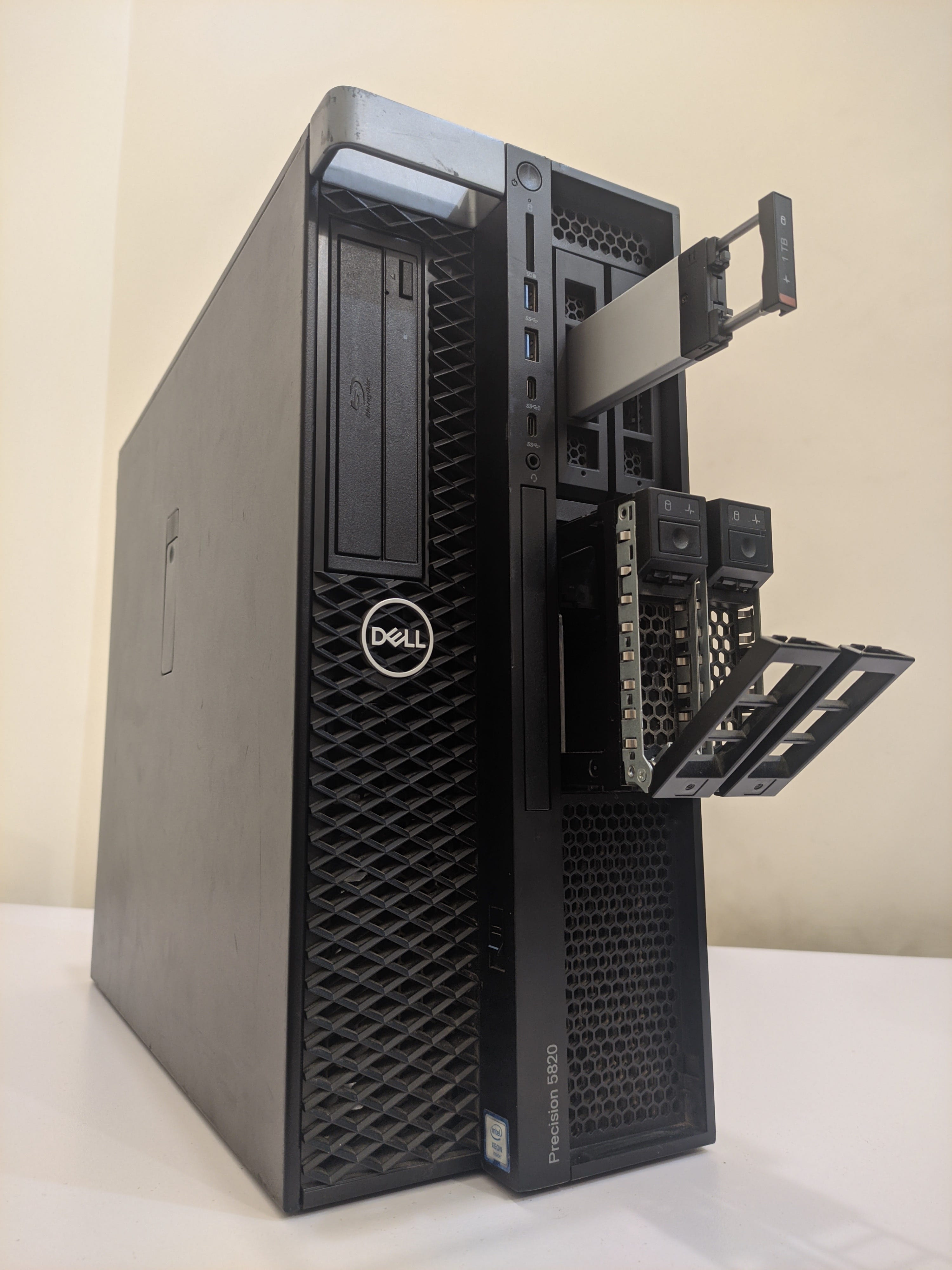
Heck, Even I’m using a computer from 2019 that is perfectly fine for my workload as it stands currently. I’m literally using that same computer I’m writing this article on :p
If you want to know how my 2019-era computer is working great, you can checkout the full article I wrote on it last year.
So, The upgrade pressure you feel is real but it comes from marketing cycles and product announcements, not from your actual experience of using your computer.
Your decision should not be entirely based on that. Because if you do there is no stop to it. You should be able to take a deep breath and analyze thing for yourself.
Basically, don’t just give into the hype and do some research when it comes to your usecase and expectations from the tech you buy.
Hold on to what you have. Wait for prices to correct. Only buy something new when you genuinely need it, not when Apple launches a new MacBook.
Your 2019 machine might have more life in it than you think.
Mine definitely does. And I’m happy with it even though everyday my body is itchy when I discuss new technology that is coming out.