



If you’ve lived in Pakistan long enough, you already know the fear of losing your Gaming PC every time it rains or the transformer goes KABOOM.
Random power cuts. Voltage dipping at night. Lights getting brighter when the AC kicks off. That loud thak sound when the generator switches over - none of this feels unusual anymore.
What is unusual is when your PC suddenly refuses to turn on one day. Or your console starts shutting down randomly.
Or your PSU dies and everyone around you confidently declared it was “Chinese quality” or “cheap power supply”.
Most of the time, the PC is not the real problem. The power feeding it is.
And as someone who has learned it the hard way after frying multiple power supplies (one for a PC, the other for a console), I’m writing this article to show you how you can save your expensive tech in the local environment.
This article is written for people who have real money tied up in their setups. Gaming PCs, GPUs that cost more than a bike, consoles that were bought after months of saving.
If you care about your hardware lasting more than a year or two, this is for you.
Disclaimer: This is not an electrician’s guide. Nor am I a certified electrician. This is an educational piece and I encourage everyone to do their own diligence.
To anyone reading this: You should consult your local electrician and laws before implementing anything.
I’m writing this as a person who has done research on his own and tried most of the stuff I’m recommending in this article.
Still, Feel free to disagree and correct any information that I present here in the comments down below.
Explaining Basic Power Terminology
Before we talk about solutions, we need a shared understanding of basic terms like Fluctuations, Surge, Brownouts, etc. Power terms sound scary, but most of them describe very simple ideas that are not much hard to understand.
Voltage
Voltage is basically electric pressure. Think of it as how hard electricity is being pushed into our electric devices.
In Pakistan, the standard is around 220 to 240 volts. That number is not a fixed promise. It is more like a suggestion. In reality, voltage keeps moving up and down throughout the day.
The rule of thumb is that voltage should not go below 220 and not above 240. If that happens then that’s not good for your devices.
More voltage is not better. Your PC does not run “stronger” on higher voltage. In fact, higher voltage creates more heat and stress inside components.
And if anything electric devices hate with a passion - that is heat.
Even though modern electronics are designed to tolerate a range of voltage they are not made to test extremes of that range.
The real problem is that our grid (WAPDA/LESCO supply) frequently goes outside safe limits, both above and below, especially in residential areas.
Fluctuations and Brownouts
A brownout is when voltage drops but power does not completely shut off. Your fan keeps spinning. Your lights stay on, just dimmer.
Low voltage forces power supplies to work harder to deliver the same power. This increases heat and stress inside the PSU. Over time, this kind of stress shortens component life.
Slow voltage drops are often worse than a clean power cut. A sudden shutdown is something modern electronics handle well. Being half-powered for minutes at a time is not.
Surge
Surge is very fast and high jumps in voltage. Spikes are similar too but they are even faster.
We usually experience spikers and surges during rain because that causes these cheap transformers in our neighborhoods to go crazy.
Lightning is not the main cause of spikes for most homes. The bigger culprit is switching. Grid switching, generator switching, big motors turning on and off nearby.
Spikes are dangerous because they do not always kill things immediately. They silently damage components until one day something just stops working.
Even though lightning and rains aren’t the main cause of electric surges, the low-quality transformers that go boom every time rain takes over contribute to these spikes that slowly cut down lives of electric devices.
Ground/Earth
Have you ever touched a metal part of an electric device like a washing machine bare foot and felt a tingling sensation? That is excess electricity moving around the device’s circuit.
This excess electricity that keeps on moving around our electronics is called ‘Ground’.
In proper scenarios, we create a path for this electricity to go to some place like literal earth so it doesn’t keep moving around our electronics. That is where the term ‘Earth’ comes from.
Grounding is usually implemented at the main power intake of a house so all of the connected devices can use that ground to dump excess electricity in their circuits.
That is when the third pin of a power cord comes into play:
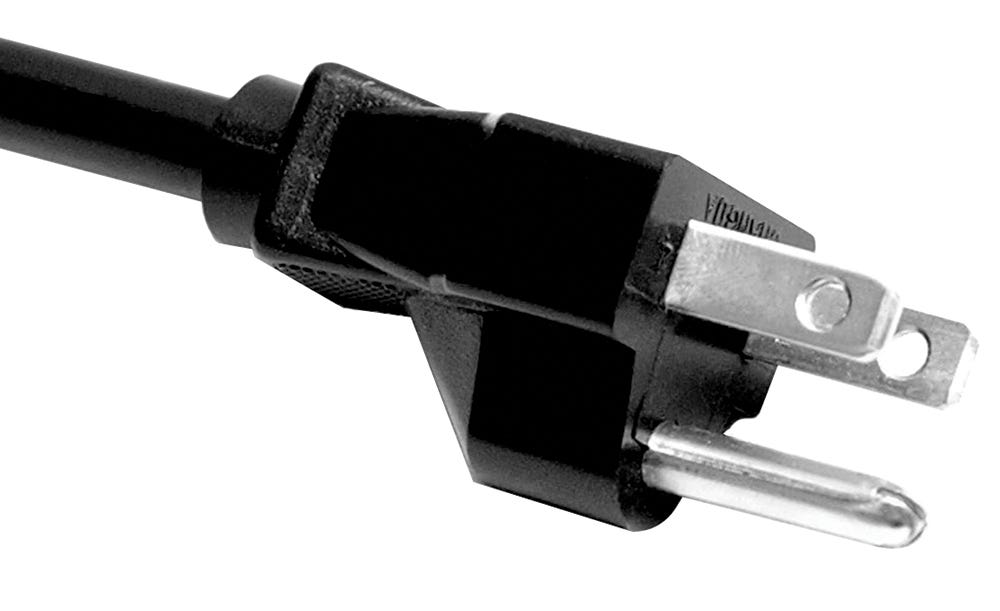
Because many homes in Pakistan don’t have grounding and the wiring that supports it. We usually cut down the third pin that is normally an important part of a circuit.
However, in many Pakistani homes, “ground” exists only on paper. Either it is missing entirely or badly implemented. This matters because surge protection relies heavily on proper grounding.
Without a real ground, surge protectors have nowhere to dump excess energy. They still work to some extent, but far less effectively than advertised.
How Modern PC and Console Power Supplies Actually Work
Old vs Modern Power Supplies
Old appliances used simple (dumb) power supplies. They expected clean, stable input and reacted badly to changes in voltage.
Modern PCs and consoles use features like Switch Mode Power Supplies, or SMPS. These are far more flexible and intelligent. They can handle a wide voltage range and convert messy input into clean internal power.
Frequency changes matter far less today. Voltage quality matters far more. Dirty power still creates heat, noise, and long-term wear.
In a sense, modern power supplies have a built-in voltage stabilizer because they have to adjust the voltage to their liking anyways.
Inside a Modern PSU (High-Level Only)
At a very high level, a PSU takes AC power, cleans it up, converts it to DC, and then splits it into multiple rails for different components like fans, motherboard, hard-drivers, etc.
Active PFC (another protection feature) helps deal with inefficient input. Internal protections shut things down when something goes wrong. None of this is magic.
Wide voltage support does not mean infinite tolerance. It means survival, not comfort. Stable input still matters if you want a long life.
Consoles Are Not Special
PS5, Xbox Series consoles, monitors, and even TVs use similar SMPS designs.
They are not immune. They just fail more quietly. Instead of a dead PSU, you may get random shutdowns, controller disconnects, or strange system errors.
Consoles survive bad power longer, but they do not escape it.
Protections Your Devices Already Have
As time progresses, the usual pace is that technology gets better. And that has certainly happened with power supplies that we use in our tech devices.
With time, modern power supplies have gotten better at handling voltage and now most of the good power supplies have many built in protections.
Modern PSUs are smart, but they are not bodyguards.
Built-in Protections
Most decent PSUs include protections like over-voltage, under-voltage, over-current, short-circuit, and over-temperature protection.
These systems exist to protect the PSU and internal components from catastrophic internal failure. They are last-resort systems.
They react when something has already gone wrong.
Automatic Power Factor Correction (APFC) and Metal Oxide Varistor (MOV), are some of the terms used for these built-in technologies.
What These Protections Do Not Handle Well
Repeated brownouts slowly cook components. Poor grounding reduces the effectiveness of internal filters.
Large external surges can overwhelm protections before they react. Long-term stress is different from instant failure. Protections do not prevent aging. They only prevent explosions.
Relying only on PSU protections is like trusting airbags to replace brakes.
Common Pakistani Myths That Actively Kill PCs
In local households, we’ve seen our elders use big mechanical stabilizers to protect expensive devices like refrigerators, ACs, etc.
However, PCs, gaming consoles and much of the modern electronics are pretty different from traditional devices like refrigerators.
Many times, they don’t need the same protections because they operate differently than those devices.
A lot of bad advice comes from treating modern electronics like old appliances. PCs are not fans. Consoles are not refrigerators.
I’ll debunk some of the myths below:
The Famous Muhafiz Voltage Protector
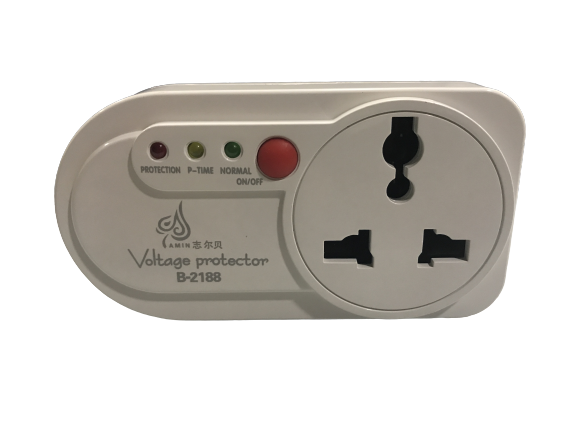
The Muhafiz protector is basically a desi voltage protector with a relay and delay logic. It disconnects power if voltage goes outside a preset range, then reconnects after a few seconds.
Delay is not protection. It does nothing against fast spikes. It does nothing against bad waveform quality. It only helps during extreme over or under voltage events.
It is better than nothing, but it is not saving your PSU the way people think it is.
Old AVR and Stabilizers
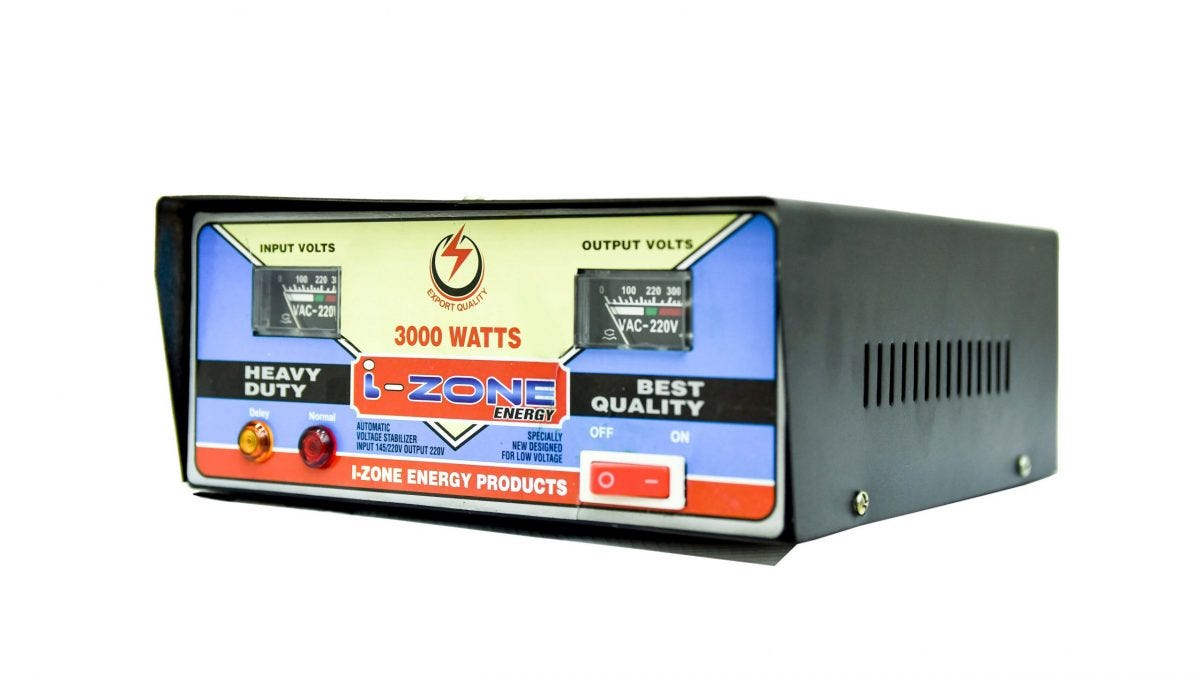
AVRs (Automatic Voltage Regulators) were designed for motors, not modern electronics. They react slowly and often distort the waveform while adjusting voltage because they actually have a mechanical motor inside them.
SMPS units do not like distorted input. Harmonics create extra heat and noise inside the PSU.
These stabilizers made sense in the CRT TV era. They are a poor match for modern PCs.
Desi UPS
Many local UPS units output a rough square wave. This forces PSUs to work harder and run hotter.
Instead of clean backup power, you end up feeding your PC something worse than the grid itself.
A bad UPS can reduce lifespan faster than no UPS at all.
Which Protections Actually Matter for Modern PCs?
If you talk to ten different people about protecting a PC in Pakistan, you’ll hear ten different answers:
AVR lagao.
UPS zaroori hai.
Muhafiz laga lo kaafi hai.
Most of this advice comes from good intentions but poor understanding.
For modern PCs, not all protections matter equally. Some are critical. Others are legacy ideas that refuse to die.
Cutoff speed is one of the most important factors. When voltage goes out of range, how fast does the device disconnect power? Slow cutoffs mean your PSU is forced to operate in unsafe conditions for longer. That stress adds up.
Surge clamping rating decides how much excess voltage is allowed through before protection kicks in. Cheap boards often advertise surge protection but clamp too late to be useful. By the time they react, the damage is already done.
Output waveform quality matters only when something is actively modifying power. Devices that distort the sine wave make life harder for SMPS units. Clean power does not mean fancy power. It means predictable power.
Ground dependency is often ignored. Many protections assume proper earthing.
In our local homes where the ground is weak or fake, some devices lose a big part of their effectiveness. This does not make them useless, but it does change expectations.
Thermal and overload behavior decides whether a device fails gracefully or takes your PC with it.
Good protection sacrifices itself. Bad protection panics, overheats, or reconnects repeatedly.
Understanding these basics makes the next section much simpler.
Three Practical Ways to Save Your PC
There is no single perfect solution for everyone. Protection should match risk, budget, and hardware value. That’s why I’ve broken down solutions in my mind to 3 budget segments.
Solution 1: Voltage Protection (Cheapest Entry)
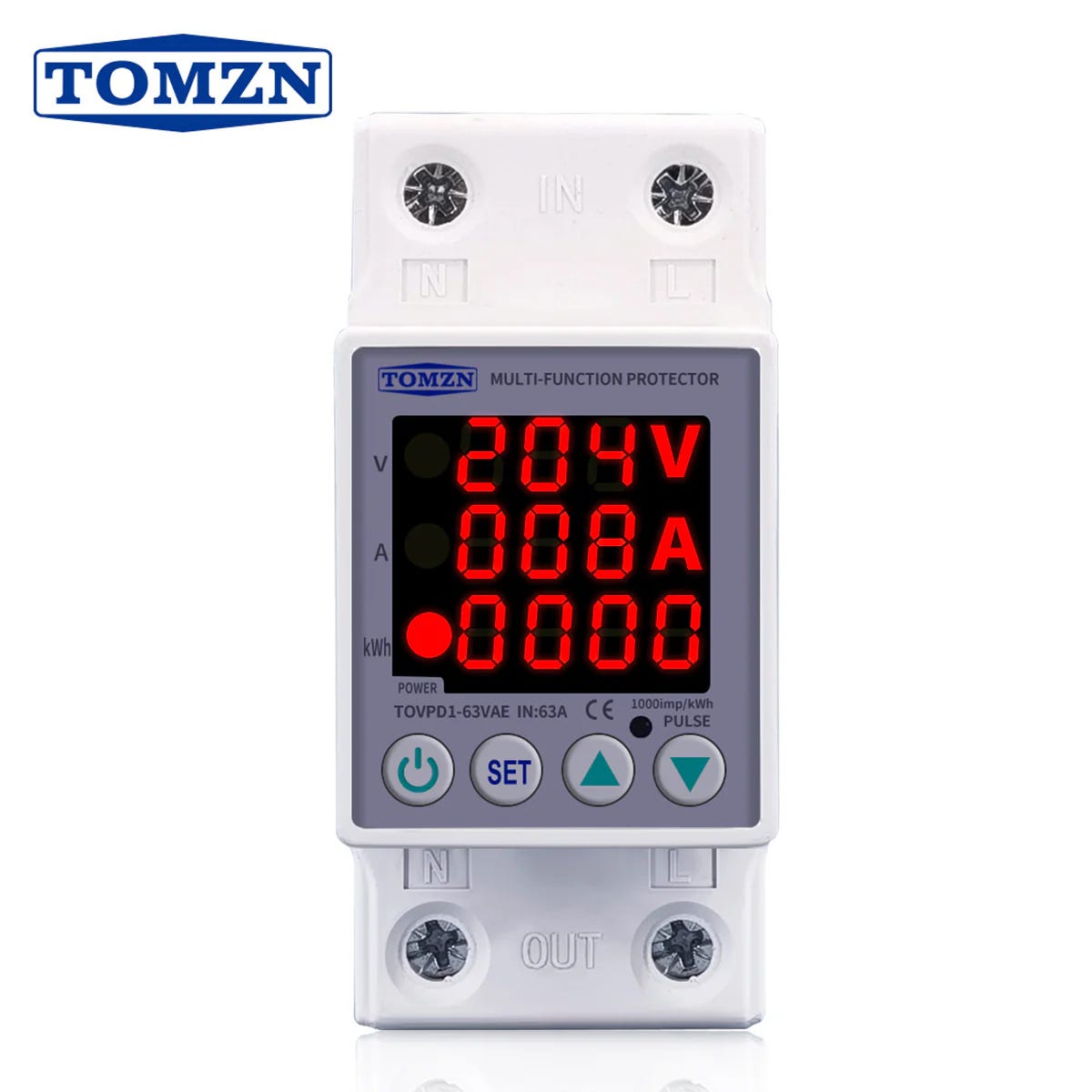
This is where most PC gamers in Pakistan should land because this is among the cheapest solutions you could have.
Modern voltage protection devices are very different from old Muhafiz units
Chinese devices like TOMZN monitor voltage digitally and disconnect power much faster. They allow you to set clear upper and lower thresholds.
Fast cutoff logic matters. Instead of waiting and hoping voltage stabilizes, these devices act decisively. That alone saves a lot of PSU stress.
Pairing voltage protection with a proper surge protector covers two major threats. Long brownouts and sudden spikes. This combination works better than AVRs because it does not try to “fix” bad power. It simply refuses it.
This setup still cannot create clean power. It only blocks bad power. But blocking bad power is often enough.
Pros:
Strong protection per rupee
No waveform distortion
Cons:
No backup power
Still dependent on grid behavior
Solution 2: Spike and Surge Protection (Mid-Range Sweet Spot)
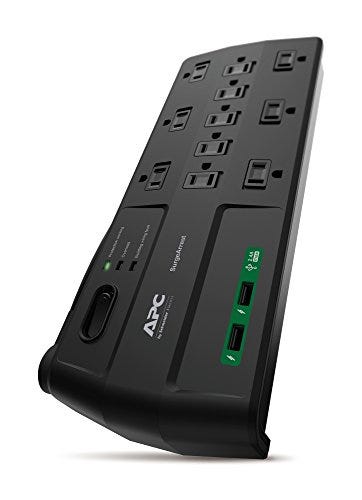
Once you have gone through the first solution. This is the second level of protection anyone with a PC should consider.
A real surge protector absorbs and diverts excess voltage caused by spikes. It does not regulate voltage.
A surge protector does not provide backup power. Its job is to take the hit so your PSU does not.
Most surge protectors rely on MOV protections. These components clamp voltage once it crosses a certain threshold. Joule rating tells you how much energy the protector can absorb over its lifetime. Clamping voltage tells you how aggressively it reacts.
Extension boards do not count. If it has no surge rating, no certification, and no clamping spec, it is just a fancy socket strip.
APC-class protectors exist because proper surge protection costs money. Better components, better response, and predictable failure behavior separate them from local boards.
Pros:
Cheap
Easy to install
Cons:
Needs proper grounding
No voltage correction
MOV protections wear out silently
Solution 3: UPS (Safest and Most Expensive)
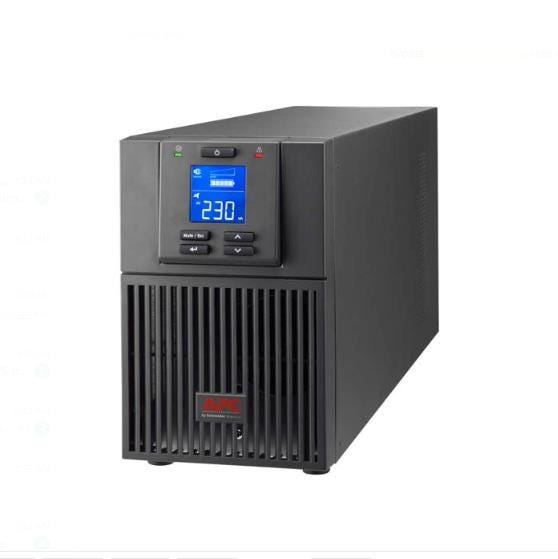
A UPS is the most complete solution if done correctly.
Offline UPS units are basic and switch to battery when power fails. Line-interactive units add voltage regulation. Online UPS units constantly regenerate power but cost significantly more.
For home PCs, line-interactive is usually the practical choice.
Waveform quality matters a lot here. Square wave or stepped wave outputs force PSUs to work harder. Heat, noise, and long-term stress increase. This is why many desi UPS units slowly kill electronics.
A good sinewave UPS provides clean cutoffs, basic voltage regulation, and time for graceful shutdowns. It does not make WAPDA better. It just shields you from it.
A bad UPS is worse than none. Cheap batteries, poor inverters, and unstable switching undo all the benefits.
Pros
Maximum protection
Power continuity
Cons
Expensive
Battery maintenance
Quality matters a lot
A Special Shout-out
Before writing this article, I came across this fine video by a local Youtuber with the name of GuyThatDoesEverything. This video not only helped me personally but inspired me to write on this too.
I really suggest that you guys watch this video, and maybe drop a like. It is such a good video breaking down the myths and providing affordable solutions to save our PCs and tech devices.
The video practically shows how modern PSUs work, why we don’t need big stupid stabilizers for our PCs and what protections we should go for, when on a budget.
Do not watch it and conclude that PSUs can handle everything. Watch it to understand where they struggle and what are your possible options.
You Can’t Fix WAPDA, But Your Setup
The sad reality is that our local power delivery companies just don’t give a damn about electronic devices used by their customers. You cannot control the grid but you can control what reaches your PC.
Power damage is dangerous for electronics. Hardware rarely dies in one dramatic moment. It ages, weakens, and eventually fails if bad power is supplied for a long time.
Cheap protection is better than none. Good Voltage Protectors are available for cheap in local hardware stores as well as online. But bad protection can sometimes be worse than none.
That’s why you must know what you’re buying and how it’s going to benefit your setup. It’s important that you consult a local electrician before implementing anything that we discussed here.
In the end, peace of mind matters above everything else. No one wants to worry about turning off the main switch every time their light flickers or the transformer goes out.
Enjoyed reading this article. Great work Yousaf!
Great read!