
The Best Laptop of the Decade? It Runs on a Phone Chip - MacBook Neo is Here
A phone chip just killed every Intel and AMD laptop
Hey there 👋
If you’ve consumed a minute of tech news the last few weeks you have surely heard of that $599 MacBook that has all the tech world by storm.
And by now you might be somewhat bored by seeing the MacBook Neo over your Youtube, Instagram or Tiktok feed even.
Look, it’s common for Apple products to receive special spotlight at launch but the recently launched MacBook Neo deserves the high praise.
And it’s not just me saying it. Linus Sebastian from Linus Tech Tips, being someone who is somewhat critical of Apple products at times, has said that he can only recommend MacBooks now.
If you had told anyone in the tech community that Linus would say that in 2018, they would have laughed at you.
Back then the arguments for buying Windows were genuinely stronger. MacBooks were expensive, ran hot, had bad keyboards, and the performance for the money just wasn’t there.
So what happened between then and now? And why is a $599 laptop the clearest and most surprising expression of it yet?
So, this isn’t another MacBook Neo article but it’s one that covers what was wrong with Apple before their own Silicon.
I’ll talk about what Apple did that no-one else could that led to we getting a $599 laptop from Apple.
And of course there will be a comparison of Neo to laptops at its price-point.
MacBooks Before Apple Silicon
In 2026, I feel if you have to talk about MacBooks you can divide all of them into two categories; Before Apple Silicon and After Apple Silicon because that’s what has provided the biggest edge to MacBooks.
Today’s MacBooks look perfect but it’s important to know that they weren’t like this forever.
To understand why the MacBooks of today are so good, let’s discuss some of the issues that plagued MacBooks before Apple Silicon arrived on the scene.
The Butterfly Keyboard
So, let’s start with the butterfly keyboard.
From 2015 to 2019, Apple shipped MacBooks with something called the butterfly keyboard. The name sounds beautiful but the product really was not.
The butterfly mechanism was an ultra-thin keyboard design Apple used across its entire MacBook lineup for four years running.
The pitch was that thinner keys meant a thinner laptop. The reality was that if a single crumb, a grain of dust, or a tiny piece of debris got under a key, the keyboard would stop working.
Keys would repeat on their own without being pressed. Letters would randomly stop registering. Some people had multiple keys fail simultaneously.
Apple’s solution was to replace the broken butterfly keyboard with another butterfly keyboard. The exact same design. And it would break again.
Reviewers questioned its reliability publicly. The keyboard became a running joke in tech circles. And then it stopped being funny when people started filing lawsuits.
Apple eventually paid $50 million to settle a class-action over it. But the keyboard was just the beginning.
The Dongle Era
The 2016 MacBook Pro redesign removed every port except USB-C. Not some ports. Every single port.
No USB-A. No HDMI. No SD card slot. Just USB-C holes and nothing else.
If you owned an external hard drive, a USB drive, a camera, or a monitor - all of which most people who spend $1,300 on a laptop tend to own - you now needed a dongle to use them.
The dongle era became its own meme. People sitting in coffee shops with a cluster of white adapters hanging off their MacBook like a bunch of grapes.
Apple is selling a $9 dongle for a machine that cost $1,299. Reviewers called it the most dongle-dependent laptop Apple had ever shipped.
The Heat Issues
And then there were the heat issues.
MacBook Pros from 2018 and 2019 showed severe throttling issues. The 2018 15-inch model launched with a software issue that slowed the processor below its rated speed under load, and Apple had to send out a formal apology.
Even though Apple sent patches the problem did not fully go away because the root cause was not the firmware, it was the build itself.
Apple also had to bear the brunt of Intel’s failure because back in 2015 Intel promised delivery of 10nm chips well before they actually arrived.
Apple had already designed the 2016 MacBook Pro enclosure around those promised chips, and Intel was years late.
The heat piping, fan design, and laptop dimensions were all built around a processor that never showed up on schedule, leaving Apple cramming more powerful Intel processors into a body that was too thin to cool them properly.
What this meant in practice: the CPU would hit 100 degrees Celsius under load and throttle down to protect itself.
A $2,000 MacBook Pro with an Intel i9 processor - Apple’s most expensive consumer laptop - was slower under heavy workloads than the i7 model because the i9 generated more heat than the chassis could handle.
Dave Lee, a popular tech reviewer at the time, demonstrated this on YouTube and it went viral. A $2,300 laptop throttling itself below its advertised speeds was not a minor software bug. It was a fundamental design problem.
The 2017 MacBook Pro still carried the defective butterfly keyboard and had performance troubles from thermal throttling. CPUs slowed under heat, undermining the “Pro” status, and the faster Kaby Lake chips barely mattered in practice.
The Pricing Issues
And the price. Let’s talk about the price.
The base 2017 MacBook Pro with Touch Bar started at $1,299 and came with a dual-core Intel Core i5, 8GB of RAM, and 256GB of storage.
In 2017, you could buy a Windows laptop with a quad-core processor, 16GB of RAM, a dedicated GPU, a full set of ports, and a backlit keyboard for $700.
The MacBook cost nearly double, offered half the RAM, had a keyboard that might stop working if you ate a biscuit near it, ran hot, and required a separate $50 dongle.
High starting price relative to Windows alternatives with similar raw specs, accessories and dongles increasing total cost.
Many users found the premium unjustified given compromises in ports, keyboard reliability, and thermal limits.
The arguments for buying Windows during this period were not just valid. They were overwhelming.
Although not everything was bad with the MacBooks. There were things the Intel MacBooks did well.
For example, the display quality was excellent - Retina panels with P3 wide color gamut that Windows laptops at the same price could not match.
Build quality was still best in class. macOS was (and still is) a genuinely better operating system for a lot of people’s daily workflows.
The trackpad was the best in the industry by a wide margin. And for light work - browsing, writing, email, the machines were perfectly capable.
But for anyone spending $1,500 to $2,000 on a machine they expected to perform like a professional computer, the Intel era MacBook Pro was a consistently disappointing experience.
The gap between what it cost and what it delivered was hard to square. And Apple knew it.
The thermal issues in the MacBook line were likely one of the main reasons Apple moved strongly toward its own cool-running ARM processors.
The decision to ditch Intel was not just about ambition. It was about fixing a problem Apple could not fix any other way.
The chassis was too thin for Intel’s chips of the time. And Intel kept missing its own deadlines for better, more efficient chips.
Apple had been waiting years for Intel to deliver something it could actually cool properly, and Intel kept disappointing them.
So Apple built its own.
How Apple Silicon Broke The Laptop Industry
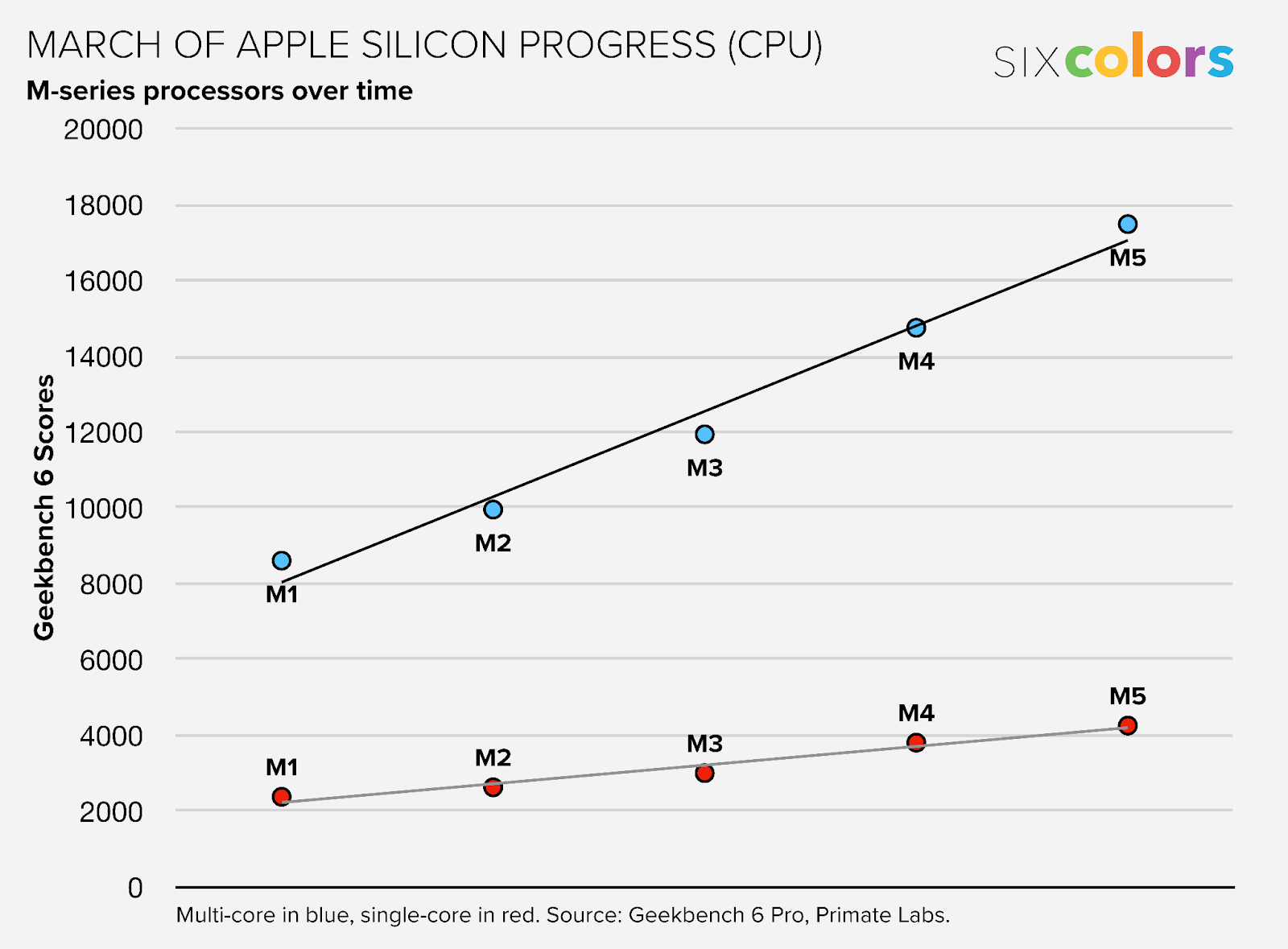
In 2020, Apple announced it was done with Intel.
After fifteen years of using Intel chips in every single Mac, Apple decided it was going to build its own processor. Their first chip was called M1. And it landed like a bomb.
The MacBook Air with M1 launched at $999 with battery life that lasted well over twelve hours in real-world reviewer testing and not just in Apple’s controlled lab conditions.
The machine ran completely silently because it had no fan inside at all. It was faster than most Windows laptops that cost twice as much.
And the surface of the machine barely got warm even under load compared to every Intel MacBook that came before it.
People who had been dismissing Macs for years suddenly had very little to say.
Here is the key thing to understand about why M1 was so fundamentally different from what came before it.
Traditional laptop chips - your Intel and AMD processors are built from separate components that communicate with each other over something called a bus.
The CPU is one piece. The GPU is another piece. The RAM is separate from both.
When any of these components need to share data (which they do constantly) the data has to travel across that bus. That travel creates latency using energy while generating heat as a result.
Apple’s M1 put everything on a single piece of silicon. The CPU, the GPU, the memory, the neural engine for AI tasks - all of it sits on one chip and shares data through a unified RAM.
There is no bus for data to travel across between these components because they are all right next to each other.
The result is a system that does significantly more work with significantly less energy, generates much less heat, and on everyday tasks runs faster than Intel chips that consume two or three times as much power.
Reviews of the M1 MacBook Air showed that in terms of thermals under normal workloads, the machine remained comfortably cool while performing better than Intel-based Macs.
The passive cooling (no-fan design) turned out to barely matter for the tasks most people actually do on a laptop.
Browsing, watching videos, video calls. The M1 handled all of it without breaking a sweat and without making a single sound (because no fan, remember?).
Battery life on the Intel MacBook Air before M1 was around 6 to 8 hours depending on what you were doing.
The M1 Air took 12 to 15 hours. That is not a marginal improvement. That is a completely different category of machine.
And Apple didn’t stop there but kept going.
M2. M3. M4. M5. Each generation built on the architecture of the last. Each generation compounded the advantage over Windows.
Each year the gap between what a Mac could do and what a comparable Windows laptop could do grew a little wider.
MacBook Neo Enters The Chat

By 2026, the M5 has no real competition at its performance level. That is what five years of compounding advantage looks like.
This is why when Apple launched a $599 laptop using the iPhone chip it beat every machine at that price point in the form of a complete package.
Just this month, Apple announced the MacBook Neo at $599. $499 for students.
That is the cheapest new Mac Apple has ever sold in its own stores. By a significant margin.
The CEO of ASUS said publicly that Neo’s pricing came as a shock to the entire PC industry.
That is not a throwaway quote. ASUS makes some of the best Windows laptops in the world.
Their CEO calling an Apple product a shock to the industry means the math did not add up in a way they expected. Something changed.
The thing that changed is the chip Apple chose to put inside it.
The iPhone Chip Inside a MacBook
The MacBook Neo does not run an M-series chip.
It runs the A18 Pro. The same chip Apple put inside the iPhone 16 Pro in late 2024.
When Apple announced this, the reaction in tech circles was immediate and skeptical. People questioned if a phone chip would be enough for a MacBook until the benchmarks came out.
It turns out the A18 Pro beats Intel’s Core Ultra 9 285HX - a flagship laptop processor that sits at the top of Intel’s lineup - by 9%.
It beats the Snapdragon X Elite by 16%. It outperforms AMD’s Ryzen 9 9950X3D by 3%. The only chips that score higher in single-core are Apple’s own M4 and M5.
NotebookCheck’s headline after testing it was blunt: “Apple toys with the competition.” lol.
Now, single-core is not the complete picture.
In multi-threaded performance (tasks that use multiple processor cores) simultaneously the A18 Pro still sits closer to M1-level performance .
The A18 Pro has six cores total, two performance and four efficiency. The M4 has ten.
That gap shows up when you are rendering long-form video, running complex code compilation, or doing anything that needs every core working at full capacity for a sustained period.
But here is the honest truth about who Neo is for.
Most people doing most things on a laptop are doing single-threaded work. Browsing. Writing. Email. Video calls. Watching content.Lightly editing photos.
Those tasks are generally handled by single-core performance, and the A18 Pro is remarkable at all of them.
Apple claims Neo is up to 50% faster for everyday browsing tasks than the bestselling Intel Core Ultra 5 laptop at a similar price.
Reviewers tested that claim and broadly confirmed the number is accurate.
The reason Apple could put the A18 Pro in a Mac and make it work and make it good comes down to manufacturing economics.
The A-series and M-series chips share the same performance cores and are built on the same TSMC 3-nanometer process. They are like cousins.
But the A18 Pro is produced at iPhone scale. Hundreds of millions of units per year. That manufacturing volume drives the cost per chip down dramatically compared to the M-series, which is produced in much smaller quantities for Mac.
That cost reduction is what made $599 possible.
A phone chip made it into a Mac not because Apple cut corners but because the phone chip is genuinely that good, and building it at phone scale made it cheap enough to put in the cheapest Mac Apple has ever sold.
What Is Actually Inside The MacBook Neo
Aluminum body, Not plastic. Aluminum!!
At $599, every Windows laptop you look at is plastic. The Neo is aluminum in four colors:
Silver
Blush
Citrus
Indigo
By the way, all of the colors above come with color-matched keyboards, which is a small detail but a nice one at this price.
13-inch Liquid Retina display at 2408 by 1506 resolution, 500 nits of brightness, support for one billion colors, full sRGB color gamut.
This just means that the Neo’s screen is noticeably sharper and brighter than anything else you will encounter at $599 in a Windows machine.
A18 Pro chip comes with a 16-core Neural Engine for running Apple Intelligence and other lightweight on-device AI features locally without sending your data to a server.
The base MacBook Neo comes with 8GB of unified RAM and 256GB storage. The 512GB model is a step-up which also adds Touch ID.
Two USB-C ports. One on the left side running at USB 3 speeds, which is fast. One on the right side running at USB 2 speeds, which is slow in 2026. The headphone jack moved to the right side. No MagSafe. No SD card slot. No Thunderbolt.
Similar to MacBook Air, the Neo has no fans. It has basically no moving parts making noise. The machine is completely silent.
Neo’s battery is also similar to MacBook Air’s with a capacity of 36.5Wh that can power the device for up to 16 hours as claimed by Apple.
Reviewer tests do come close to 12 to 14 hours under normal workloads. Basically, All-day without question.
One thing different from every other MacBook made in the last decade: the Neo uses a mechanical trackpad. Not Force Touch.
Force Touch is what simulates a click through haptic feedback under the trackpad that is used in other MacBooks.
Neo’s mechanical trackpad physically clicks when you press it. The mechanical trackpad on Neo actually moves. It is a cost reduction.
Reviewers noticed it but most said it is still significantly better than any Windows trackpad at this price tier, which is genuinely true.
Neo Versus Everything Else at $599
At $599, the Windows world mostly offers plastic body laptops that flex when you pick them up, displays that look washed out, trackpads that feel imprecise, and batteries that need a charger by early afternoon.
Tom’s Hardware called the Neo “a spectacular budget laptop that should shock the PC industry” and said it “never makes you feel like you’re getting a lesser machine in exchange for affordability.”
Where Neo wins every day in comparison to Windows laptops at similar price-point:
A chip that is faster than anything Intel or AMD ships in a laptop at this price
Battery life that genuinely gets through a full day without stress
Aluminum build quality that does not creak or flex
A display that is sharper and brighter
A trackpad that is more accurate even when mechanical
An Operating System optimized for the hardware
Where Windows wins: raw specs on paper. 16GB of RAM is common on Windows laptops at $599 versus Neo’s 8GB ceiling.
More ports in general. More storage in base configurations. And if your workflow depends on Windows-specific software, the Neo is simply not the answer regardless of how good the hardware is. Gaming is not a conversation on Neo at all.
The honest summary: for the person buying a laptop to write, study, browse, call, lightly edit photos, and do everything a modern connected person does day to day - Neo is a better machine than almost everything Windows ships at $599.
By the way, that is not a fan statement. The reviews and comparisons support it too.
Who This Laptop Is Actually For
OK, the MacBook is great but it is not a silver-bullet. Apple’s targeting a specific audience and it is worth being clear about.
Students are the most obvious answer and Apple knows it.
$499 education pricing puts a real aluminum Mac running full macOS within the range of people for whom $999 was never realistic.
Chromebooks dominate 93% of American K-12 schools right now. Apple is looking directly at that market and pricing accordingly.
Another target are the people already inside the Apple ecosystem.
If you have an iPhone, an iPad, an Apple Watch - the Neo makes all of those devices work together in ways that a Windows laptop simply cannot. iPhone Mirroring, AirDrop, Handoff, Universal Clipboard, Continuity Camera.
All of it works out of the box, immediately, without any setup beyond being signed in to the same Apple account.
First-time Mac buyers who have been curious for years but could not justify $999 as the entry price. Neo removes that barrier.
People doing what most people do on a laptop. Writing, studying, browsing, video calls, streaming, viewing and editing photos casually, managing documents.
The Neo handles all of that without hesitation and does it faster than any Windows laptop in its price range.
MKBHD made a fun point about the 8GB ceiling.
He said if you’re asking about the RAM ceiling on MacBook Neo the laptop is straight-up not for you :p
Because if you know 8GB is low for you, your workflow probably needs more and the architecture of MacBook Neo doesn’t allow RAM to be upgraded. So, that makes it a bad choice for such people.
If your work genuinely requires more than 8GB and some people do like developers, video editors, the Neo is not your machine and you should know that before you buy it.
The MacBook Air at $1,099 starts with 16GB and handles those workloads more comfortably.
Who the MacBook Neo is not for:
Developers running multiple environments or virtual machines simultaneously
Designers who need P3 wide color gamut coverage (Neo covers sRGB, not Display P3),
Anyone whose software runs on Windows and has no Mac equivalent
Anyone who games seriously
Know your needs clearly before you buy. Watch reviews online and see benchmarks for your specific workflows like how the apps run on the MacBook Neo as reported by people online.
The Neo is excellent at what it is designed for but genuinely limited at everything outside of that.
The Most Repairable MacBook in 14 Years
iFixit is the gold standard for repairability scoring. They tear down every major consumer device, document every component, and score it on how easy it is to repair if something breaks.
Apple products have historically scored terribly on their scale. The 2012 Retina MacBook Pro earned a 1 out of 10. Recent MacBooks have sat between 3 and 5.
When iFixit tore down the MacBook Neo, they said something they have not said about an Apple laptop in a very long time. They said it sent cheers across the office.
The battery - instead of being glued to the chassis with industrial-strength adhesive like every recent MacBook before it - is secured with 18 screws into a tray.
Screws can be removed with a screwdriver. Adhesive cannot be undone without heat guns, specialized tools, careful prying, and the real risk of puncturing the actual battery.
Battery replacement on recent MacBooks required all of that and cost $129 to $199 at an Apple Store. On the Neo, it is a straightforward job.
The USB-C ports are modular too. The headphone jack is modular. Both are color-matched to the chassis.
If a port breaks - which happens a lot, especially on laptops owned by students who plug and unplug things constantly it is a port replacement, not a logic board replacement.
That distinction is enormous. A logic board replacement on a MacBook costs hundreds of dollars. A modular port replacement costs a fraction of that (if available for fair price though).
The keyboard can be replaced without swapping the entire top case, which is how previous MacBook keyboard repairs were handled and why they cost so much.
Apple published a full repair manual for the Neo on the same day it went on sale. Not a few months later. Day one.
iFixit gave it a 6 out of 10. The M5 MacBook Pro scores 4 out of 10. The M4 MacBook Air scores 5. A score of 6 from iFixit is the highest any MacBook has scored in approximately fourteen years.
iFixit’s exact words: “We haven’t been as happy about a MacBook since 2012.”
This did not happen by accident. Apple is targeting the education market and school IT departments care enormously about repairability.
A broken Chromebook in a school can be fixed quickly and cheaply because the parts are accessible and the documentation is public. Apple designed the Neo to compete in that world. The repairability is not a side effect of the design. It is the design.
The Tradeoffs You Should Know
Let’s start with the obvious ones.
No backlit keyboard in 2026 is genuinely difficult to defend. Every Windows laptop at $599 has backlighting. Every other MacBook has backlighting. Neo does not.
Apple says the white keycaps are more visible in low light than darker keys. They are, slightly. It is not enough. Typing in a dim room, on a flight, or in bed without disturbing someone is a real use case and the Neo makes it harder than it should be at this price.
This is the most fair criticism of the machine and it is completely valid.
8GB of unified memory is soldered directly to the logic board. There is no upgrade path. The machine you buy today is the machine you will have in five years.
With Apple Intelligence being memory-hungry and the general direction of software toward requiring more RAM over time, buying a machine with an 8GB ceiling is a decision worth thinking about carefully.
If there is any chance you will push this machine professionally, buy the Air with 16GB.
The right-side USB-C port runs at USB 2.0 speeds. 480 megabits per second. External SSDs, modern USB accessories, and high-speed docks can transfer data at thousands of megabits per second.
Plugging a fast drive into the wrong port on the Neo and wondering why transfers are slow is a trap that is easy to fall into.
External display support tops out at a single 4K 60Hz monitor. One screen, that is your maximum. Multi-monitor setups are not an option with MacBook Neo.
The speakers are noticeably weaker than other MacBooks. Multiple reviewers flagged this consistently and independently. The side-firing speakers do the job for casual listening but they are clearly the place inside the chassis where the $599 price point shows most visibly.
None of these are dealbreakers for the person the Neo is designed for. But they are real tradeoffs and you guys should know about them before spending your money.
Price, Performance & Package
Here at SK NEXUS, we like to define the Apple Silicon MacBooks by three Ps, those are; Price, Performance and Package.
It is a simplified description of how we view MacBooks that is by Price, Performance and the overall product as a package.
Compare a similarly-priced Windows laptop from any of the big laptop manufacturers like HP, Dell, Lenovo with Apple Silicon MacBooks and you’d see their price; they don’t deliver near as much for the price of a starting MacBook.
When you compare the Apple Silicon MacBooks released in 2020, their performance is unmatched when compared to Windows laptops in the same price bracket.
And then there are overall components like the screen, speakers, touchpad, keyboard, full aluminium build, MacOS, all of that make up the final package that is the MacBook.
It is 2026. The M5 has no meaningful competition at its performance level - Intel, AMD, and Qualcomm are all chasing a target that keeps moving further away.
The MacBook Air has been the best laptop in terms of Price, Performance and the overall Package that most people can buy for three consecutive years.
And now the Neo is arguably the best laptop at $599. Apple owns nearly every tier of the laptop market simultaneously. That has never been true before in the history of personal computing.
The path from the butterfly keyboard disaster of 2015 to this specific moment runs directly through one decision made in 2020: ditching Intel and building their own silicon.
That decision took five years to fully show itself.
Year one, M1 shocked everyone. Year two, M2 refined what M1 started. Year three, M3 added efficiency the previous generation could not match. Year four, M4 pushed the performance ceiling further than any competitor had matched.
Year five, M5 made the gap so wide that even the cheapest Mac Apple sells can use a chip from last year’s iPhone and still beat everything Windows ships in its price range.
Every year the MacBook Air kept winning its category. Every year more reviewers switched their recommendation. Every year the comparison articles between Mac and Windows get harder to write in Windows’ favor for the majority of users.
And then Linus made his video recommending MacBooks only.
Linus switching is not just a meme. It is a signal.
When the person whose audience is built on PC building and Windows enthusiasm looks at what Apple has done with silicon and says he cannot recommend anything else in good conscience, that reflects a genuine shift in what is true about these products.
He did not switch because he likes Apple. He switched because the hardware became impossible to argue against for most of his audience’s needs.
The ASUS CEO calling Neo’s pricing a shock to the industry is another signal. He isn’t just a regular executive. He publicly said that the PC industry did not see it coming.
And honestly, no-one did.
The question now is not whether MacBooks are good. Everyone agrees they are. The question is whether anything in the Windows ecosystem is going to meaningfully close the gap, and when.
Competition is coming. Maybe it closes the gap. Maybe it does not but as things stand, MacBooks are winning.
In March 2026, Apple built a $599 laptop with an aluminum body, an all-day battery, a chip that beats every Intel and AMD competitor at its price tier, and the most repairable design any MacBook has had in fourteen years.
That is not an ordinary product launch and that’s why everyone’s talking about it.
My Thoughts on MacBook’s Impact
Apple has been a trailblazer in adopting the ARM-based processors for general purpose use and it has paid them dividends.
To me it feels like MacBook may just win this decade in consumer laptops in price, performance and package.
It’s 2026 already and we don’t have any serious competition to MacBooks. Right from the start of this decade Apple has kept the laptop crown.
And 6 years later, it is still maintaining its lead. But it’s not like the companies aren’t trying. In fact, the competition has started to heat up.
Nvidia is rumored to enter the laptop CPU space with ARM-based chips later this year. Qualcomm is improving its Snapdragon X chips which have performed great.
That Qualcomm Snapdragon chips are already being used and have outstanding reviews especially when compared to x86 mobile chips.
Qualcomm is trying their best to compete with Apple Silicon even when Apple has a vertical integration edge over its laptops.
Vertical Integration basically means that Apple has complete control over the hardware as well as software stack of their MacBooks and that allows them to push optimizations that other laptop manufacturers just could not.
Windows has been one of the biggest bottlenecks in the PC industry for quite some years now and Microsoft is also promising to fix it from the ground-up.
They’re already maintaining ARM-builds for Windows and re-writing core Windows libraries in modern languages like Rust.
With time the Snapdragon chips will get mature and as that hardware ages a couple of years it will land the used lot market in Pakistan.
That is when we’ll go from good-for-most laptops that easily last a day that would be available for cheap prices here.
For me, I’ll be happily recommending Macbook Neo and similar price-point laptops especially when they land inside our used market.
And while Apple’s busy beating the hell out of every other processor, It’s not like the CPU wars in the PC space are over. Intel just launched its Core Ultra 200K Plus series and reviewers are calling it a genuine comeback.
This time we not only have x86 vs ARM but x86 is also redeveloping itself against the performance that ARM-based processors have delivered.
Stay tuned for a whole article discussing what Intel’s been doing lately and what impact could its latest chips have for Windows desktop and laptops moving forward.
Comment down if you’re excited for my article on Intel Core Ultra 200k series.


