



Hey there 👋
A couple of months ago, my phone screen went black on a random morning.
I was using it as a hotspot and forgot that the phone was sitting on the washing machine.
When I went to collect it, it wouldn’t turn on. I restarted it right away but that didn’t work either.
I was chilled to the bone. It is the only phone I have and all of my photos, videos, WhatsApp convos were inside it.
I was specifically scared of losing my 2FA codes. Losing them means losing access to my important accounts.
My phone was fixed in about a week and fortunately my data had stayed untouched.
But I sometimes imagine what would have happened if my phone were actually dead.
No one likes organizing stuff and making proper backups.
Most people have never made the list of stuff to back up. You only learn about the importance of backups once you’re close to losing your data.
But you see, it doesn’t have to be all that complicated. And you can go quite far if you just spend an afternoon.
That’s why in this article I’ll go over how to approach backups.
I’ll talk about the 3-2-1 rule in plain words and what those free Google and Apple tiers really cover. The focus is to make the backup journey a bit simpler for you guys.
I’ll also touch upon how much access AI tools should be allowed, now that many of them can read and write files on your computer.
What Would You Actually Lose?
Before you back anything up, you should know what you have. Most people badly underestimate this.
Go through this list in your head. Let me share a few:
* Photos and videos
* Chat history
* Documents, tax papers, CVs, ID scans
* My password manager
* Two-factor authentication codes
* Notes
This is my list. Yours would be different of course. If you’re a creator, you should also include anything you made yourself like designs and writing.
Now split that list into two piles.
Pile one is stuff you can get again. This includes your installed apps, your music, movies, and games. It’d be annoying to redo, but nothing is actually lost.
Pile two is stuff that exists nowhere else on earth. Those are your photos, chats and your work. If that copy dies, it is gone permanently.
Pile two is what this whole article is about. It is usually much smaller than people expect, often just tens of gigabytes. But it is what truly matters at the end of the day.
There is one special case worth pulling out. Your 2FA codes.
If your only authenticator app lives on the phone that just died, you are locked out of every account it protects.
And once you lose both your recovery codes and your authenticator access, getting back into an account with 2FA enabled ranges from very hard to impossible.
Sync Is Not a Backup
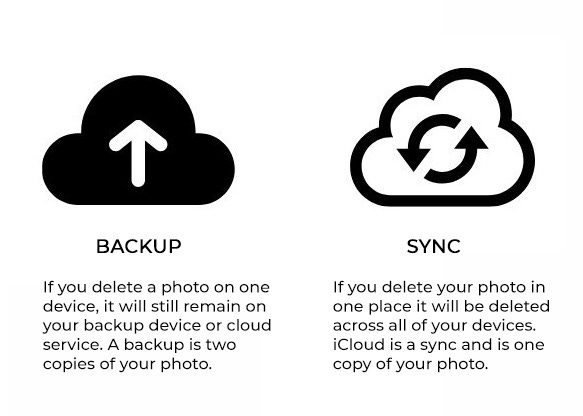
This is a big misunderstanding and almost everyone has it.
Google Drive, iCloud, OneDrive and Dropbox are sync services. Sync means your files are mirrored across your devices and the cloud, so a change in one place shows up everywhere.
That sounds like a backup. It behaves very differently when something goes wrong.
Delete a file on your laptop, and sync helpfully deletes it everywhere else too. That is the job. It faithfully copies what happened, including the mistakes.
Same story if a file gets corrupted, or encrypted by ransomware, or overwritten by an AI agent gone rogue. The broken version syncs up and replaces the good one.
A backup is different. A backup is a separate copy taken at a point in time.
It does not care what you did to the original afterwards. If you deleted something last Tuesday, a backup from last Monday still has it.
Most sync services do have a trash and some version history, which helps. Free tiers usually keep deleted items for around 30 days.
That saves you from an oops. It does not save you from something that went wrong 4 months ago and you only noticed now.
So sync is convenience. Backup is insurance. Ideally, you want both, and you should not mistake one for the other.
The 3-2-1 Rule in Plain Words
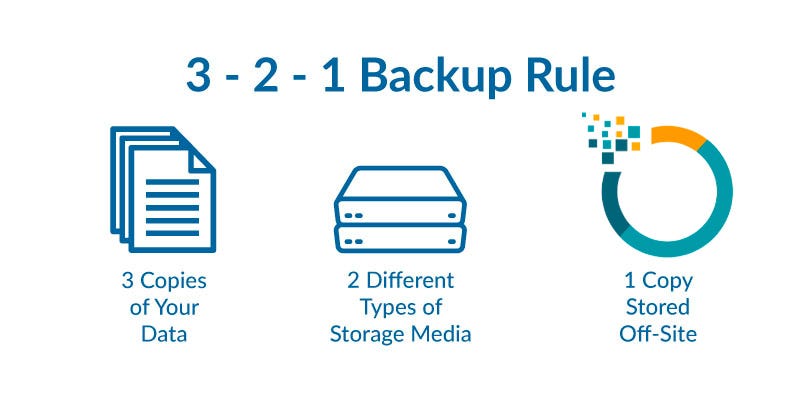
The standard rule everyone in this field uses is called 3-2-1. It came from a photographer named Peter Krogh.